Version v3.2.0
User Store
UserStore is ProAuth's local identity provider for users, passwords, passkeys, verified security contacts, recovery, and invitation bootstrap. Security policy belongs to the UserStore IDP instance; tenant and client requirements can tighten access but cannot weaken the shared credential policy.
If you are configuring a new instance, start with UserStore enterprise hardening. It provides a short decision guide and links to the detailed references:
- Password policy and recovery security
- Unified invitations
- Verified security contacts
- Layered abuse protection
- Identity and session security
- UserStore migration and activation
- Security administration views — tab-by-tab AdminApp guidance and screenshots
Recommended path
Most administrators should use versioned recommendations and preview APIs instead of setting every option by hand. Recommendations write ordinary concrete option values, so you can inspect and adapt them without introducing a separate policy mode.
Create new IDP
Steps to create a new IDP:
- Navigate to the ProAuth Admin UI and login with a user assigned to role
SubscriptionAdminor higher - Navigate to
Idp Instancesand click onCreate Idp Instance - Choose the IDP Type
UserStore - Enable the flag
Active - Enable the flag
Auto Create ProAuth User - Choose the proper Subscription
- Click
Save
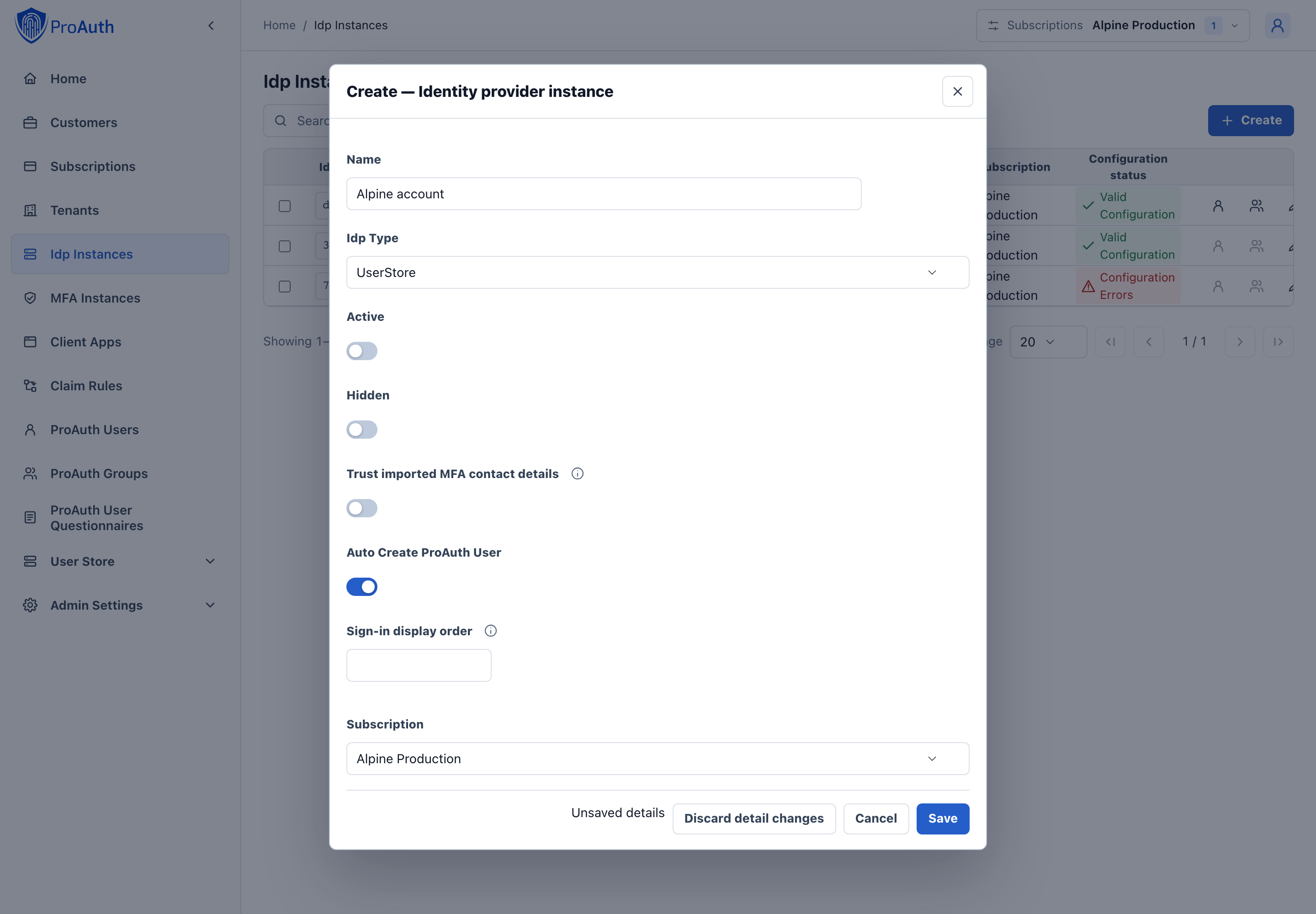
Configure new IDP
After the creation of the IDP in the step before, it's now necessary to configure the IDP. Invalid IPDs aren't available in ProAuth.
It's necessary to already have an existing and deployed UserStore database. The connection string with Read/Write permissions to this database is one of the mandatory options.
Steps to complete the configuration of the IDP:
- Open the IDP in the extended edit view
- Assign the IDP to the required Tenants
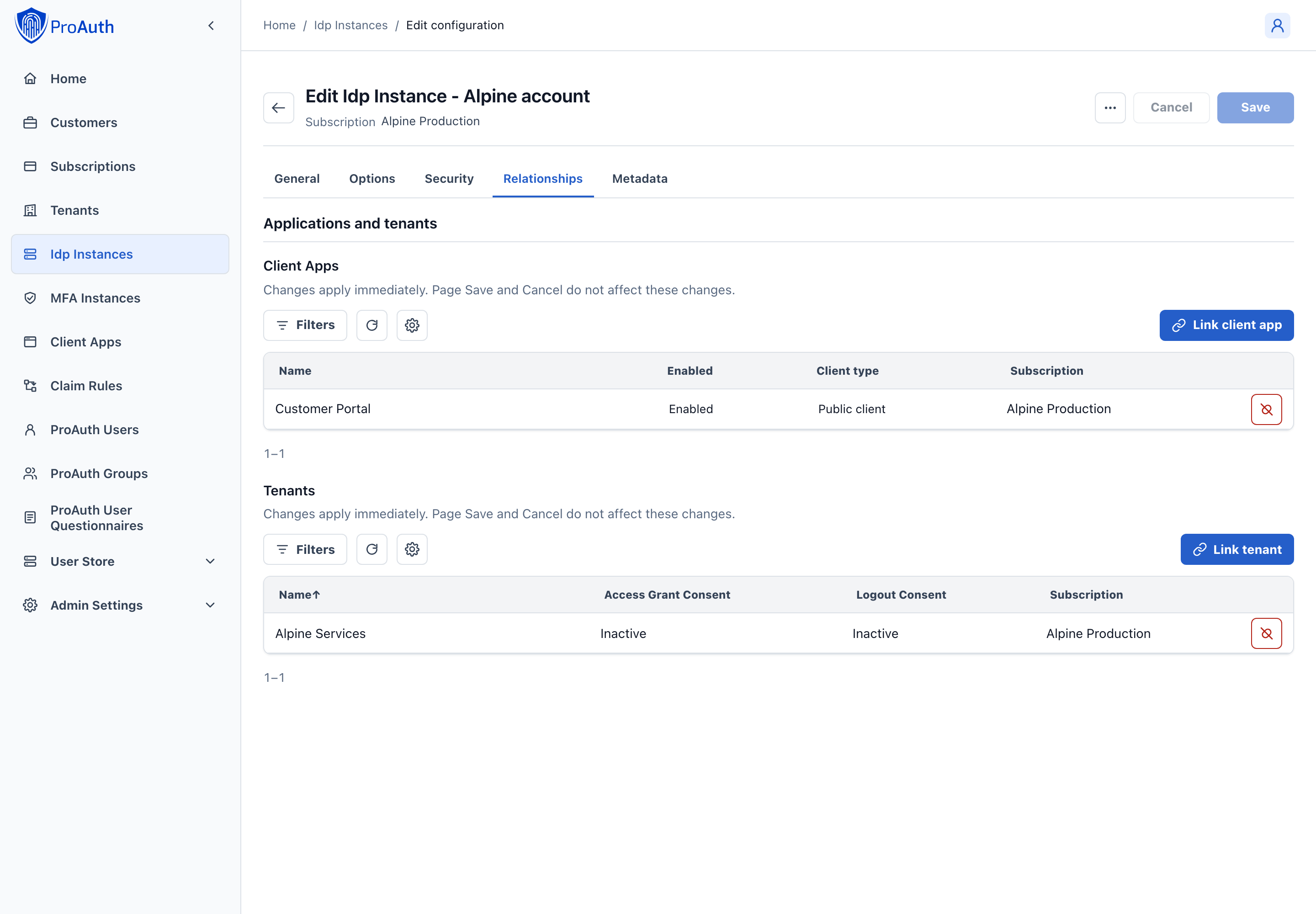
Configure mandatory Options:
- Set the
ConnectionStringfor the SQL database - Set the
CallbackPath(e.g./signin-userstore) - Set the
ClaimIssuer(default:UserStore) - Set the
HashAlgorithmName(default:System.Security.Cryptography.SHA256) - Set the
IsDatabaseReadOnlyMode(default:false)
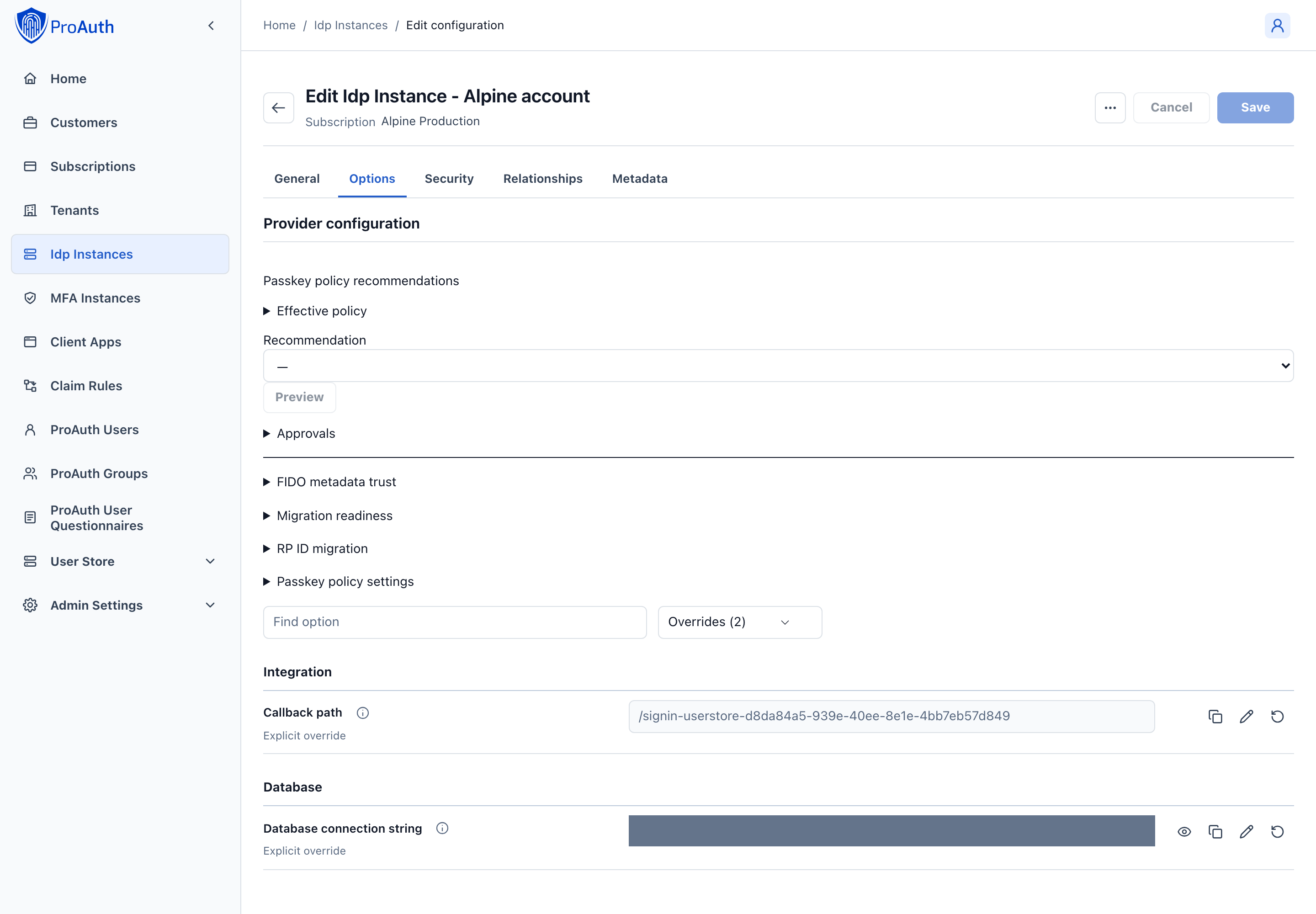
Enable UserStore login by email address:
The UserStore identifies its users by their unique username. The user entry also contains an e-mail field which is primarily used for notifications. People are used to login by their e-mail address. There are two possibilities to achieve that behavior. Either the username is set to the users e-mail or you can enable to UserStore to accept logins by the username or the e-mail address. The latter option only works, if the e-mail addresses are unique across all users in the same user store. To enable login by e-mail, please set the following options:
Set the
LoginByEmailEnabledoption totrue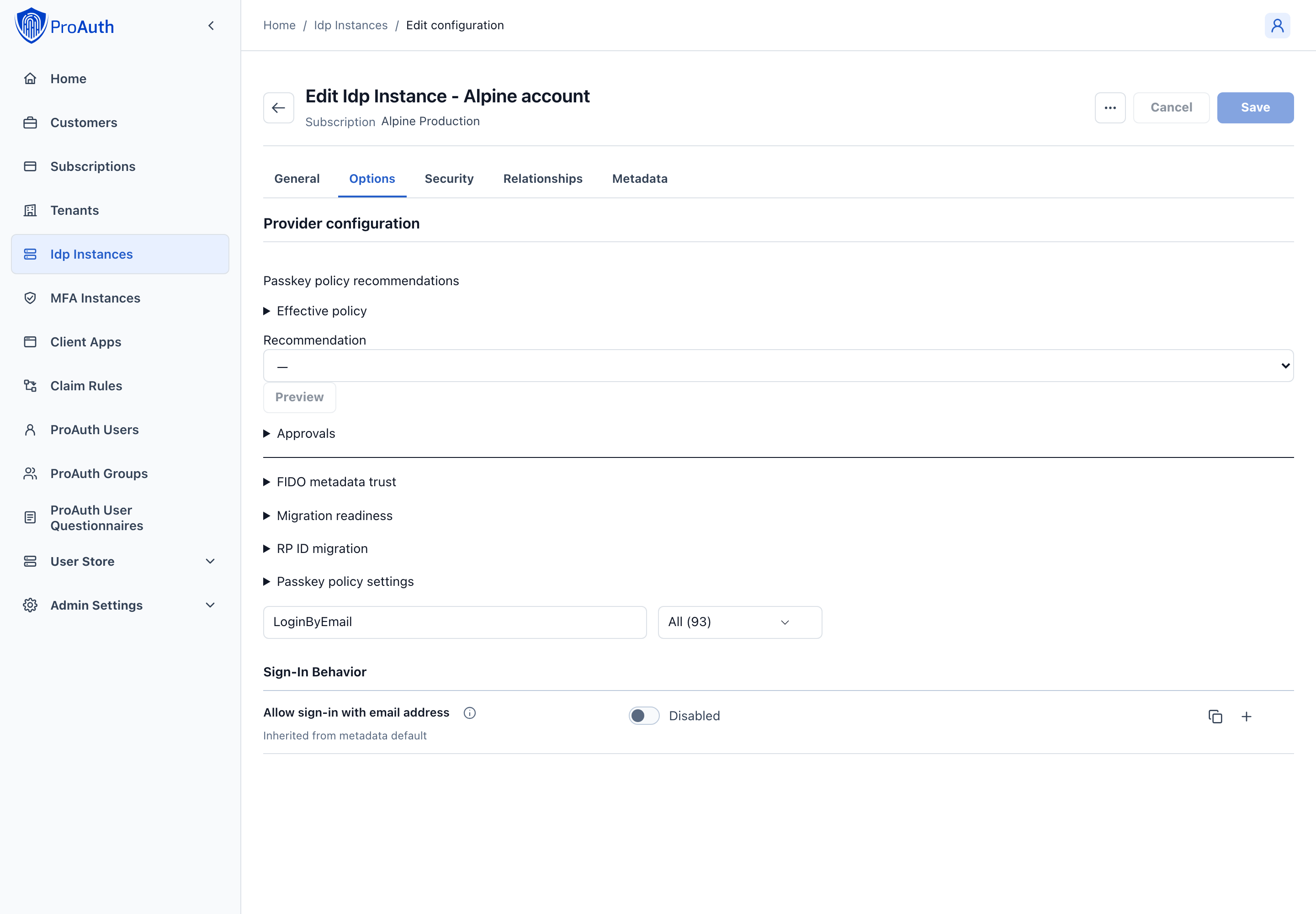
INFO
The user input (username or e-mail) is always checked against the username first. If no username is found and this option is enabled, the e-mail address is used to identify the user. This order is necessary because e-mail addresses can also be used as usernames in the user store.
If more than one user is found due to the email address (two or more users have entered the same email address) an error message is displayed (username/email or password wrong). We treat this case as if the e-mail address does not exist. For these users a login via username is mandatory. For security reasons, only a general error message is returned.
The password reset works similar to the login: If the option is enabled, the password reset can be requested via the e-mail address. If the e-mail address is used more than once, the password reset must be requested via the username.
Configure mail setting Options
- Set the
EMailSenderAddress - Set the
MailServerConfig
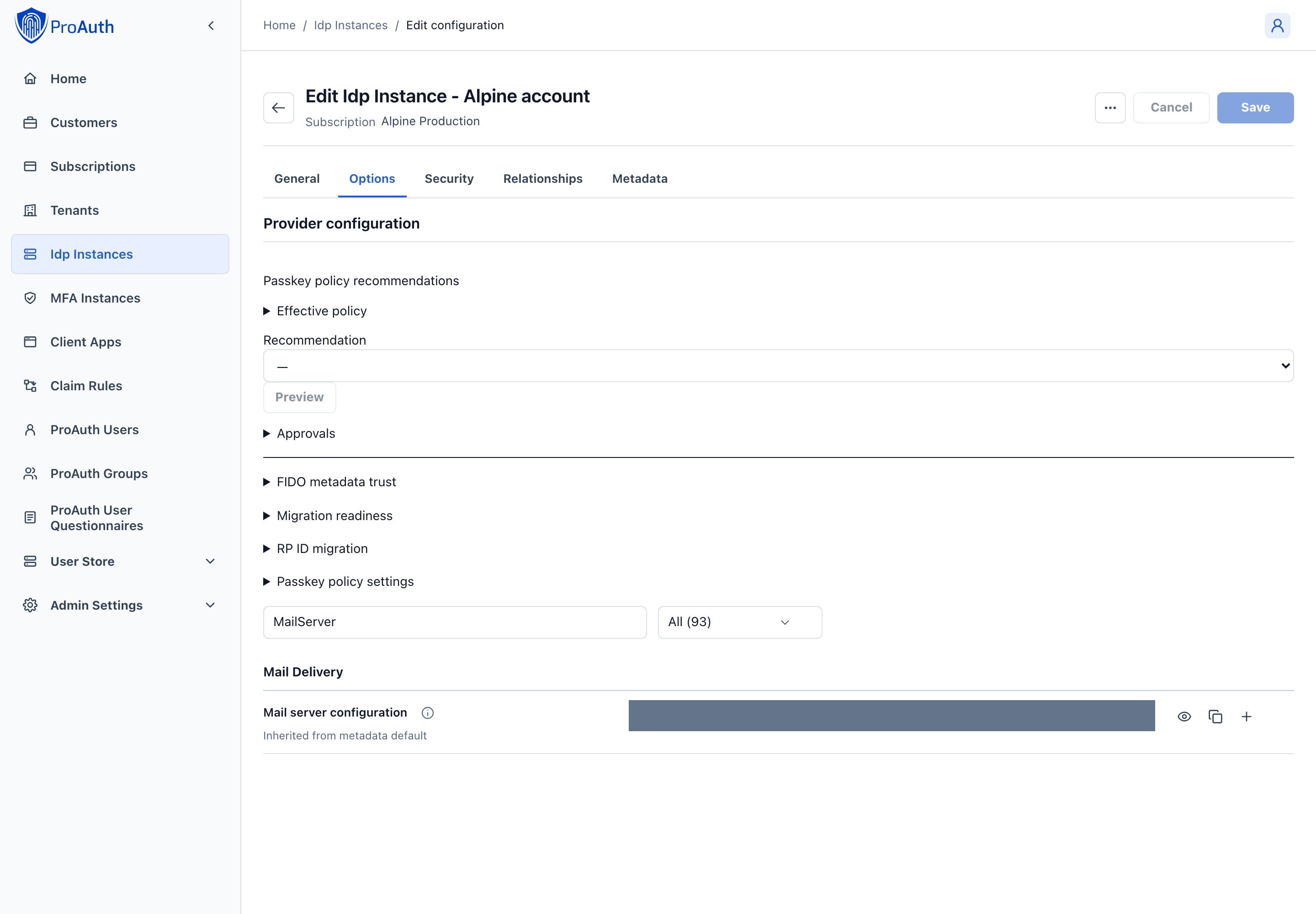
MailServerConfiguration sample data for SMTP Server:
json
{
    "MailType": "SMTP",
    "Host": "<smtp-host-address>",
    "Port": 465,
    "EnableSSL": true,
    "UserName": "<smtp-username>",
    "Password": "<smtp-password>",
    "Timeout": 20000
}
MailServerConfiguration sample data for Microsoft365:
json
{
    "MailType": "M365",
    "ClientId": "<aad-app-clientid>",
    "ClientSecret": "<aad-app-clientsecret>",
    "TenantId": "<aad-app-tenantid>",
    "UserId": "<aad-user-objectid>"
}
User lock notifications Options
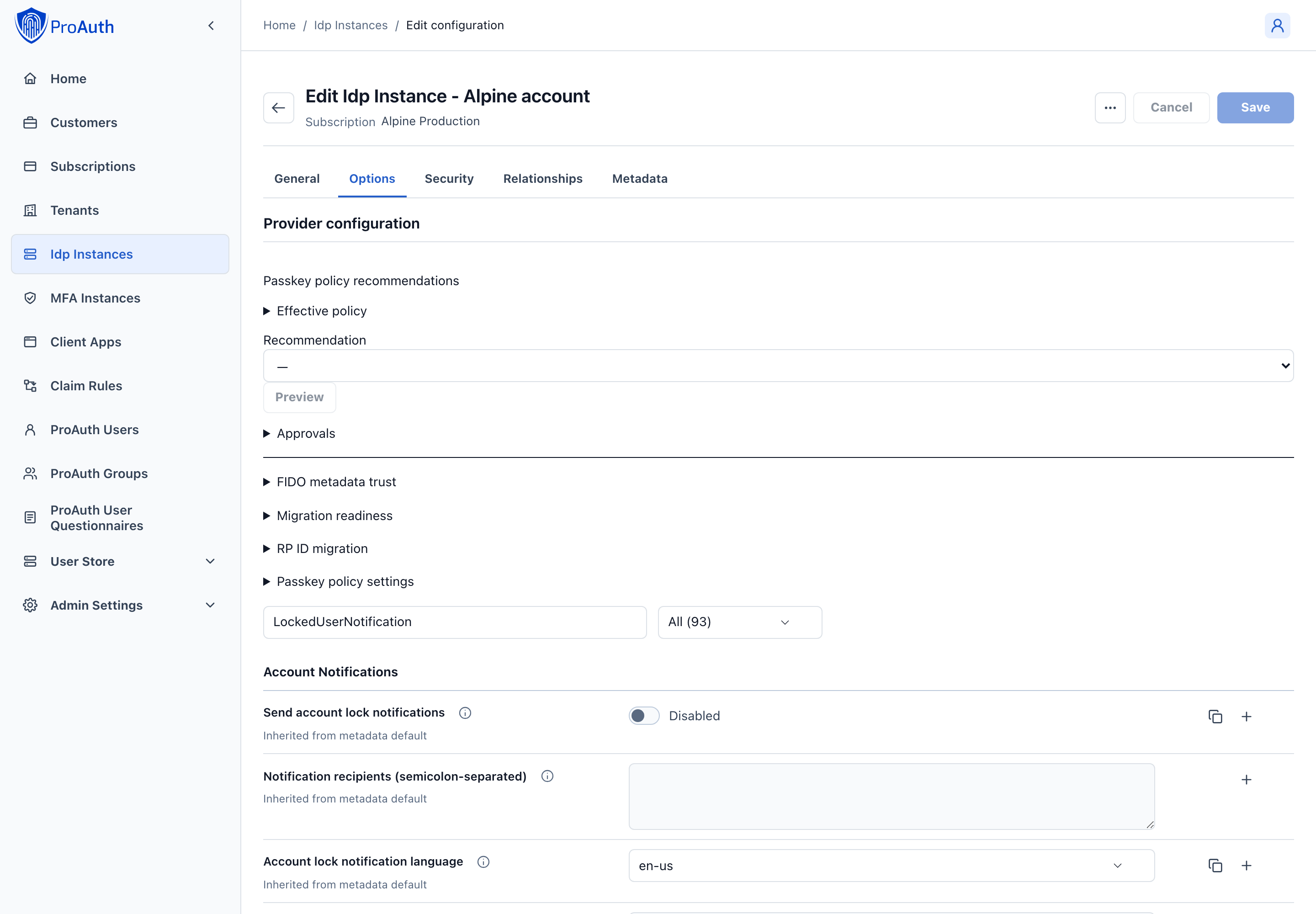
An email notification can be enabled to inform administrators about locked users (due to too many wrong login attempts).
- Enable notification by the option
LockedUserNotificationEnabled - Configure the recipients by adding a semicolon separated list of e-mail addresses in the option
LockedUserNotificationRecipients
The subject and the content of the e-mail message can be customized. The following options are used for this:
LockedUserNotificationMailSubjectTemplate: Contains the reference for a label used as the e-mail subjectLockedUserNotificationCulture: This defines the culture which is used to translate the labels (The culture name in the format languagecode2-country/regioncode2)
The following syntax is used within templates or options:
- Labels: In the form of
[[labelname]] - Placeholders for data values: In the form of
. Each template has a fixed set of placeholders.
The values of the labels can be modified by overwriting the label values in the label management of ProAuth. User Store interaction and email labels use the /authviews content-path root in ProAuth 3.x.
Configure Password Hashing Algorithm
ProAuth provides a modular password hashing functionality for its UserStore which means that different hashing algorithms can be used side-by-side. Password hashes can be migrated to other algorithms upon a user login. Besides our standard algorithms, custom algorithms can be developed to ease the migration of UserStores from other systems.
We currently support 3 algorithms:
- AspNetCoreIdentity V2
- AspNetCoreIdentity V3
- ProAuthPasswordHasher V1
Each UserStore defines a default hasher which is used for newly created users or to upgrade existing hashes during a login. Our current system default is AspNETCoreIdentity V3. The two other algorithms indicate a "rehash needed" flag which triggers the password hash migration to the default algorithm if configured accordingly.
Password Hashing Algorithm Options
DefaultPasswordHasherWith this option the default password hash algorithm can be defined. By default, the most current one is always configured.
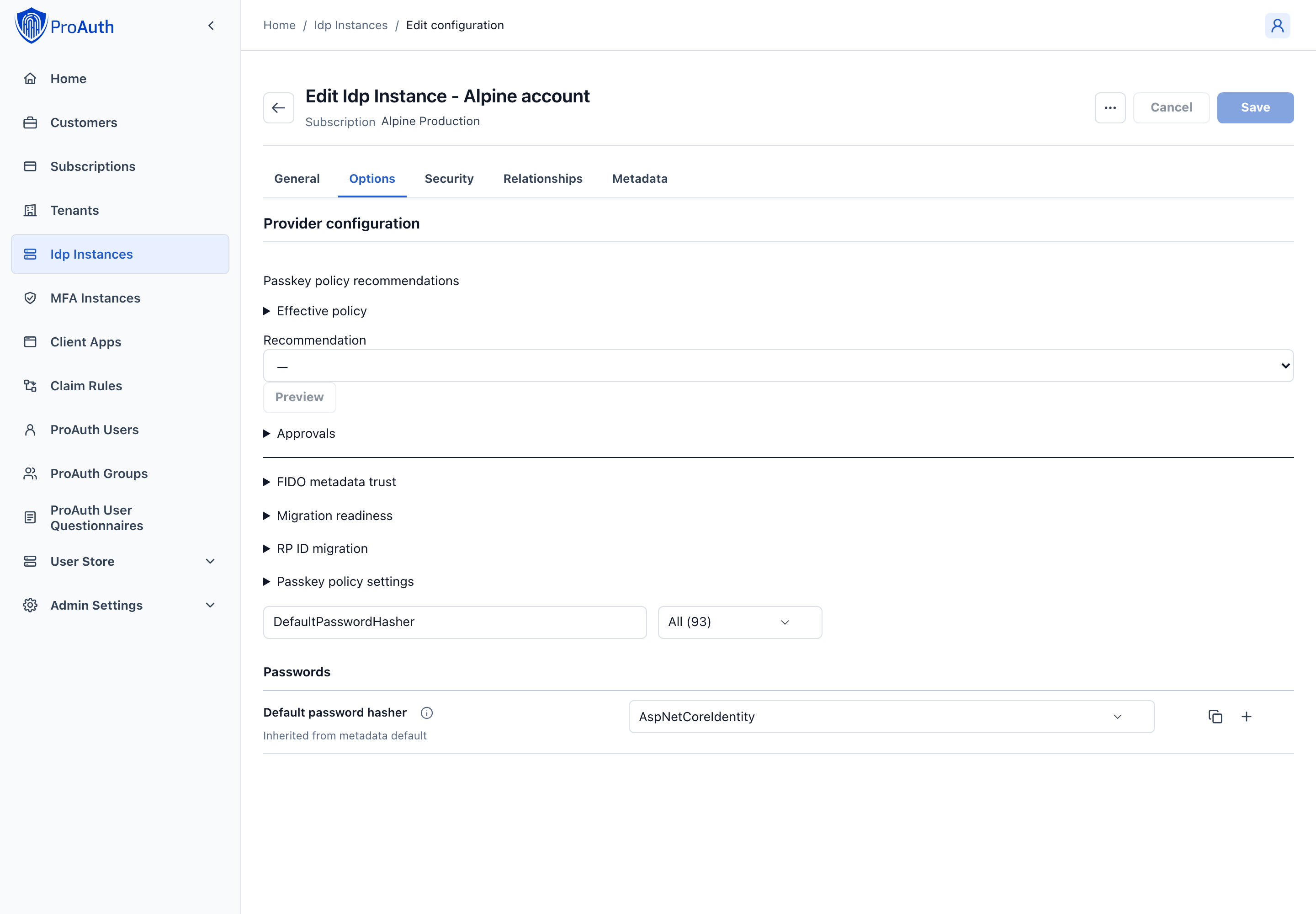
Possible password hashers:
ProAuthPasswordHasherProAuthPasswordHasherV1
AspNetCoreIdentityAspNetCoreIdentityV2AspNetCoreIdentityV3
For the password hasher a generic hasher (e.g.
AspNetCoreIdentity) can be chosen as well as an explicit hasher (e.g.AspNetCoreIdentityV3). With a generic hasher, the latest version of this hasher is always used.AutomaticPasswordRehash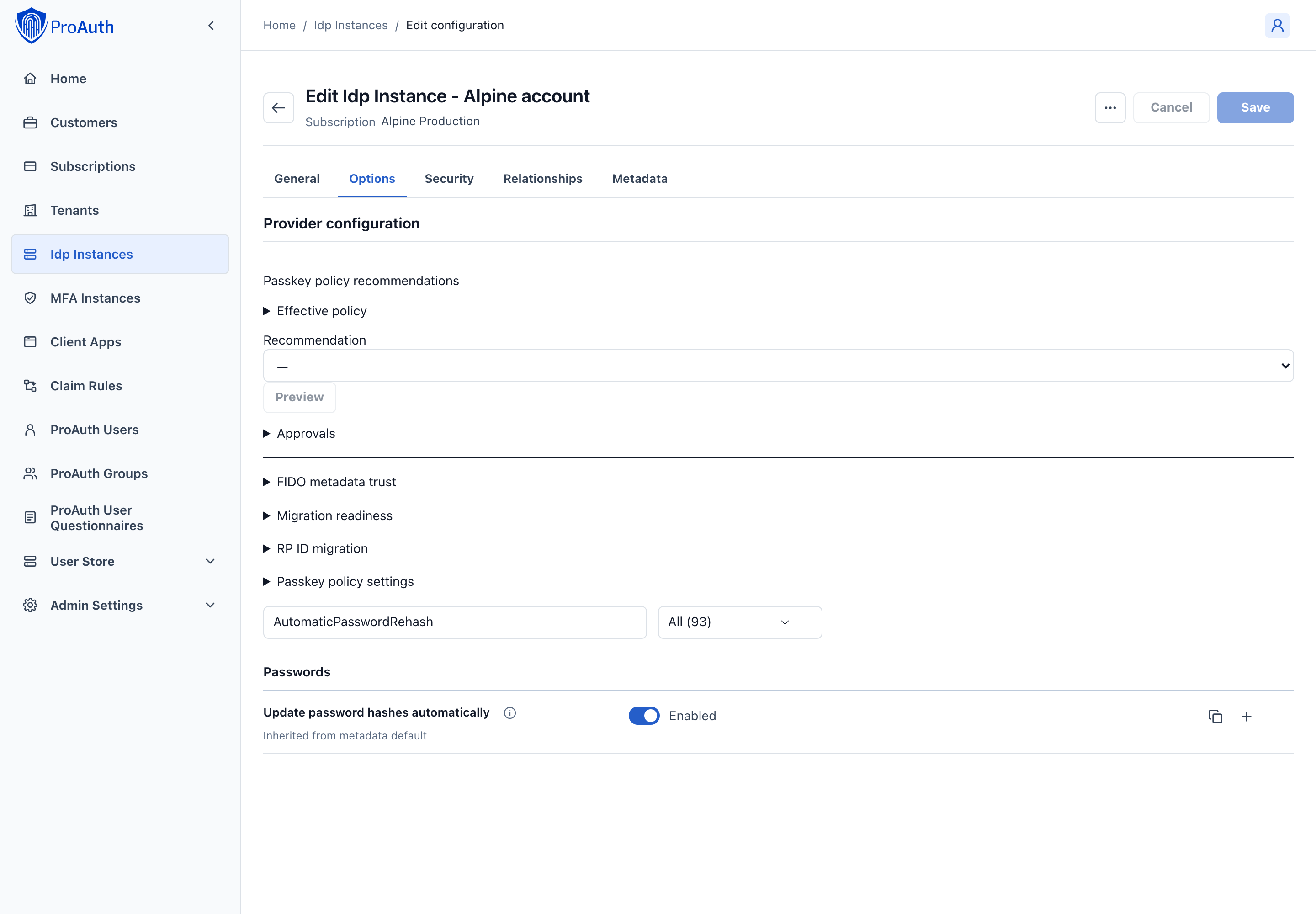
This option defines whether a password hash that should be rehashed is automatically rehashed the next time it is used
UserStore to ProAuth synchronization (implicit SCIM synchronization)
By default, UserStore groups and users are synchronized with ProAuth users and groups (one-way only). All possible properties of groups and users are synchronized. For users, all profiles are also synchronized, for groups all metadata as well. The synchronized ProAuth groups and users are read-only, they cannot be edited. It is only possible to define ProAuth Roles or MFA settings on synchronized objects.
Synchronization of group members is limited to the affected users in that UserStore. Empty groups do not trigger user synchronization. Users linked to additional identity providers are matched using their identity for the current UserStore.
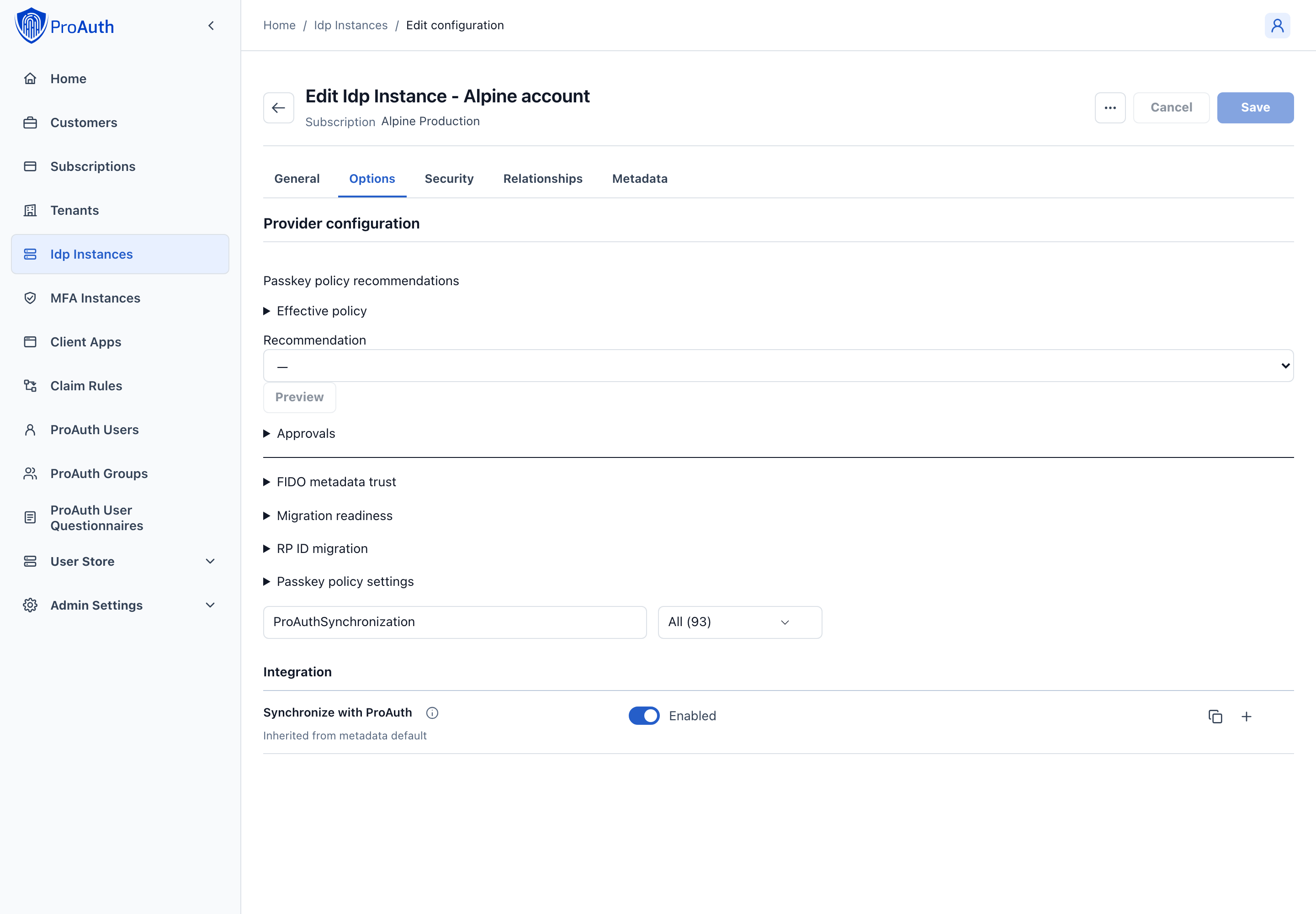
UserStore to ProAuth synchronization can be configured via the UserStore option: ProAuthSynchronizationEnabled.
UserStore AuditTrail
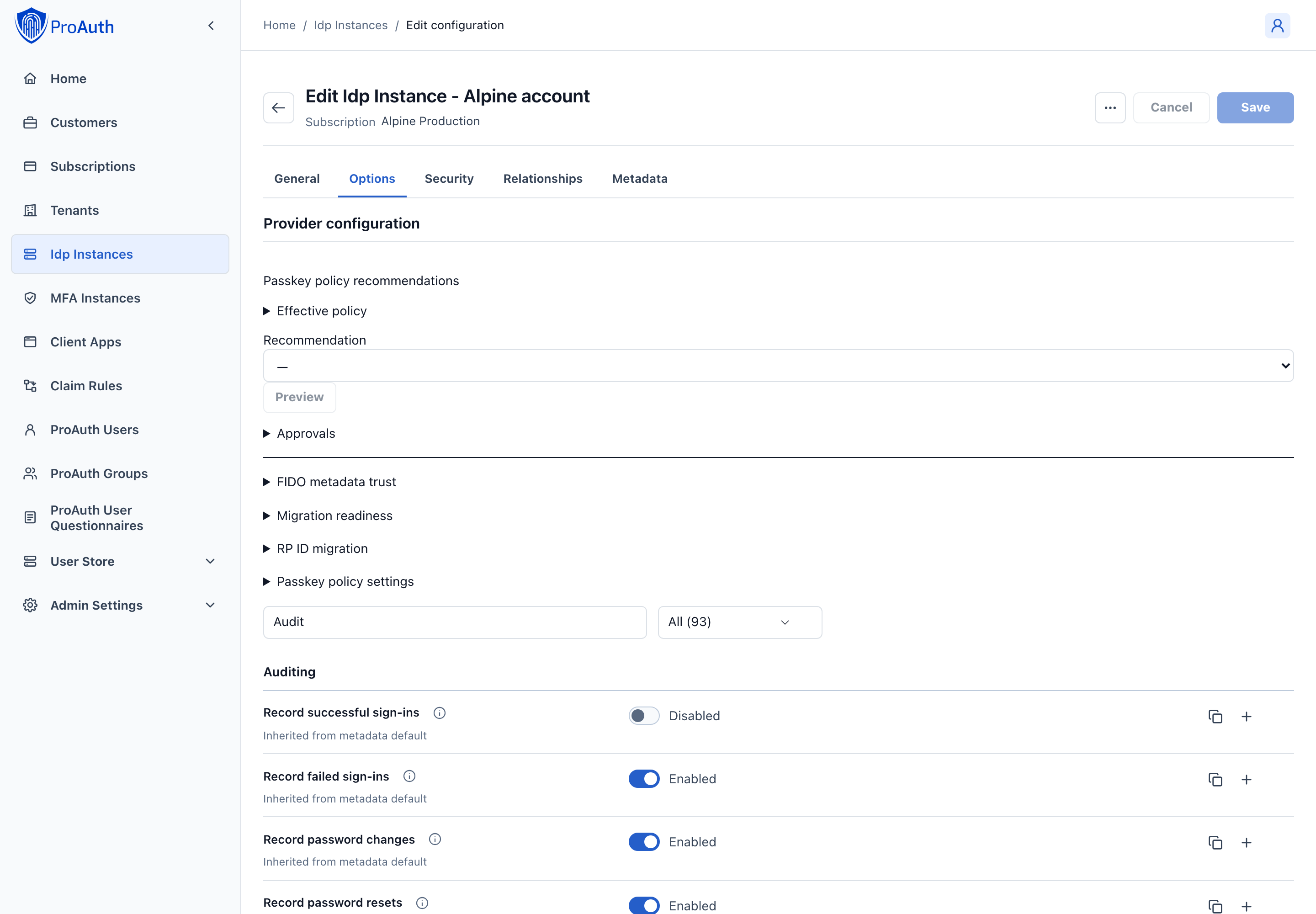
By default, failed login attempts are audited in UserStore. Optionally, all successful logins to ProAuth can also be audited.
The auditing of logins can be controlled by following UserStore options:
User Store DB Deployment Worker
ProAuth provides a worker container which is able to automatically create and configure databases for newly created UserStore IDP instances. To deploy and run the DB deployment worker container, please enable it in the Helm values and configure the appropriate settings corresponding to your setup.
The DB deployment worker listens for ProAuth UserStore changed events. Either a change on an active UserStore IDP with a configured ConnectionString or the change of the ConnectionString itself triggers the worker to create the potentially missing database.
The database provider is selected globally with Data:DefaultConnection:Provider (Data__DefaultConnection__Provider as an environment variable). Supported values are SqlServer and PostgreSql. UserStore connection strings can use aliases, but they do not define their own provider; ProAuth and all UserStore databases use the same provider.
If a change event is received, the DB deployment worker performs the following steps:
- Use the configured deployment target (
AzureSql,SqlServer, orPostgreSql). - Create the database if it does not already exist.
- Add the database users or roles if they do not already exist.
- Apply the security roles to the users
- Apply the UserStore schema migration in the
userstoreschema.
For SQL Server and Azure SQL, created UserStore users use userstore as their default schema. For PostgreSQL, created roles are granted access to the userstore schema. If a UserStore connection string points to the same physical database as the ProAuth connection string, the worker does not create or delete the database; it only applies the UserStore schema migration.
Password change and initial credentials
UserStore supports user-initiated password change, password reset, required change at sign-in, and administrator-created initial passwords. Every new or replacement password is validated by the effective server policy.
Why the workflow matters
Changing a credential affects more than the password hash. A secure workflow must verify the actor, enforce current policy, advance authentication security state, revoke affected sessions and renewable grants, and notify the user. A client application should not reproduce this logic locally.
For new onboarding, prefer unified invitations with user-controlled password or passkey enrollment. An administrator-created initial password remains available for compatibility, but the administrator necessarily knows that temporary credential and must deliver it through a protected channel.
Available journeys
| Journey | When to use it | Security behavior |
|---|---|---|
| Account Management password change | The signed-in UserStore user knows the current password. | Derives the target user from the session, validates the old password and new policy, advances security state, and applies revocation. |
| Required change during sign-in | The password is initial, expired with change permitted, or marked for replacement. | No ordinary authorization result is issued until the change completes. |
| Forgot password | The user cannot supply the current password and has an eligible verified recovery route. | Uses a hashed, expiring, single-use recovery artifact and durable delivery. |
| Invitation enrollment | A new user is onboarding. | The user creates the initial credential inside a restricted bootstrap journey; activation waits for all invitation requirements. |
| Administrator-created initial password | A legacy integration requires a temporary credential. | Marks the password as initial and requires replacement. Use only with a short expiry and a protected delivery process. |
Passwordless policy remains authoritative. If PasskeyPasswordRecreationPolicy prohibits password recreation, reset, initial-password, and self-service routes cannot be used to bypass it.
Account Management
UserStore users can change their password from /account/security. The action is available only when password use is permitted and the current password state supports a normal change.
The portal obtains password requirements from the effective v2 policy. Browser validation improves guidance, but the server reevaluates the complete password. See Password policy and recovery security.
Standalone password-change link
A relying application can link to the built-in change page:
text
https://<proauth-domain>/UserStore/ChangePassword?loginName=<login-name>&tenantid=<tenant-id>&idpinstanceid=<idp-instance-id>Optional query parameters are:
clientId— selects client-specific view customization;changePwReturnUrl— redirects after success when the destination is valid for the request context.
Do not construct an arbitrary return destination from untrusted input. ProAuth validates the URL, but the application should still use registered, predictable destinations.
The claim engine can publish a password-change URL to an application. For example:
liquid
{% if Context.IsUserStoreLogin %}https://{{ Context.Host }}/UserStore/ChangePassword?loginName={{ Context.LoginName }}&tenantid={{ Context.TenantId }}&idpinstanceid={{ Context.IdpInstanceId }}&clientid={{ Context.ClientAppId }}{% endif %}Initial-password options
| Option | Purpose |
|---|---|
InitialPasswordExpirationInSeconds | Default validity of an administrator-created initial password. |
PasswordChangeEnabled | Enables the built-in password-change journey for the UserStore IDP instance. |
UserPasswordExpirationInSeconds | Legacy password-age limit for normal user passwords. Use 0 or the documented disabled value when periodic expiration is not required. |
AutomaticPasswordRehash | Rehashes a successfully verified password when its format or parameters are obsolete. |
Avoid periodic password expiration unless a regulation or confirmed compromise requires it. Forced periodic changes tend to produce predictable variations and do not replace compromise detection, MFA, passkeys, or abuse controls.
Password reset
When PasswordResetByEmailEnabled is enabled, the forgot-password page uses an active verified contact with the PasswordRecovery purpose. PasswordResetTokenExpirationInSeconds controls the reset artifact lifetime; mail subject and body options control the notification template.
The response does not reveal whether the account or eligible contact exists. Reset completion consumes the artifact atomically, advances the UserStore authentication-security epoch, invalidates incompatible recovery artifacts, and revokes dependent authentication state.
For the complete security model, see Password policy and recovery security and Verified security contacts.
Administrative guidance
- Prefer invitation, temporary access pass, or recovery workflows over communicating an administrator-chosen password.
- Never send an initial password and its login name in the same unprotected channel.
- Set a short initial-password expiry and require change at the next sign-in.
- Do not set verified contact state through generic user update operations.
- Treat password reset after a recent contact change as a high-risk event.
- Monitor reset requests, delivery failures, replay rejection, policy failures, rehash duration, and revocation completion.
{% if Context.IsUserStoreLogin %}https://{{ Context.Host }}/UserStore/ChangePassword?loginName={{ Context.LoginName }}&tenantid={{ Context.TenantId }}&idpinstanceid={{ Context.IdpInstanceId }}&clientid={{ Context.ClientAppId }}{% endif %}
Manage a User Store account in the React AdminApp
Select the intended User Store before opening a user. This record owns the local sign-in account. The corresponding ProAuth user owns the identity presented to applications and its ProAuth roles and MFA configuration.
| Tab | Configuration and workflow |
|---|---|
| General | Edit login name, first and last name, and email address. Keep email confirmation beside the address and verify ownership before marking it confirmed. The record ID is read-only. |
| Security | Configure account activation and validity dates, then inspect permanent and temporary lockout diagnostics. |
| Credentials | Configure password expiration and inspect initial-password/change-required status. |
| Membership | Manage membership in local User Store groups. |
| Profiles | Manage additional local profile attributes. |
Sign-in requires an active account and a current time inside the validity interval. Either date may be empty for an unbounded interval on that side. Validity dates remain editable while the account is inactive so an operator can prepare reactivation.
Account validity and password expiration use UTC. A date selected in the AdminApp represents midnight UTC on that date, independent of the display language or server timezone. In User Store API v2 create, update, and patch requests, timestamps with an explicit offset are converted to UTC; date-only values and timestamps without an offset are interpreted as UTC. These rules apply to both SQL Server and PostgreSQL storage.
Enable permanent lockout combines with the provider’s failed-attempt threshold. Temporary lockout has separate provider options. Disabling permanent lockout does not clear an existing lock or disable temporary protection. The permanent lock flag, failed-login counter, temporary-lock expiry and temporary-lock counter are read-only diagnostics. The expiry displays its full stored timestamp so a short temporary lock can be distinguished from one lasting all day. A future temporary-lock expiry can block sign-in even when the permanent flag is off. See Brute-force protection for provider thresholds.
Password never expires bypasses password expiration. The expiration date and permission to change a password after expiration remain visible but disabled while this option is selected; toggling it preserves their form values. With the option off, a date limits the password’s lifetime and an empty date has no expiration. Initial-password change requirements continue to apply regardless of expiration policy.
Set initial password operates immediately on the saved account. It sets the initial-password and change-required flags, clears lockout state and counters, and derives expiration from the provider’s initial-password lifetime unless the saved account is configured never to expire passwords. Save pending account changes before using this action. Neither the status flags nor counters can be set through the normal account Save command.
Changing the legacy email confirmation flag does not send a verification message. Password reset prefers an active, verified security contact authorized for password recovery; the confirmed account email remains a compatibility fallback when no eligible security contact exists. Review recovery contacts and the confirmation flag when changing an address.
Account lockout and legacy throttling
UserStore provides permanent account lock, temporary account lock, progressive throttling, and CAPTCHA. These established controls remain available after layered abuse protection is activated.
Why several controls are necessary
Each control solves a different problem:
| Control | Primary purpose | Important trade-off |
|---|---|---|
| Progressive throttling | Makes repeated guesses slower. | Holds requests while delaying and does not stop distributed spraying. |
| Temporary lock | Gives an attacked account time to recover automatically. | An attacker can temporarily deny service to the user. |
| Permanent lock | Stops further attempts against a confirmed high-risk account. | Requires administrator intervention and can be abused for denial of service. |
| CAPTCHA | Separates automated traffic from an interactive user. | Requires an accessible alternative and provider availability. |
| Layered abuse protection | Detects account, identifier, network, tenant, and system patterns across nodes. | Requires a conforming distributed state store in multi-instance deployments. |
For internet-facing and multi-instance deployments, use these controls together with layered abuse protection. Account lock alone does not stop password spraying across many users.
Permanent account lock
A user is permanently locked after the configured number of consecutive failed password attempts when that user's IsUserLockEnabled property is enabled. An administrator must unlock the user.
| Option | Valid values | Default |
|---|---|---|
AttemptsBeforeUserLocked | Non-negative integer; 0 disables | 7 |
A successful password login resets the failed-attempt counter. Invalid persisted values are logged and permanent lock is disabled until corrected; temporary lock and throttling continue independently.
Denial-of-service risk
Do not use permanent lock as the only abuse control for a public application. An attacker who knows a login name can deliberately lock the account.
Temporary account lock
Temporary lock rejects all password attempts, including a correct password, until the duration has elapsed.
| Option | Valid values | Default |
|---|---|---|
TemporaryLockEnabled | Boolean | false |
TemporaryLockThreshold | Positive integer | 5 |
TemporaryLockDurationSeconds | Positive integer | 3600 |
Temporary and permanent lock use the same established failed-password counter. Configure the permanent threshold above the temporary threshold if both are active.
For most customers, a 5–15 minute temporary lock is less disruptive than the one-hour compatibility default. Validate the chosen value against helpdesk and abuse-response requirements.
Progressive throttling
Legacy throttling increases the delay with consecutive failed password attempts:
text
delay = min(BaseDelayMs × 2^(failedAttempts - 1), MaxDelayMs)| Option | Valid values | Default |
|---|---|---|
ThrottlingEnabled | Boolean | false |
ThrottlingBaseDelayMs | Non-negative integer | 1000 |
ThrottlingMaxDelayMs | Non-negative integer | 30000 |
This delay is distinct from AbuseMaximumDelayMilliseconds, which caps distributed layered decisions.
Lock-state feedback
When a correct password is submitted for a locked account, ProAuth can either explain the lock or return the same generic message used for invalid credentials.
| Option | Values | Default |
|---|---|---|
InformAboutLockAfterSuccessfulLogin | Boolean | true |
Set it to false for public or penetration-test-hardened deployments to avoid confirming that an attacker guessed the correct password. Keeping it true can reduce support requests in internal environments.
CAPTCHA
Use CaptchaActivationMode and CaptchaFailureThreshold to decide when password login requires a challenge. CaptchaProvider, CaptchaSiteKey, and CaptchaSecretKey configure the provider. The obsolete CaptchaEnabled value remains readable for compatibility but should not be used for new configuration.
Layered Challenge decisions feed the same password-login CAPTCHA path. A missing provider configuration fails safely rather than silently allowing the attempt.
Recommended baseline
| Deployment | Starting point |
|---|---|
| Public consumer | Activate layered defaults, enable CAPTCHA, set InformAboutLockAfterSuccessfulLogin=false, enable a short temporary lock, and consider disabling permanent lock if denial of service is a greater concern. |
| Workforce | Activate layered defaults, enable progressive throttling and a short temporary lock, and tune network/tenant capacity for office NAT or VPN traffic. |
| Privileged or regulated | Use layered defaults, CAPTCHA, temporary lock, explicit hard block for confirmed compromise, lock notifications, and alerting. Permanent lock can be appropriate when the response process is staffed. |
Configure options
These are UserStore IDP-instance options. Configure them in AdminApp, through Management API v2 option resources, through generated v2 clients, or with ProAuth CLI configuration import.
http
POST /api/management/v2/option
Content-Type: application/json

{
  "name": "TemporaryLockEnabled",
  "value": "true",
  "applyToIdpInstanceId": "<idp-instance-id>"
}
The server validates runtime values. Test threshold relationships and user-visible behavior in a non-production instance before applying them broadly.
Infrastructure protection
Application controls protect identities and recovery journeys. A trusted reverse proxy, load balancer, CDN, or WAF should also limit connections and requests to protect CPU, memory, network, and PBKDF2 capacity.
Configure forwarded headers only from trusted proxies; layered network dimensions are ineffective if an attacker can supply the apparent client address.
UserStore passkeys
ProAuth can use FIDO2/WebAuthn passkeys as the primary authenticator for UserStore users. A passkey replaces a shared password with a cryptographic credential that is bound to the ProAuth relying party. This makes the normal sign-in path resistant to credential phishing, password reuse, credential stuffing, and password-database disclosure.
This page explains why passkey policy exists, how to choose an operating model, and how to introduce it safely. For every accepted value and default, see the Passkey policy option reference. For recovery, FIDO metadata, investigations, approvals, and RP ID migration, see Passkey security operations.
Login passkeys and MFA passkeys are different
This guide covers UserStore login passkeys, which are stored with the UserStore user and can replace the password as the primary authenticator. Passkey MFA is configured separately, can protect UserStore and federated users, and does not remove a UserStore password. See Passkey MFA.
Why ProAuth uses a policy instead of one passwordless switch
Registering a passkey is only the first part of a passwordless design. If password login and weak recovery remain available, an attacker can bypass the passkey by choosing the weaker path. Removing that path too early creates the opposite problem: users can be locked out when an authenticator is lost, a device is replaced, or an authenticator becomes non-compliant.
A complete policy therefore answers several connected questions:
- When should users be invited or required to enroll?
- How many usable credentials are sufficient, and must they be independent?
- When may a password be removed, and can it ever be recreated?
- Which recovery proofs are strong enough for this population?
- Are synced passkeys acceptable, or must credentials be hardware-bound and attested?
- What should happen when trust metadata, a risk provider, or a signature counter reports a problem?
- Which destructive changes require approval by another operator?
ProAuth evaluates these controls together. Password removal is permitted only when the user's credentials, recovery methods, security contacts, authentication evidence, maturation period, and durable notifications satisfy the current policy.
Policy scope and ownership
Passkey policy is configured on each UserStore IDP instance through the normal mutable ProAuth option system. The stored options remain authoritative and can be changed at any time, subject to validation, optimistic concurrency, and any configured maker-checker approval.
A UserStore IDP can be assigned to one or more tenants. Its credential and password policy follows the UserStore IDP, so the same user receives the same primary-authentication policy wherever that IDP is used. Each sign-in and notification still carries one validated initiating tenant context. Background UserStore notifications use a neutral template when no initiating tenant exists.
Choose an operating model
Start with the outcome you need rather than individual option values.
| Requirement | Recommended starting point | Why |
|---|---|---|
| Introduce passkeys without changing password behavior | PasskeyCoexistence | Lowest migration risk; passwords and passkeys remain equivalent sign-in choices. |
| Improve consumer sign-in and allow users to become passwordless | ConsumerPasskeyFirst | Reduces password use while preserving familiar email or saved-code recovery. |
| Move a managed workforce to passwordless authentication | EnterprisePasswordless | Enforces enrollment, requires two credentials, and removes passwords only after readiness and grace periods. |
| Require attested, hardware-bound authentication with governed recovery | RegulatedHardwareBound | Adds metadata trust, external risk evidence, credential diversity, and two-person control for critical operations. |
These are versioned recommendations, not customer profiles or permanent product modes. Applying one writes a complete set of ordinary IDP option values. You can change any valid value afterward.
Passkey coexistence
Use coexistence when the immediate goal is adoption rather than password removal.
- Enrollment is optional.
- The login page offers conditional passkey suggestions and an explicit passkey button.
- User verification is required for new-policy behavior.
- Password login remains available.
- Existing credentials are grandfathered.
- No recovery route or verified security contact is required because the password remains a recovery path.
This is the safest first step for an existing deployment. It improves the sign-in path for users who choose passkeys, but it does not make their account passwordless. Continue to enforce strong password and brute-force policies.
Consumer passkey-first
Use the consumer recommendation when user experience and broad authenticator compatibility are more important than managed hardware provenance.
- Enrollment is encouraged and passkey sign-in is presented first.
- One mature passkey is sufficient.
- The user may explicitly remove the password after readiness succeeds.
- One verified security contact is required.
- Recovery can use either a verified email address or a saved primary recovery code.
- New credentials mature for 24 hours before satisfying destructive-action readiness.
This model accepts platform and synced passkeys. It is appropriate only if the security of the email channel and the user journey for securely storing recovery codes match your threat model.
Enterprise passwordless
Use the enterprise recommendation for a managed workforce with a staffed support or security function.
- Enrollment is required, with a 30-day enrollment grace period.
- Two mature credentials are required.
- Password removal is scheduled only after readiness succeeds, followed by a 7-day removal grace period.
- Password recreation is available only through recovery.
- One verified security contact is required.
- Recovery uses a saved primary recovery code or an operator-issued temporary access pass (TAP) with one independent approval.
- Initial enrollment uses an approved TAP.
Before activation, define who may issue and approve TAPs, how users prove their identity to the operator, and how emergency requests are audited outside ProAuth.
Regulated hardware-bound
Use the regulated recommendation only when the organization can operate the supporting trust and recovery services.
- Passwords are prohibited after the migration and removal windows.
- Enrollment is required, with a 30-day migration grace period and a 7-day password-removal window.
- Two attested, device-bound credentials with distinct trust roots are required.
- Existing credentials that do not meet the new policy receive a grace period and are then restricted.
- Two verified security contacts are required.
- FIDO Metadata Service trust and an external risk provider are required.
- Binding and deletion require phishing-resistant authentication.
- Critical changes require two independent approvers.
- Recovery requires either two independent proofs, a dual-approved TAP, or qualified identity reproofing.
DANGER
Do not apply this recommendation merely because it is the strictest. If FIDO metadata, the external risk provider, identity proofing, notification delivery, hardware inventory, or the maker-checker operating model is not ready, enrollment or recovery can be blocked by design.
Recommended rollout
For an existing UserStore, use a staged rollout even when the final target is enterprise or regulated passwordless.
- Prepare operations. Confirm notification delivery, Account Management access, help-desk ownership, supported authenticators, recovery routes, and monitoring.
- Inventory and backfill. Run the additive legacy backfill only after every serving node runs the new release. Review credentials whose RP ID, algorithm, attestation, or metadata evidence could not be derived.
- Enable coexistence. Allow registration and measure enrollment, browser coverage, authenticator types, and support demand without changing password behavior.
- Encourage or require enrollment. Set an enrollment policy and a grace period appropriate for the population. Ensure newly provisioned password-prohibited users have an initial-enrollment route.
- Make recovery operational. Verify security contacts, recovery codes, TAP approvals, or identity-proofing integration. Exercise recovery with representative users.
- Activate password removal. Preview the exact option impact. Start with a non-zero credential maturation period and password-removal grace period.
- Tighten trust deliberately. Before changing attestation, authenticator class, AAGUID, risk, or diversity requirements, inspect how many existing credentials would become held or non-compliant.
WARNING
Activating destructive passkey modes while old and new ProAuth nodes serve traffic together is unsupported. Complete the rolling deployment first. A committed password-hash removal cannot be reversed by rolling the application back.
Apply a recommendation safely
In AdminApp, open the User Store IDP instance and select Passkey policy → Recommendations. Under Passkey policy recommendations, choose a recommendation and select Preview. Compare the current and proposed values before requesting approval or applying the change. Independent approvers open the same instance, select a request in Approvals, and preview the exact proposal before approving or rejecting it. The requester refreshes the approval status before executing an approved change.
Use Passkey policy settings on the same tab to edit individual options. These settings are previewed and applied together; resetting an override is also part of that reviewed policy change. Saving the surrounding IDP form does not apply pending passkey policy changes.
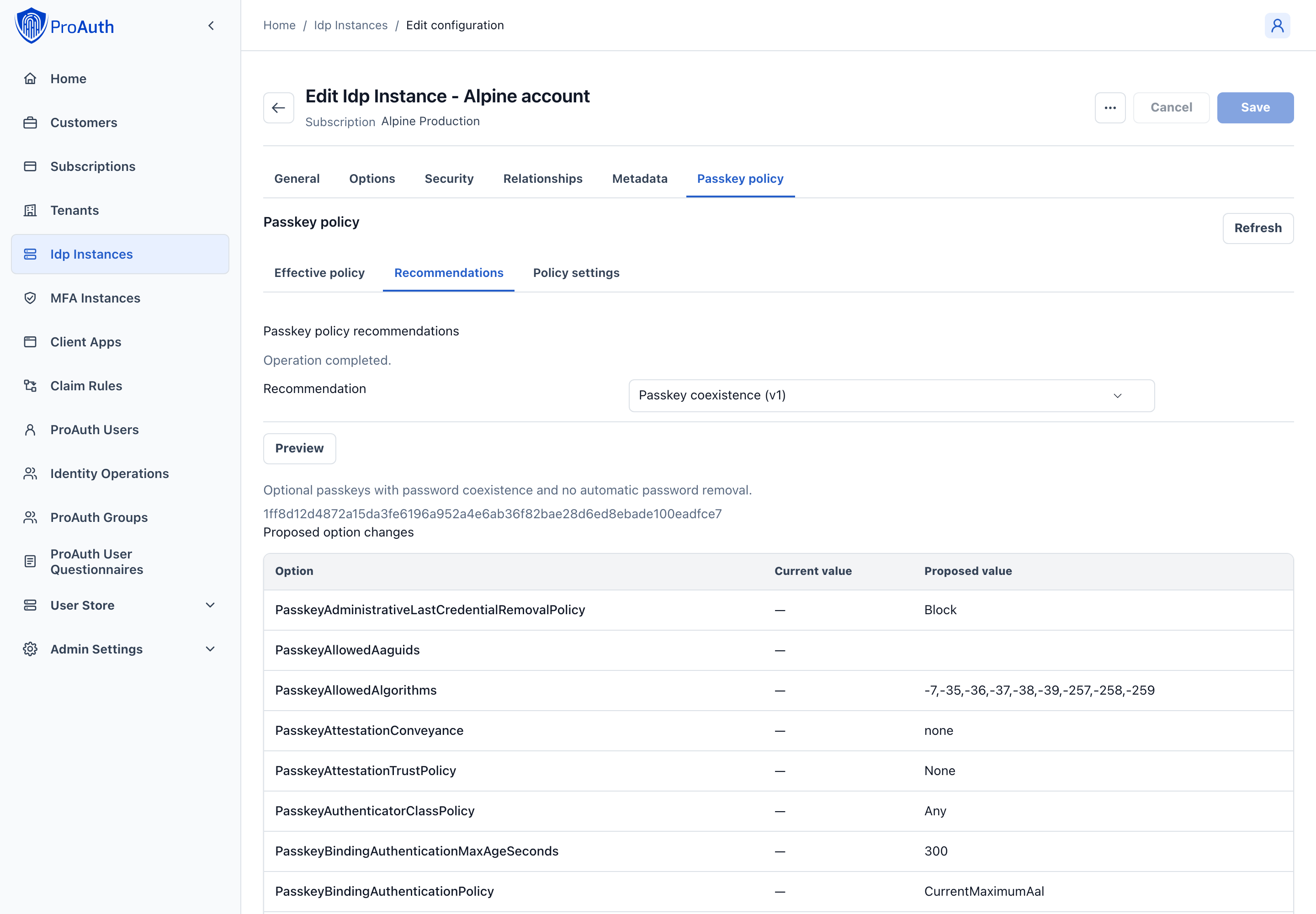
You can apply recommendations in AdminApp or through Management API v2. Both use the same server-side workflow:
- List the available recommendation IDs and versions.
- Preview a recommendation against the current IDP options.
- Review every changed value, validation error, warning, destructive impact, and required approval count.
- If approval is required, create an approval request and obtain the required independent approvals.
- Apply the recommendation with the recommendation fingerprint and preview fingerprint returned by the preview.
text
GET  /api/management/v2/idpinstances/{idpInstanceId}/passkey-policy/recommendations
POST /api/management/v2/idpinstances/{idpInstanceId}/passkey-policy/recommendations/{recommendationId}/versions/{version}/preview
POST /api/management/v2/idpinstances/{idpInstanceId}/passkey-policy/recommendations/approvals
POST /api/management/v2/idpinstances/{idpInstanceId}/passkey-policy/recommendations/apply
The two fingerprints protect different state:
- The recommendation fingerprint identifies the exact versioned recommendation definition.
- The preview fingerprint binds the proposed operation to the current option values and concurrency state.
If either changes, ProAuth rejects the apply request. Preview again instead of retrying stale input.
The apply request uses only values returned by the selected recommendation and its latest preview:
json
{
  "recommendationId": "EnterprisePasswordless",
  "version": 1,
  "recommendationFingerprint": "<fingerprint returned by list or get>",
  "previewFingerprint": "<fingerprint returned by preview>",
  "approvalRequestId": null
}
Set approvalRequestId to the approved request ID when the preview reports independent approvals. Do not substitute an approval created for another preview.
Customize a policy
Use the effective-policy endpoint before editing individual values:
text
GET  /api/management/v2/idpinstances/{idpInstanceId}/passkey-policy
POST /api/management/v2/idpinstances/{idpInstanceId}/passkey-policy/preview
POST /api/management/v2/idpinstances/{idpInstanceId}/passkey-policy/approvals
POST /api/management/v2/idpinstances/{idpInstanceId}/passkey-policy/apply
Always preview and apply coordinated changes through the policy endpoints. They validate the complete resulting policy and report whether an operation is a policy weakening, trust-overlay change, or destructive password activation. ProAuth writes remain ordinary IDP options; the endpoints add validation, impact analysis, concurrency protection, and approval enforcement.
For example, preview a coordinated consumer policy change instead of updating the options independently:
json
{
  "options": {
    "PasskeyPasswordPolicy": "UserRemovable",
    "PasskeyRequiredVerifiedSecurityContactCount": "1",
    "PasskeySecurityNotificationMode": "Required",
    "PasskeyRecoveryRoutes": "{\"Version\":1,\"Routes\":[{\"Name\":\"VerifiedEmail\",\"Requirements\":[{\"TrustClass\":\"VerifiedAddress\",\"Count\":1,\"RequiredApprovals\":0,\"ProviderCapability\":null}]}]}"
  },
  "removeOptionIds": []
}
The option values are strings because they use the standard ProAuth option architecture. The effective-policy response converts them into typed values for inspection.
Do not copy a recommendation's current values into long-lived deployment logic without retaining its version and fingerprint. Recommendation contents can evolve in a later release.
Password and authentication lifecycle
Password state and primary-authentication readiness are intentionally separate. For example, both a newly provisioned passwordless user and a user who lost every passkey have no password, but they require different handling.
Password removal never occurs merely because a passkey exists. At commit time, ProAuth reevaluates all readiness conditions under optimistic concurrency. A successful commit atomically:
- clears the password hash;
- invalidates password-reset material;
- clears password-expiry state;
- advances the user's authentication security epoch;
- records a correlated security event and durable notification intent.
Removing passkeys later cannot restore the previous hash. If the last usable passkey is compromised, revocation still proceeds and the user enters restricted recovery.
What counts as ready
The Account Management portal and UserStore API expose a server-evaluated readiness result. Depending on policy, readiness includes:
- the required number of active, mature, compliant, non-held passkeys;
- the required credential diversity;
- enough verified security contacts;
- at least one currently operational recovery route;
- mature binding lineage or a fresh independent recovery proof;
- authentication that satisfies the binding policy and maximum age;
- explicit user confirmation;
- required durable notification delivery capability.
Do not reproduce this calculation in a client or UI. Display blockingReasons from the v2 API and let the server remain authoritative.
Enrollment, replacement, and deletion
Users manage login passkeys through Account Management. They can register and rename credentials, see policy compliance and readiness, replace a credential, manage recovery methods, and request password removal when allowed.
Self-service deletion of the final usable passkey is always blocked. The user is guided to register and mature a replacement first. Administrative compromise revocation is different: security takes precedence over availability, so a confirmed compromised credential can always be permanently revoked.
Revoked credentials become non-reactivatable tombstones until the configured retention period expires. A credential with the same identifier cannot be silently restored.
Recovery is part of authentication policy
ProAuth supports saved primary recovery codes, verified contacts, governed TAPs, multiple independent proofs, and pluggable asynchronous identity proofing. The policy defines one or more named routes; satisfying every requirement in any one route is sufficient.
Recovery does not immediately create a normal sign-in session. It creates a short-lived restricted session that can only bind a new policy-compliant primary authenticator. Completion revokes pre-recovery sessions, renewable grants, and one-time artifacts.
A credential placed on a risk hold cannot complete recovery or initial enrollment. The restricted registration is rejected without completing the transaction or revoking the remaining recovery artifacts. Resolve the risk condition and start a new registration ceremony while the restricted session remains valid.
Primary recovery codes are independent from MFA recovery codes. They are displayed once, stored as hashes, single-use, and intended specifically for recovery of primary UserStore authentication.
See Passkey security operations before enabling a password-removing policy.
OIDC assurance
ProAuth derives ACR and AMR values from the complete authentication evidence rather than the selected UI path:
https://proauth.net/acr/baselinerepresents baseline ProAuth assurance.https://proauth.net/acr/mfarepresents ProAuth multi-factor assurance.- Standard
phris emitted only when the complete chain is phishing-resistant. - Registered AMR values such as
pwd,pop,user, andmfaare emitted only when supported by evidence. An enrolled but incomplete factor, or an MFA recovery code, does not establish completed additional-factor evidence.
The built-in passkey path does not currently retain verified key-protection evidence. It therefore does not emit phrh, hwk, or swk, and discovery does not advertise phrh. Trusted attestation and a non-backup-eligible credential do not by themselves prove hardware protection. A configured alias for phrh cannot make this unsupported assurance available.
Tenant-scoped ACR aliases can map business-facing values to canonical assurance requirements. Reserved values and mappings that would inflate assurance are rejected.
acr_values is an ordered list of voluntary preferences. If none can be satisfied, ProAuth emits the assurance actually earned. An essential claims.id_token.acr value or values constraint instead requires an exact permitted output value. For example, a user-verified passkey can satisfy a request for baseline assurance and emit the requested baseline identifier or configured alias. An unsupported essential value fails rather than being replaced with a different value. prompt=none returns login_required when the existing session cannot satisfy the essential request.
Refresh retains the original authentication time and selected ACR. Changing claim disclosure does not change that evidence. Keep alias meanings stable; revoke affected sessions and renewable grants when changing an existing alias's meaning or applying stronger requirements to existing authorizations.
Routing is not encoded in acr_values. New integrations use proauth_tenant, proauth_idp, proauth_hidden_idp, proauth_invitation, and the standard ui_locales parameter. Conflicting dedicated and legacy routing values fail with invalid_request.
Upgrade compatibility
An upgrade does not enable passkeys, remove passwords, invalidate reset material, or remove credentials. When replacement options are absent, ProAuth preserves legacy behavior for:
PasskeyConditionalUiEnabled;PasskeyEnforcePasswordless;PasskeyAllowLoginWithoutUserVerification;- per-user
PasskeyRequirePasskeyLogin.
New-option presence takes precedence. The per-user PasskeyRequirePasskeyLogin value remains compatibility-read-only and is never converted automatically into password removal.
Legacy passkeys are backfilled only where RP ID and COSE algorithm can be proven. Missing historical attestation evidence becomes UnknownLegacy; it cannot satisfy new regulated trust requirements unless an explicit policy permits grandfathering.
Next steps
- Use the Passkey policy option reference when reviewing or customizing concrete values.
- Prepare support, recovery, trust, monitoring, and migration with Passkey security operations.
- Review the end-user experience in Account Management.
- Keep password defenses enabled for coexistence deployments with UserStore brute-force protection.
Requested authentication context
Applications can send a space-separated, ordered acr_values list. ProAuth returns the first requested context that the authentication evidence satisfies. An explicitly configured tenant alias is returned under that exact name. Unknown values are not treated as aliases. If none of these voluntary preferences can be satisfied, ProAuth returns the session's strongest achieved canonical context.
To require an exact context, request acr as an essential ID-token claim using claims.id_token.acr with value or values. ProAuth must return a satisfied value from that request or fail authentication. It does not replace an essential exact value with an unrequested context merely because it is considered stronger.
Selecting an ACR does not change the underlying authentication evidence or amr methods. Phishing-resistant and hardware-protected contexts require the corresponding verified passkey evidence; a tenant alias cannot grant assurance that was not achieved.
For voluntary ACR preferences, ProAuth first evaluates claims.id_token.acr in the client's specified order, then acr_values in its specified order. If neither list has a satisfied value, the session's strongest achieved canonical context is used. Differing voluntary lists are accepted. Essential ACR constraints take priority and never allow a fallback outside their requested values. Explicit tenant aliases use the same verified requirements as canonical contexts; selecting an alias does not change the underlying authentication evidence or amr.
Password policy and recovery security
Typed password policy replaces an administrator-written regular expression with understandable, independently configurable rules. It also provides versioned recommendations, bounded evaluation, Unicode-aware length handling, common-password screening, and a self-describing PBKDF2 hash format.
Why typed policy is safer
A regular expression can express almost anything, but it does not tell an administrator or user which rule failed. Complex expressions can also consume excessive CPU, behave differently from client-side validation, and encourage composition rules that produce predictable passwords.
Typed policy gives each requirement a name, range, default, and stable API representation. ProAuth remains the final authority: browser guidance may describe the policy, but password creation and replacement always run the server evaluator.
Existing instances remain compatible
Existing UserStore IDP instances stay in PasswordPolicyMode=LegacyRegex until an administrator previews and applies typed options. Do not activate typed policy while an older ProAuth binary can serve traffic. Reverting to a pre-typed binary after new hashes or policies are active is unsupported.
Choose a recommendation
Recommendations are versioned presets that write concrete options. They are not permanent customer modes. Administrators can review every proposed value, apply a preset, and then adjust individual options if required.
| Recommendation | Use it when | Important qualification |
|---|---|---|
ConsumerBalanced-v1 | Passwords are a normal primary authenticator for public or general-purpose users. | Recommended default: minimum 15 characters, no composition rules, common-password screening, advisory strength feedback. |
WorkforceMfa-v1 | Every affected user is independently required to complete MFA or a passkey policy. | Lowers the minimum to 8 only for compatibility with an enforced second factor. Do not use for password-only access. |
PasswordlessFirst-v1 | Passwords remain temporarily while users move to passkeys. | Enforces the strength score for remaining passwords. Password prohibition comes from passkey policy. |
RegulatedHighAssurance-v1 | A regulated deployment still permits passwords and has benchmarked additional cost. | Uses 1,200,000 PBKDF2 iterations and enforced strength. Phishing resistance still requires passkeys or another suitable authenticator. |
If you are unsure
Use ConsumerBalanced-v1. Avoid uppercase, digit, and symbol requirements unless a contract or regulation explicitly requires them. Long passphrases, common-password rejection, throttling, and MFA provide better security and usability than arbitrary composition rules.
Inspect, preview, and apply
Management API v2 exposes the effective policy and recommendation workflow:
http
GET  /api/management/v2/idpinstances/{idpInstanceId}/password-policy
POST /api/management/v2/idpinstances/{idpInstanceId}/password-policy/preview
GET  /api/management/v2/idpinstances/{idpInstanceId}/password-policy/recommendations
POST /api/management/v2/idpinstances/{idpInstanceId}/password-policy/recommendations/{recommendationId}/versions/{version}/preview
POST /api/management/v2/idpinstances/{idpInstanceId}/password-policy/recommendations/apply
The generic preview overlays proposed name/value pairs without persisting them and reports cross-option validation errors. Recommendation preview also reports the current value, proposed value, option ID, concurrency token, warnings, recommendation fingerprint, and inventory fingerprint.
Apply requires both fingerprints and AllServingNodesCurrentAttestation=true. If the option inventory changes after preview, ProAuth returns a conflict and the administrator must preview again.
Compatibility mode
PasswordPolicyMode=LegacyRegex preserves PasswordComplexityPolicyRegex. ProAuth does not try to translate an arbitrary expression because a translation could silently weaken or change its meaning.
| Option | Valid values | Default | Purpose |
|---|---|---|---|
PasswordPolicyMode | LegacyRegex, Typed | LegacyRegex for existing instances | Selects the runtime evaluator. |
PasswordComplexityPolicyRegex | Valid .NET regular expression | Existing configured value | Complete legacy rule. Used only in LegacyRegex mode. |
LegacyPasswordRegexTimeoutMilliseconds | 10–1000 | 250 | Hard timeout for each legacy match. A timeout rejects the password. |
Existing password hashes cannot reveal whether their original plaintext satisfies a new content rule. Typed policy applies when a password is created, changed, reset, or successfully supplied for reevaluation and rehash. Migration tooling must never claim that hashes were content-validated.
Complete typed-policy option reference
All values are scoped to the UserStore IDP instance. Length is measured in Unicode code points after NFC normalization; UTF-8 bytes are bounded separately before expensive hashing.
Length and normalization
| Option | Valid values | Default | Guidance |
|---|---|---|---|
PasswordMinimumLength | 8–128 | 15 | Use 15 for password-only or general access. Use 8 only with independently enforced MFA. |
PasswordMaximumLength | 64–1024, and not below the minimum | 128 | Keep at least 64 so password managers and passphrases work. |
PasswordMaximumUtf8Bytes | 256–4096 | 1024 | Bounds memory, storage, and hashing cost for large Unicode input. |
PasswordUnicodeNormalization | NFC | NFC | The only supported normalization. The normalized value is evaluated and hashed. |
Spaces and printing Unicode are accepted. ProAuth does not silently trim the password before hashing.
Optional composition and pattern checks
| Option | Valid values | Default | Guidance |
|---|---|---|---|
PasswordRequiredUppercaseCount | 0–10 | 0 | Leave at 0 unless required. |
PasswordRequiredLowercaseCount | 0–10 | 0 | Leave at 0 unless required. |
PasswordRequiredDigitCount | 0–10 | 0 | Leave at 0 unless required. |
PasswordRequiredSymbolCount | 0–10 | 0 | Leave at 0 unless required. Whitespace does not count as a symbol. |
PasswordMaximumRepeatedRun | 0, or 2–32 | 0 | 0 disables. A value of 3, for example, rejects a run of four equal characters. |
PasswordMinimumSequenceLengthToReject | 0, or 3–16 | 0 | 0 disables. Detects ascending or descending ASCII sequences. |
PasswordIdentityDerivedChecks | Flags None, Username, Email, Tenant, Profile | Username, Email, Tenant | Rejects passwords containing selected identity values of at least three characters. |
Pattern checks can create surprising rejections in passphrases and localized input. Enable them only when their support cost and false-positive behavior are acceptable.
Common-password and strength evaluation
| Option | Valid values | Default | Guidance |
|---|---|---|---|
PasswordLocalBlocklistEnabled | Boolean; must be true in typed mode | true | Rejects the bundled common-password catalog. It cannot be disabled in typed mode. |
PasswordBlocklistDatasetVersion | Immutable catalog identifier | proauth-common-v1 | Records the packaged dataset version in policy output and the fingerprint. Keep the shipped value unless the installed release documents another catalog. |
PasswordStrengthEstimatorMode | Disabled, Advisory, Enforce | Advisory | Advisory returns a score without rejecting solely on that score. Enforce applies the minimum. |
PasswordMinimumStrengthScore | 0–4 | 3 | Used as a rejection threshold only when mode is Enforce. |
The packaged proauth-common-v1 catalog screens common passwords locally. It is not an external breach service and does not claim that every compromised password is present. The built-in score is a bounded online estimate based on length and character diversity; it is guidance, not a cryptographic entropy measurement.
No password or password-derived value is sent to an external provider by these options.
Password storage options
Typed mode writes a versioned, self-describing PBKDF2-HMAC-SHA-256 envelope using System.Security.Cryptography.
| Option | Valid values | Default | Guidance |
|---|---|---|---|
PasswordHashAlgorithm | Pbkdf2HmacSha256V1 | fixed | Other values are rejected. |
PasswordHashIterations | 600000–10000000 | 600000 | Benchmark on the slowest production node under expected peak load before increasing. |
PasswordHashSaltBytes | 16–64 | 16 | Random salt stored in the envelope. |
PasswordHashOutputBytes | 32–64 | 32 | Derived hash length. |
AutomaticPasswordRehash | Boolean | true in recommendations | Rewrites a successfully verified legacy or lower-cost hash using current parameters. |
Legacy hash formats remain verify-only. A successful authentication can rehash the password; rollback never downgrades a hash. Increasing iterations affects login CPU and denial-of-service capacity, so test it together with layered abuse protection.
Activation metadata
These locked values are written by recommendation apply and are not normal administrator settings:
| Option | Meaning |
|---|---|
PasswordPolicyActivationFingerprint | Exact preview fingerprint that was applied. |
PasswordPolicyActivatedOn | UTC activation time. |
PasswordPolicyAllNodesCurrentAttested | Recorded all-serving-nodes-current attestation. |
They support audits and upgrade diagnostics. Editing them directly is unsupported.
Password reset and recovery
Password reset is a recovery operation, not a normal login. A mailbox proof never receives unlimited authority merely because the account also has a password.
The reset request returns an enumeration-safe response and applies abuse controls to known and unknown identifiers. For an eligible user, ProAuth creates a 256-bit random secret, stores only its SHA-256 digest, binds it to the UserStore user, authentication-security epoch, verified-contact snapshot, issue time, and expiry, and commits the protected notification intent in the same transaction.
Redemption verifies the digest in constant time and rejects the artifact after expiry, prior consumption, verified-contact change, authentication-security-epoch change, or an incompatible passwordless policy. Password replacement and consumption use one tracked transaction, so concurrent redemptions have one winner.
If PasskeyPasswordRecreationPolicy prohibits password recreation, reset cannot recreate a password. Users without an active verified PasswordRecovery contact must use another configured route such as a recovery code, temporary access pass, identity proofing, or governed administrator recovery.
See Verified security contacts and Passkey security operations.
Security effects and operations
Password change, reset, recreation, relevant contact change, recovery, and administrative security changes advance the appropriate UserStore epoch or scoped revocation cutoff. Older authentication artifacts fail validation, and renewable grants are revoked according to scope.
Before production activation:
- preview the recommendation and retain its warnings;
- benchmark PBKDF2 under peak authentication and attack load;
- test localized guidance for every enabled rule;
- confirm Account Management and custom clients render the effective v2 policy rather than copying rules;
- confirm that all serving nodes run the coordinated version and review the documented rollback restrictions;
- monitor policy failure codes, rehash duration, reset delivery, reset replay rejection, and epoch invalidation.