Version v3.2.0
Passkey security operations
Passwordless authentication moves operational responsibility away from password reset and toward credential inventory, trusted enrollment, recovery proof, and incident response. This guide describes the controls that must be operational before enabling password removal and the procedures administrators use afterward.
For policy selection, see UserStore passkeys. For every option value, see the Passkey policy option reference.
For a tab-by-tab walkthrough, see Security administration views, including when to use each view, its scope, available actions and screenshots.
Operating responsibilities
Assign ownership before deploying a password-removing policy.
| Responsibility | Typical owner | Required outcome |
|---|---|---|
| Passkey policy | Identity architecture/security | Approved option set, rollout phases, and exception policy |
| Authenticator support | Endpoint/workplace or customer support | Supported devices, hardware-key issuance, replacement, and browser coverage |
| Recovery | Help desk/security operations | Documented identity checks, TAP or proofing process, escalation, and service hours |
| FIDO metadata | Identity platform operations | Fresh last-known-good snapshot, outage response, and offline import capability |
| External risk provider | Security platform team | Availability target, decision semantics, and failover expectations |
| Notifications | Messaging/platform operations | Durable delivery, retry monitoring, and neutral background templates |
| Maker-checker | Security governance | Independent operators, approval SLAs, and emergency procedure |
| Audit and incident response | Security operations | Retention, correlation, credential-compromise response, and evidence export |
WARNING
Two registered passkeys are not a complete recovery design. They reduce device-loss risk, but both credentials can be lost together, invalidated by a policy change, or affected by the same synced credential provider.
Pre-activation checklist
Before changing PasskeyPasswordPolicy to UserRemovable, RemoveWhenReady, or Prohibited, verify all applicable items:
- Account Management is reachable from every relying application and preserves the correct tenant and IDP context.
- Users can register the authenticator classes allowed by policy in every supported browser and operating system.
- The required number and diversity of credentials can be achieved in practice.
- Security-contact verification and security notifications are delivered through the configured channels.
- Users understand that primary recovery codes are separate from MFA recovery codes and know where to store them.
- TAP request, independent approval, one-time secret delivery, and redemption have been exercised end to end.
- Every identity-proofing capability referenced by a route has exactly one production provider.
- FIDO metadata has a usable last-known-good snapshot before
MetadataRequiredis enabled. - A required external risk provider is registered, available, and tested for allow, hold, block, timeout, and failure behavior.
- Security Operations has operators who cannot approve their own requests.
- Alerting covers recovery volume, provider outages, held credentials, outbox failures, and migration progress.
- All serving nodes run the new version before legacy backfill or destructive policy activation.
Administrative workspaces
AdminApp separates security work by scope and task. Each workspace displays server-evaluated results.
| Destination | Scope and tasks |
|---|---|
| User Store → Security Operations | Selected UserStore: approvals, temporary access passes, recovery and security events |
| User Store → Migrations | Selected UserStore: legacy credentials, store hardening and RP ID migration |
| Identity provider → Passkey policy | Current UserStore provider: effective policy, recommendations and reviewed settings |
| Identity Operations | Authorized management records: identity replacements and legacy invitations |
| Admin Settings → FIDO metadata trust | Global snapshot health, refresh and signed import; no UserStore selection required |
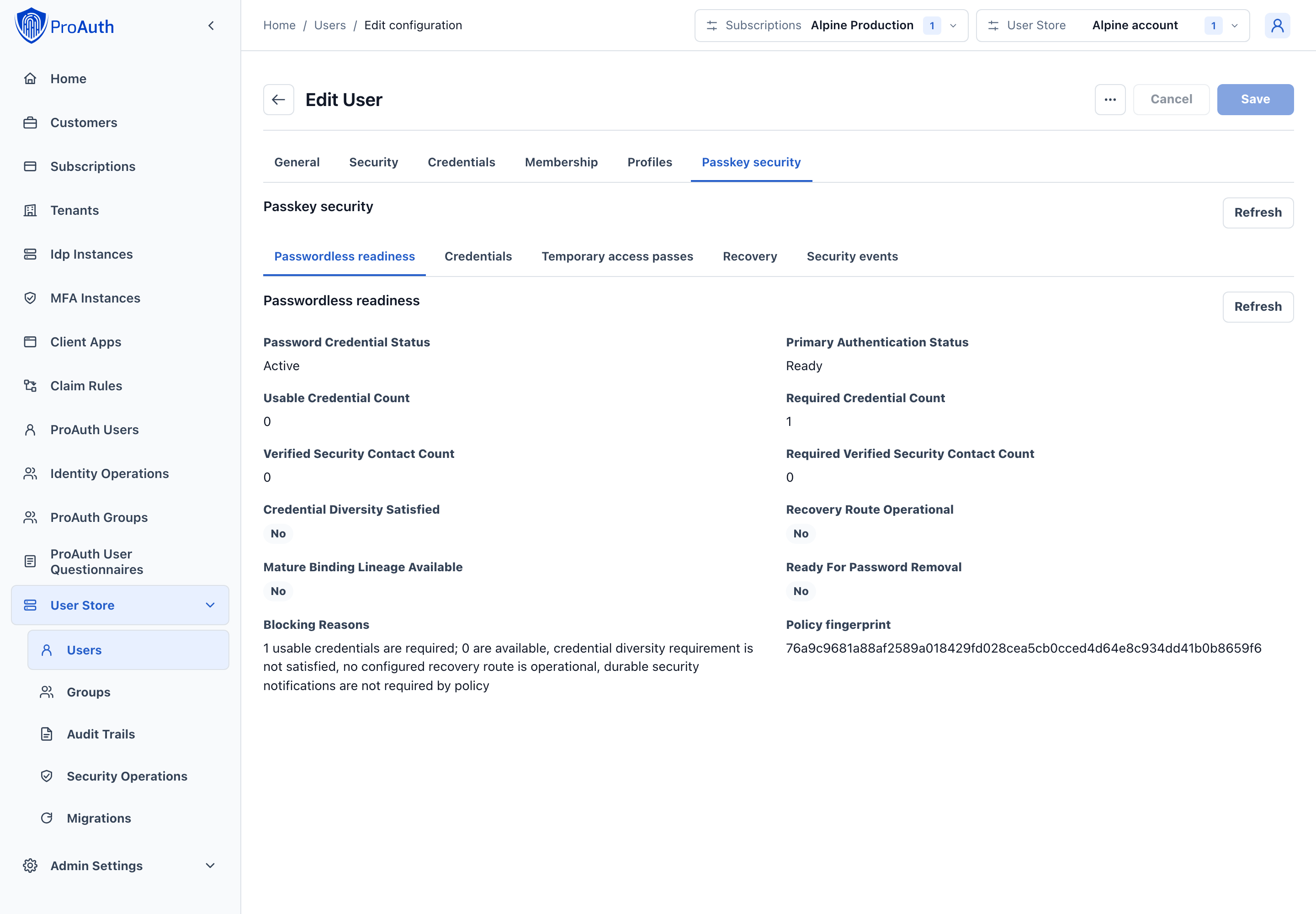
| User editor → Passkey security | Current account: readiness, credentials, access passes, recovery and history |
User Passkey security tab
Open a UserStore user and select Passkey security to investigate one account. The view includes:
- password credential and primary-authentication state;
- current readiness and blocking reasons;
- credential lifecycle, compliance, authenticator class, trust, backup, maturation, and hold evidence;
- verified security-contact counts and recovery readiness;
- recovery transaction state;
- TAP requests and approvals;
- correlated passkey security history.
Authorized operators can issue a reason-bound TAP or permanently revoke a credential confirmed as compromised. The API never returns an existing TAP secret or recovery-code secret in later reads.
Security Operations workspace
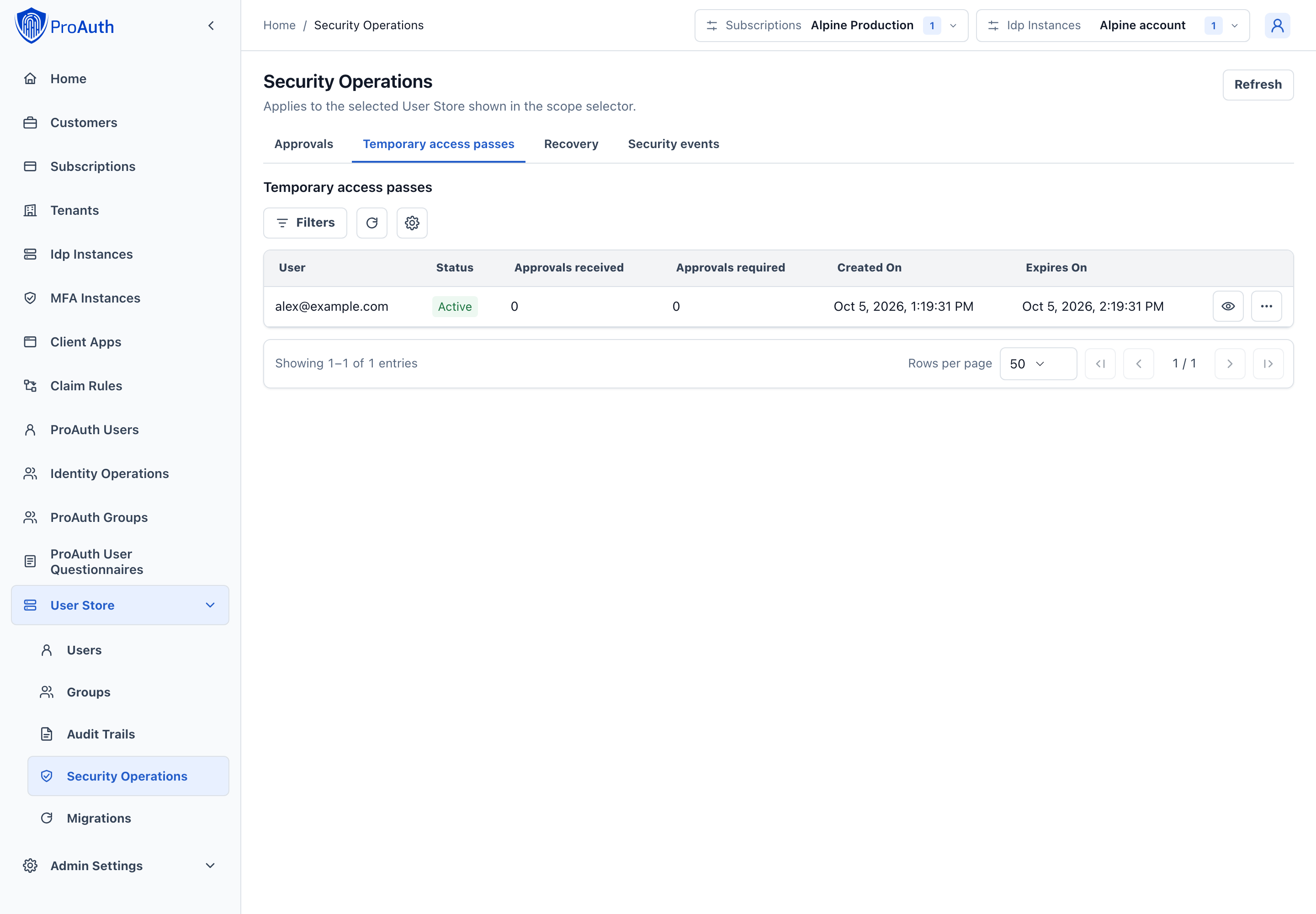
Open Security Operations under User Stores. In the header, select the subscription and then the UserStore. Changing the subscription clears the selected UserStore; choose a store in the new subscription before continuing. Use this workspace for:
- pending maker-checker requests;
- TAP approval queues;
- recovery cases;
- UserStore-scoped security events.
The workspace is scoped to one UserStore at a time. A shared UserStore can serve multiple tenants, but an operation still records the initiating tenant when the request originated in a tenant flow.
Policy configuration and controlled changes
Open the User Store identity provider and select Passkey policy. Use Effective policy, Recommendations, and Policy settings to inspect or change its policy. Standard typed controls edit policy values; passkey changes use a separate preview and apply workflow so approval requirements cannot be bypassed by the ordinary options Save action. Resetting a passkey override also participates in the policy preview.
Choose a versioned recommendation to inspect its changed options, warnings and validation errors. Apply a valid preview directly only when no approval is required. Otherwise request approval, have independent administrators review the exact proposal, then refresh and execute the approved proposal. Changed policy or an expired, rejected or cancelled request requires a fresh review.
Passkey policy, trust and migration administration retain the system-administrator requirement. The React interface also evaluates the corresponding global action permission (IdpInstance.ManagePasskeySecurity, or PasskeyTrust.Manage for metadata trust). Credential and TAP operations retain their User Store permissions and independent-actor checks. Hidden or disabled actions never replace server authorization.
Working with queues
Use the tabs to select a queue. Grids show 50 records initially and support pages of up to 200 records. Status, date and user filters run on the server before paging; searching a user lookup covers authorized users beyond the visible page. Use View details or activate a row to inspect identifiers, fingerprints and evidence. Available commands appear in the row actions menu.
Refresh reloads the workspace and its visited tabs. Successful security commands also refresh related readiness, policy and queue data. Changing scope clears open dialogs and transient results. If a proposal changed or expired, refresh and review a new proposal before retrying.
Migrations
Open User Store → Migrations and select Legacy credentials, Store hardening, or RP ID migration. Review current progress, confirm prerequisites and run the next applicable action. Hardening activation requires the current readiness fingerprint and an impact acknowledgement. RP migration displays DNS challenge values only after starting or rotating the challenges. Copy the records before dismissing the result or changing scope; rotate challenges to obtain new values if needed.
Identity operations
Identity Operations, beside ProAuth Users, covers your authorized management records independently of the selected UserStore. Use Identity replacements to review proof and approval state before approval or execution.
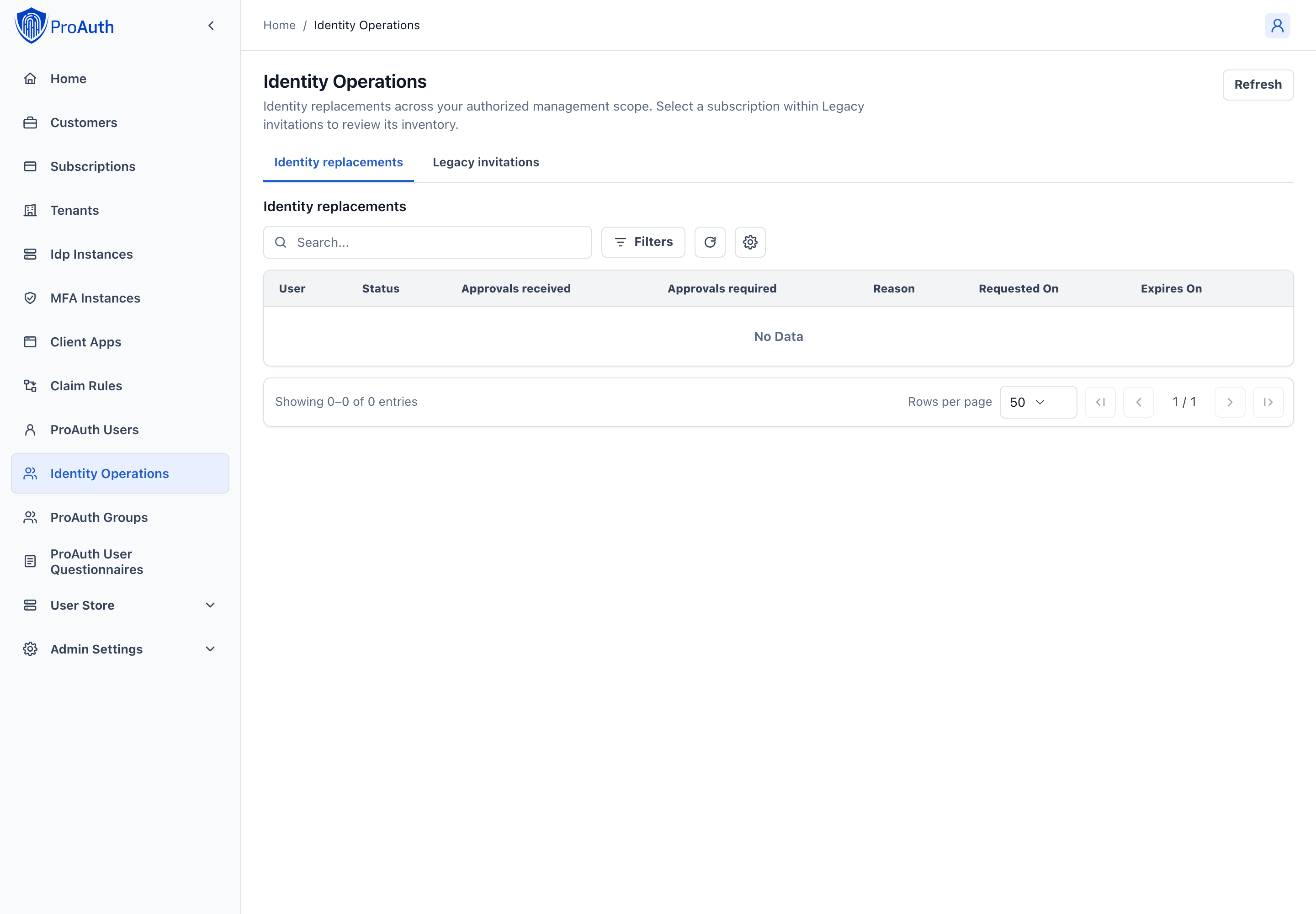
In Legacy invitations, explicitly select one subscription, then optionally filter by tenant. Select Review and reissue on an invitation. Choose the target client application and eligible identity providers using their searchable lookups. Review lifetime and approval requirements. The preview covers the complete tenant inventory; changing a page or filter does not change that preview fingerprint. Reissue cancels the legacy bearer marker and creates a unified invitation. A changed inventory requires a fresh preview.
Global trust and one-time results
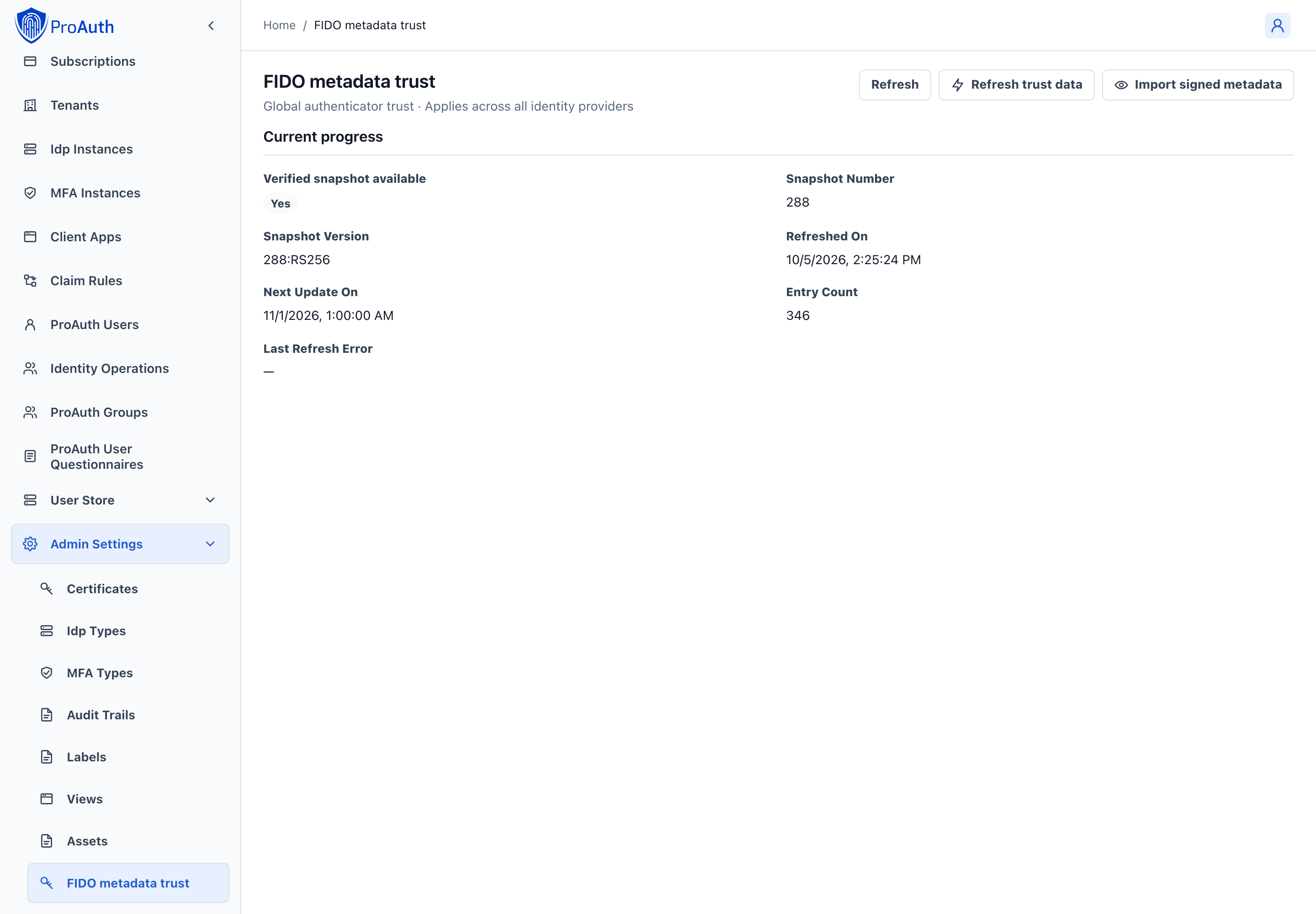
Open Admin Settings → FIDO metadata trust to inspect the verified snapshot and refresh health. Refresh trust data retrieves current metadata; Import signed metadata opens a confirmation dialog for a verified signed import. These operations affect the global trust store. In deployments with a shared state store, each running instance checks for a newer verified snapshot every minute, including snapshots imported offline. Adoption does not require a successful download from the FIDO metadata service. Synchronization is asynchronous; storage or network outages can delay convergence, and each instance retains its last-known-good snapshot.
TAP issuance and compromised-credential revocation require a reason and confirmation identifying the target user or credential. TAP secrets are shown only immediately after issuance; copy them through your approved delivery channel before dismissing or leaving the view. They are never available through queue or detail reads.
User authentication states
Use the two orthogonal state fields when diagnosing access:
| Field | Values | Meaning |
|---|---|---|
PasswordCredentialStatus | Active, RemovalPending, Absent, ResetRequired | Whether password authentication exists and whether removal or recreation is in progress |
PrimaryAuthenticationStatus | Ready, EnrollmentRequired, RecoveryRequired | Whether the user has a usable primary authenticator or must complete a restricted flow |
Examples:
Active + Ready: password exists and the user has a normal primary-authentication path.RemovalPending + Ready: removal was scheduled, but password login remains until commit.Absent + EnrollmentRequired: a newly provisioned password-prohibited user must complete bootstrap.Absent + RecoveryRequired: a passwordless user lost every usable passkey and must recover.ResetRequired + Ready: policy permits password recreation and a new password must be established; the old hash is not restored.
The readiness endpoint is:
text
GET /api/userstore/v2/{userstoreId}/administration/users/{userId}/passkey-lifecycle/readinessTreat blockingReasons as the diagnostic source. A credential count alone is insufficient because credentials can be immature, held, revoked, non-compliant, or insufficiently diverse.
Password removal operations
Password removal has separate schedule and commit operations so users and administrators have time to detect an unexpected change.
text
POST /api/userstore/v2/{userstoreId}/administration/users/{userId}/passkey-lifecycle/password-removal/schedule
POST /api/userstore/v2/{userstoreId}/administration/users/{userId}/passkey-lifecycle/password-removal/commit
POST /api/userstore/v2/{userstoreId}/administration/users/{userId}/passkey-lifecycle/password-removal/cancel
Scheduling requires explicit confirmation and current policy-compliant authentication. Committing performs a final concurrency-protected readiness evaluation. If a contact was revoked, a credential entered a hold, policy changed, or notification readiness was lost, commit fails rather than weakening the account.
A successful commit clears the password hash and reset material atomically. Application rollback does not reconstruct those values.
Recovery model
Recovery proceeds through a named route from PasskeyRecoveryRoutes or PasskeyInitialEnrollmentRoutes.
The restricted session is intentionally unable to complete an ordinary OIDC authorization. Its only useful privilege is completing the bound enrollment or recovery transaction.
Verified security contacts
Security contacts are separate UserStore records with type, normalized display value, verification state, provenance, and revocation state. Adding a contact never returns its verification secret through an administration read API.
Contact changes can affect readiness immediately. Do not allow a user to remove the last required verified contact without first providing a replacement that satisfies policy.
Confirmed legacy email addresses can be backfilled as verified contacts with migration provenance. Unconfirmed addresses remain unverified.
Primary recovery codes
Rotating codes returns the plaintext values once with Cache-Control: no-store. ProAuth stores hashes. Rotation invalidates the previous set, and redemption consumes a code atomically.
Provide users with explicit instructions to store codes outside the device or password-manager account that holds their passkeys. A saved code stored beside the only authenticator is not an independent recovery proof.
Temporary access passes
A TAP is scoped to one UserStore user, one reason, a short lifetime, and the configured approval requirement.
Operational rules:
- The requester must provide a reason of 1–1000 characters.
- An operator cannot issue a TAP for their own UserStore identity.
- The requester cannot approve their own request.
- Each independent actor can approve at most once.
- The secret is returned only at issuance and is omitted from queue, overview, and history responses.
- Approval does not extend the original expiry.
- Redemption is atomic and single-use.
Do not send TAP secrets through the same compromised channel that triggered recovery. Define an authenticated delivery process outside ProAuth.
Asynchronous identity proofing
Identity proofing is pluggable through IIdentityProofingProvider. A provider declares a unique ProviderId and one or more capabilities. A route requests a stable capability such as qualified; customers cannot redefine the meaning of built-in trust classes at runtime.
Providers are asynchronous:
- ProAuth starts a provider transaction and receives a protected provider reference, continuation URI, and expiry.
- The user completes the provider journey.
- ProAuth polls the provider until the transaction succeeds, fails, is cancelled, or expires.
- Successful provider evidence satisfies the corresponding route requirement.
Provider implementations must be thread-safe because one instance can serve multiple UserStore IDPs. Provider IDs and capabilities must be unique. If a required capability has no registered provider, the route is not operational and cannot satisfy readiness.
IdentityProofing:EnableDevelopmentLoopbackProvider exists only for controlled development testing. It defaults to false. Never enable the development loopback provider in production.
Respond to a compromised credential
Do not delay revocation to preserve sign-in availability.
- Open the user's Passkey security → Credentials tab and confirm the credential, user, and UserStore scope.
- Record a specific incident reason and revoke the credential as compromised.
- ProAuth tombstones the credential, marks compromise evidence, advances authentication security state, and revokes dependent sessions and renewable grants.
- If another usable credential remains, verify that the user can authenticate and replace the revoked credential.
- If no usable credential remains, the user enters
RecoveryRequired; start an approved recovery route. - Review correlated history, authenticator metadata status, other users of the same AAGUID, and notification delivery.
text
POST /api/userstore/v2/{userstoreId}/administration/users/{userId}/passkey-lifecycle/credentials/{passkeyId}/compromiseCompromise revocation is permanent. Do not use it to resolve a transient provider outage or policy mismatch; use holds and compliance investigation for those conditions.
FIDO Metadata Service trust
ProAuth maintains a process-wide, verified, versioned last-known-good (LKG) FIDO Metadata Service snapshot. In a multi-instance deployment, the protected snapshot is coordinated through the configured state store. The hosted refresh service attempts refresh every 12 hours; a failed refresh retains the existing valid snapshot.
The shared snapshot excludes embedded authenticator artwork and is compressed before protection. Trust certificates, authenticator capabilities, security status reports, and the original metadata statement fingerprints remain available. This reduces state-store traffic without changing credential diversity evidence or requiring a larger Dapr message limit for the current catalog. Protected snapshots are limited to 3 MiB of encoded payload, leaving room within Dapr's default 4 MiB message limit for the state envelope and request framing. If a future catalog exceeds the snapshot limits, refresh fails and an installed LKG snapshot is retained; investigate the refresh error before relying on its freshness.
When upgrading from the uncompressed snapshot format, perform a coordinated upgrade of all ProAuth nodes sharing the state store. New nodes can read the previous format and replace it on their next successful refresh or signed import; older binaries cannot read the compact format. Keep the shared Data Protection keys available throughout the upgrade. If larger Dapr/client limits were previously configured to read the old snapshot, retain them until the compact snapshot has been saved and successfully reloaded. Do not run older and newer binaries against this shared cache during migration. Before a software downgrade, restore a compatible snapshot and its Data Protection keys from backup, or arrange a fresh signed metadata download/import with the limits required by the older version.
text
GET  /api/management/v2/passkey-trust/mds
POST /api/management/v2/passkey-trust/mds/refresh
POST /api/management/v2/passkey-trust/mds/signed-offline-import
Monitor:
- whether an LKG snapshot exists;
- snapshot number and version;
- refresh and next-update timestamps;
- entry count;
- last refresh error.
Signed offline import validates the signed blob through the FIDO metadata trust chain and rejects invalid or older snapshots. The imported JWT is input to a one-time operation, not an IDP option.
When metadata is required and no usable snapshot exists, new registration or trust establishment is blocked. A refresh outage does not discard an installed LKG snapshot. An authenticator carrying mandatory compromise status remains unusable even if a customer policy would otherwise warn or grandfather it.
External risk provider and holds
ProAuth always applies baseline rules, including blocked AAGUIDs and configured counter-anomaly behavior. A registered IPasskeyExternalRiskProvider can additionally return Allow, Hold, or Block for credential binding, assertion-counter anomalies, and backup-state changes.
- In
OptionalProvidermode, an unavailable or failing provider produces a non-usable hold. - In
RequiredProvidermode, the operation is blocked. - A held credential cannot authenticate or satisfy readiness until the hold is resolved or expires according to policy.
Alert on provider failures separately from user authentication failures. Repeatedly retrying enrollment does not resolve a required-provider outage and can create confusing support cases.
Signature counters
Some authenticators always report a zero signature counter. Zero-only behavior is valid and does not by itself indicate cloning. ProAuth records and evaluates a genuine regression only after a credential has reported a non-zero counter.
Use RiskEvaluate when a risk provider or investigation queue can make a contextual decision, Hold when operations should pause pending investigation, and Block where a genuine regression must fail immediately.
Maker-checker operations
The v2 maker-checker primitive captures the exact proposed command, operation type, concurrency fingerprint, requester, required approval count, approvers, expiry, and status.
text
GET  /api/management/v2/idpinstances/{idpInstanceId}/passkey-approvals
POST /api/management/v2/idpinstances/{idpInstanceId}/passkey-approvals/{approvalRequestId}/approve
POST /api/management/v2/idpinstances/{idpInstanceId}/passkey-approvals/{approvalRequestId}/reject
POST /api/management/v2/idpinstances/{idpInstanceId}/passkey-approvals/{approvalRequestId}/cancel
After the required approvals are present, the original requester executes the approved operation. ProAuth revalidates the exact command and current state before commit. An expired, rejected, cancelled, already-executed, self-approved, or stale request cannot be reused.
Legacy backfill
The additive backfill prepares legacy users and credentials without changing authentication policy.
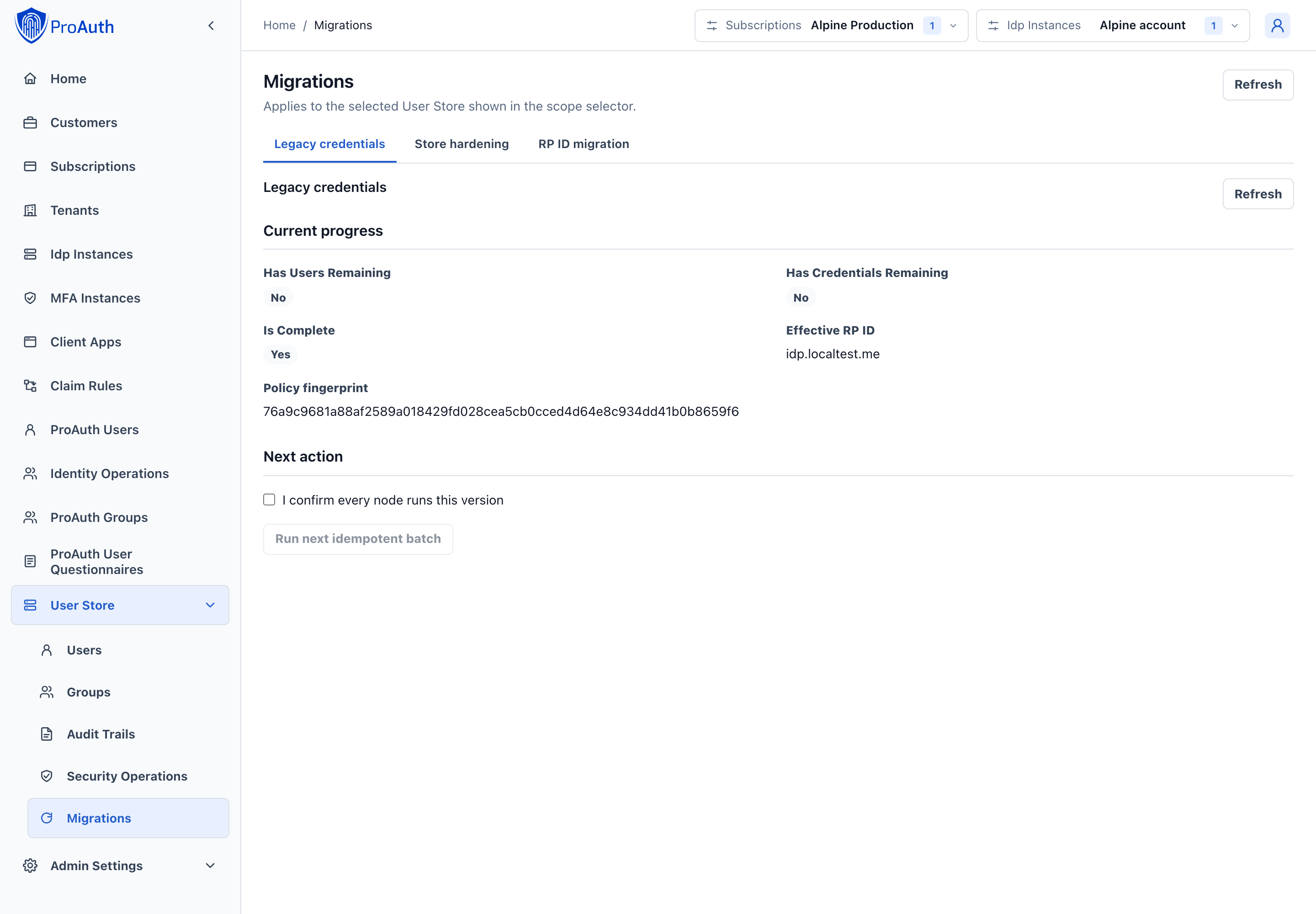
In AdminApp, open User Store → Migrations → Legacy credentials. Review the remaining legacy data before confirming that every node runs the current version and starting a batch. Use the Store hardening tab to review hardening blockers and activation readiness.
text
GET  /api/management/v2/idpinstances/{idpInstanceId}/passkey-migration/legacy-backfill
POST /api/management/v2/idpinstances/{idpInstanceId}/passkey-migration/legacy-backfill/batches
The batch size must be 1–500, and the caller must explicitly confirm that all serving nodes run the current version. The operation is idempotent and can be resumed.
It can:
- create provenance-marked security contacts from confirmed legacy email addresses;
- derive credential RP IDs and COSE algorithms where the stored evidence proves them;
- report credentials whose values cannot be derived.
It does not remove password hashes, enable a recommendation, revoke reset material, delete passkeys, or invent attestation evidence. Missing evidence is recorded as UnknownLegacy.
Change the RP ID safely
A WebAuthn credential is scoped to its RP ID. Changing PasskeyRpId directly makes existing credentials unusable, so ProAuth blocks a direct change while active credentials exist.
Use the dual-RP migration workflow:
- Start a migration with the current RP ID, new RP ID, exact old and new origins, and a bounded overlap period.
- Publish both returned DNS TXT challenges exactly as issued.
- Ask ProAuth to verify domain control. If a challenge must be replaced, rotate it through the API and replace the DNS record.
- During verified overlap, enroll credentials under the new primary RP ID. Every credential retains its exact RP ID binding.
- Monitor active legacy credentials, active new credentials, and users still needing a new credential.
- Set the authoritative
PasskeyRpIdoption to the new primary value only when the migration is ready. - Obtain any required
RpMigrationRetirementapproval. An independent operator reviews the old and new RP IDs and the forced-recovery consequence in the approval details. In Migrations → RP ID migration, select the request and refresh it after approval; ProAuth checks the exact command and current migration fingerprint again before retirement. - Retire the legacy RP. Use forced recovery only as an explicitly approved exception for remaining users.
text
GET  /api/management/v2/idpinstances/{idpInstanceId}/passkey-rp-migration/active
POST /api/management/v2/idpinstances/{idpInstanceId}/passkey-rp-migration
POST /api/management/v2/idpinstances/{idpInstanceId}/passkey-rp-migration/{migrationId}/domain-challenges/rotate
POST /api/management/v2/idpinstances/{idpInstanceId}/passkey-rp-migration/{migrationId}/domain-verification
POST /api/management/v2/idpinstances/{idpInstanceId}/passkey-rp-migration/{migrationId}/retirement-approval
POST /api/management/v2/idpinstances/{idpInstanceId}/passkey-rp-migration/{migrationId}/retire
Challenge plaintext is returned only when issued or rotated. ProAuth stores protected verification state, so record and publish the returned values before leaving the workflow.
Notifications and audit
Credential binding, compromise, password-removal scheduling and commit, password recreation, contact changes, recovery, and TAP operations produce correlated security events. Security notifications are written to a durable outbox before a destructive transition is considered complete when notification mode is Required.
Tenant-originated events use the initiating tenant's validated notification context. Background lifecycle evaluation uses neutral UserStore templates without tenant-specific action links, because a shared UserStore may belong to more than one tenant.
Monitor undelivered or repeatedly retried outbox entries. Do not downgrade PasskeySecurityNotificationMode merely to clear a password-removal blocker; repair the notification path or change the operating model through the approved policy process.
Operational monitoring
At minimum, monitor and trend:
- passkey enrollment and usable-credential coverage;
- users in
EnrollmentRequired,RecoveryRequired, andRemovalPending; - readiness blocking reasons;
- held, non-compliant, compromised, and expiring-grace credentials;
- security-contact verification coverage;
- primary recovery-code availability without exposing code values;
- recovery attempts, failures, completion time, and route selection;
- TAP requests, approvals, expiry, and redemption;
- identity-proofing provider status and latency;
- FIDO metadata freshness and refresh errors;
- external risk-provider availability and decisions;
- signature-counter anomalies and backup-state changes;
- notification outbox retries;
- pending or expired maker-checker requests;
- legacy backfill and RP ID migration progress.
Establish alerts relative to the selected operating model. For example, an MDS outage is informational for AttestationTrustPolicy=None but can block enrollment under MetadataRequired.
Periodic control review
Review the effective policy and operating evidence after material authenticator, browser, risk-provider, notification, or regulatory changes. Always use preview before tightening or weakening policy and include the resulting impact in the change record.
Exercise at least these scenarios regularly:
- loss of one of two credentials;
- compromise of the final credential;
- unavailable email, TAP, identity-proofing, MDS, and risk providers;
- rejected and expired maker-checker requests;
- stale recommendation and option fingerprints;
- recovery followed by revocation of pre-recovery sessions;
- credential replacement before deletion;
- legacy and new RP ID overlap and retirement.