Appearance
Claim Rules
Claim Rule Concepts
After a successful authentication and authorization step, ProAuth is issuing the requested tokens with appropriate claims. The claims which are included in the issued tokens can be customized with the claim rule engine. However, mandatory or sensitive claims (i.e. sub) cannot be modified by the claim rule engine.
The purpose of the claim rule engine is:
- filter not needed / not wanted claims
- change a claim's type or value based on conditions
- add new claims based on conditions
- define the claim target (ID Token, Access Token, or both)
Before the tokens are issued, all the claims (ProAuth Claims, Claims from federated identity provider) are processed by the claim rule engine. Only the resulting claims are added to the to be issued tokens.
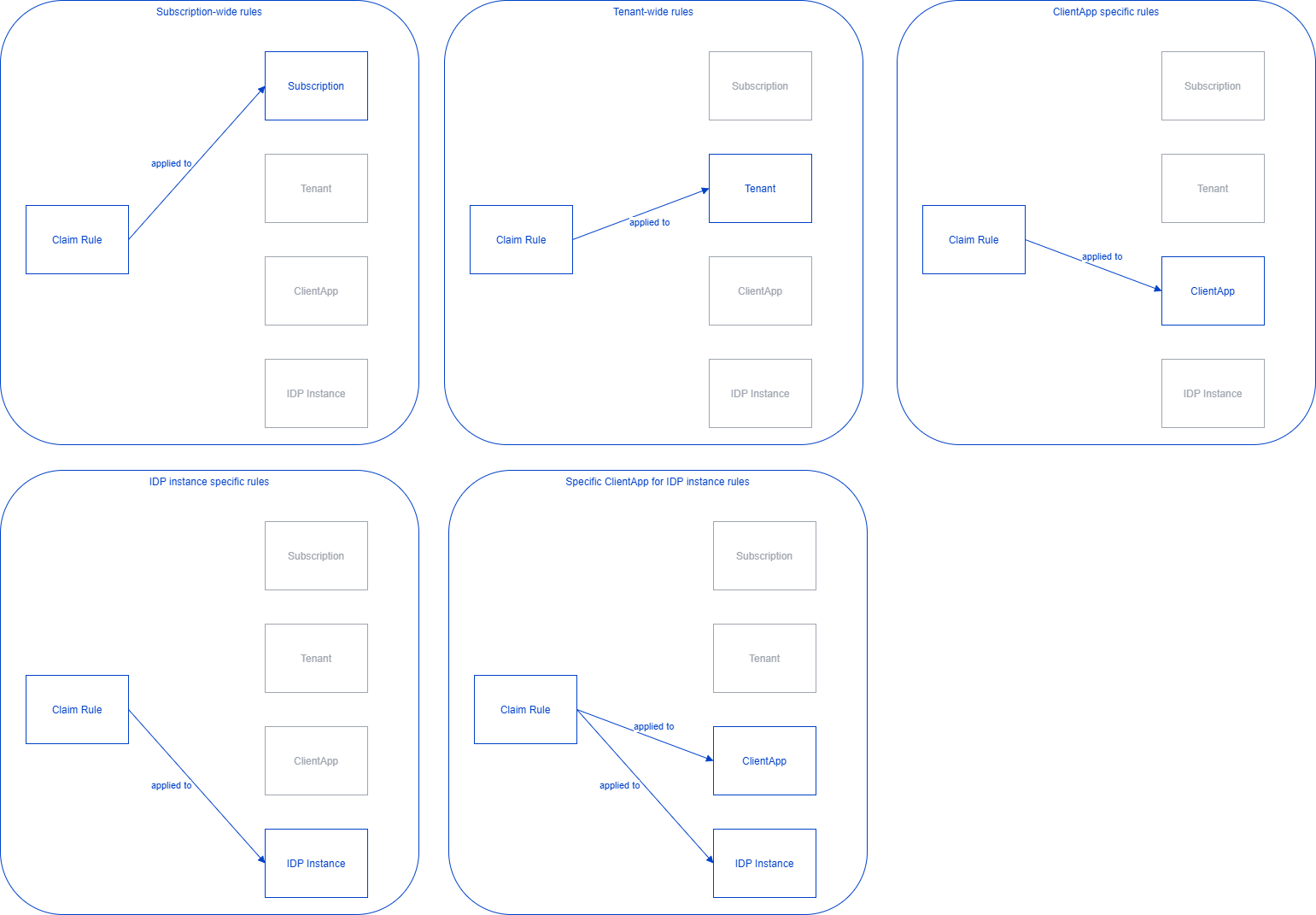
Claim rules can be defined for different organizational levels, namely Subscription level, Tenant level, Client Application level, and a combination of Client Applications and Idp Instances. So all the claim rules applicable for the current login process are evaluated.
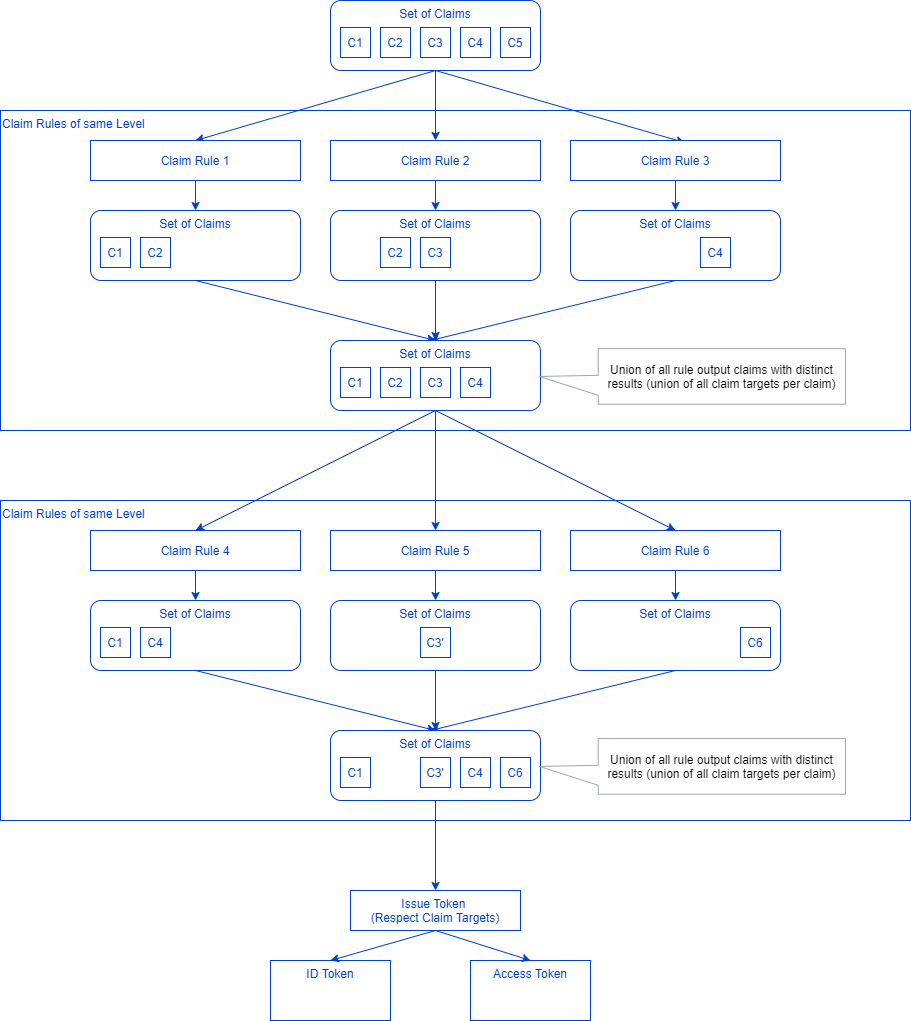
All the resulting claim rules are grouped by their level, starting at 0. All the groups of the same level are executed in parallel and their results are combined as a level result. If multiple rules return the same claims (same type and value), only a single instance is returned as a level result. If the same claim has different claim targets, the claim targets are combined for this claim in the level results. The output of the preceding level is the input of the succeeding level. The last level result set is used as a basis to issue the tokens.
There are currently four types of claim rules:
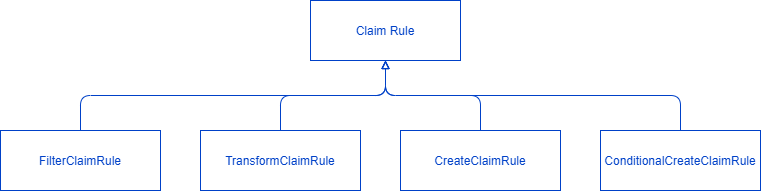
Filter Claim Rule
A filter claim rule filters the the claims according to their type or value or a combination of both. Only claims which match the filter criteria will be forwarded to the result set.
Filter type:
- Filter claim type by regex
- Filter claim value by regex
- Filter claim type by regex and claim value by regex
Transform Claim Rule
A transformation claim rule modifies the type or value or both of a claim and forwards the modified claim to the results.
- Match Criteria (same as filter, only matched claims are transformed)
- Match claim type by regex
- Match claim value by regex
- Match claim type by regex and claim value by regex
- Transform
- Transform claim type by regex and replacement pattern
- Transform claim value by regex and replacement pattern
- Transform claim type and claim value by regex and replacement pattern
- Match Criteria (same as filter, only matched claims are transformed)
Create Claim Rule
The create claim rule creates an additional claim to the results.
- Create Rule
- Fixed value for type or value
- Template variables (user properties)
- Create Rule
Conditional Create Claim Rule
The conditional create claim rule creates an additional claim if the condition applies. If the condition is true from multiple claims, only a single new claim is created.
- Match Criteria (same as filter, only if at least one match occurred, the new claim is created)
- Match claim type by regex
- Match claim value by regex
- Match claim type by regex and claim value by regex
- Create Rule
- Fixed value for type or value
- Template variables (user properties)
- Match Criteria (same as filter, only if at least one match occurred, the new claim is created)
Claims are also modified by the destination of the matching claim rule. Every time that a rule puts a claim in the results, either through a Filter claim rule, Transform claim rule, Create claim rule or Conditional Create claim rule, the destination is applied to the resulting claims. There are four different options of the Destination field:
- Source: Nothing is changed and the used destination derives from the source claim.
- IdentityToken: Set the value identity token in the resulting claim's destination.
- AccessToken: Set the value access token in the resulting claim's destination.
- Both: Set the value identity and access token in the resulting claim's destination.
Claim Rule Usage
Claim rules are defined in a subscription, independently of the claim rule association. Therefore claim rules cannot be shared between subscriptions. If no claim rules exist in a subscription, only the mandatory claims will be present in the issued tokens, all other claims will be dropped.
Please also make sure, that lower claim rule levels are not to restrictive, otherwise succeeding levels are not able to forward any needed claims (i.e. not forwarding group claims on level 0 will prevent any client application in this subscription from getting any group membership information).
Configured claim rules can either be active or deactivated. This is controlled by the "Active" property when creating or editing a claim rule.
Configuration of a claim rule supports as well the usage of a template engine (Liquid syntax) which enables Administrator to retrieve and use a couple of properties from the logged in ProAuth User, ProAuthUserProfiles and ClientApp entities.
Below you can see some of the ProAuth properties and their respective syntax to be used within a Claim rule configuration:
ProAuth User properties:
First Name
{{ User.FirstName }}Last Name
{{ User.LastName }}Email Address
{{ User.EmailAddress }}Organisational Unit
{{ User.EmailAddress }}Manager
{{ User.ManagerId }}Id
{{ User.Id }}User is Active
{{ User.IsUserActive }}Idp Instance Id
{{ User.IdpInstanceId }}Subscription Id
{{ User.SubscriptionId }}
ProAuth User Profiles consisting of Key:Value pairs.
In order to have all Key:Value pairs the following example shows how this can be done:
{% assign profiles = User.ProAuthUserProfiles %} {% assign separator = """" %} {% for item in profiles %} {{ separator }}""{{ item.Key }}"":""{{ item.Value }}"" {% assign separator = "" ,"" %} {% endfor %} }Example output:
profiles: { "key1":"value1" ,"key2":"value2" ,"key3":"value3" }
ClientApp properties
Id
{{ ClientApp.Id }}Name
{{ ClientApp.Name }}Secret
{{ ClientApp.Secret }}Resource Filter Enabled
{{ ClientApp.ResourceFilterEnabled }}Scope Filter Enabled
{{ ClientApp.ScopeFilterEnabled }}ClientUri
{{ ClientApp.ClientUri }}LogoUri
{{ ClientApp.LogoUri }}Enabled
{{ ClientApp.Enabled }}Is Public
{{ ClientApp.IsPublic }}Is Restricted
{{ ClientApp.IsRestricted }}Include Groups Claims
{{ ClientApp.IncludeGroupsClaims }}SubscriptionId
{{ ClientApp.SubscriptionId }}
ClientApp Metadata consisting of Key:Value pairs.
In order to have all Key:Value pairs the following example shows how this can be done:
{ {% assign metadata = ClientApp.Metadata %} {% assign separator = """" %} {% for item in metadata %} {{ separator }}""{{ item.Key }}"":""{{ item.Value }}"" {% assign separator = "" ,"" %} {% endfor %} }Example output:
metadata: { "key1":"value1" ,"key2":"value2" ,"key3":"value3" }
Context properties
TenantId
{{ Context.TenantId }}ClientAppId
{{ Context.ClientAppId }}IdpInstanceId
{{ Context.IdpInstanceId }}SubscriptionId
{{ Context.SubscriptionId }}IsUserStoreLogin
{{ Context.IsUserStoreLogin }}LoginName
{{ Context.LoginName }}Host
{{ Context.Host }}