Version v3.2.0
Client Applications
Create Client Applications
When creating a ClientApp following settings need to be provided:
| Setting | Description |
|---|---|
| Name | Name of the Client Application |
| Secret | Secure secret; empty when it's a public Client Application (SPA) |
| Enabled | Only active when it's set to true, otherwise the login is declined |
| Is Public | Set to true when Client Application is used for a SPA which cannot handle secrets |
| Is Restricted | Enable if only assigned users or users of assigned groups are allowed to login |
| Include Groups Claims | Enable when groups needs to be provided as claims |
| Access Token Type | Choose SelfContainedJwtToken (default) or ReferenceToken for issued access tokens |
| Token Encryption | Optional. Configure JWE algorithms and client keys after creating the ClientApp |
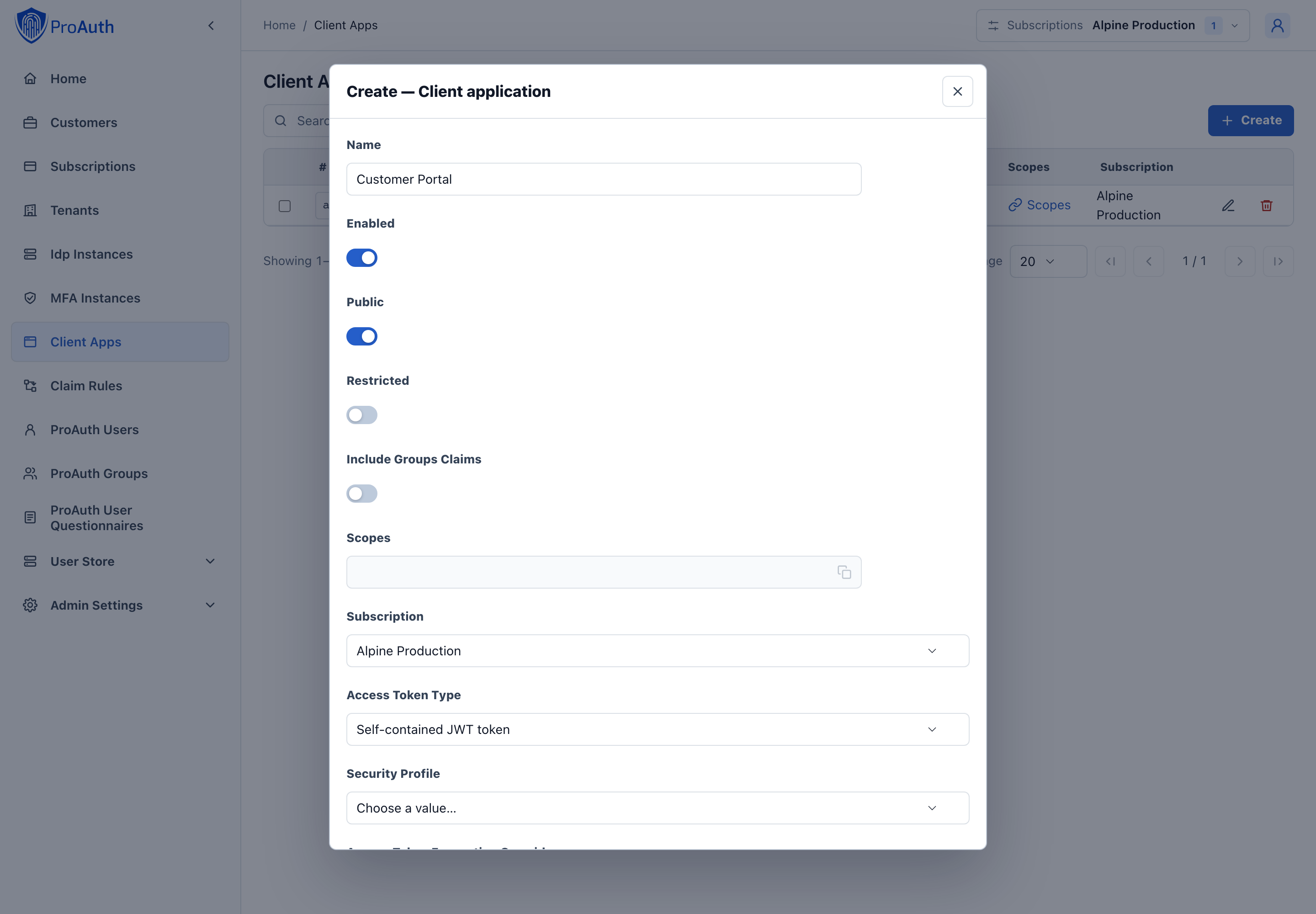
For further configuration, edit the ClientApp once it is created.
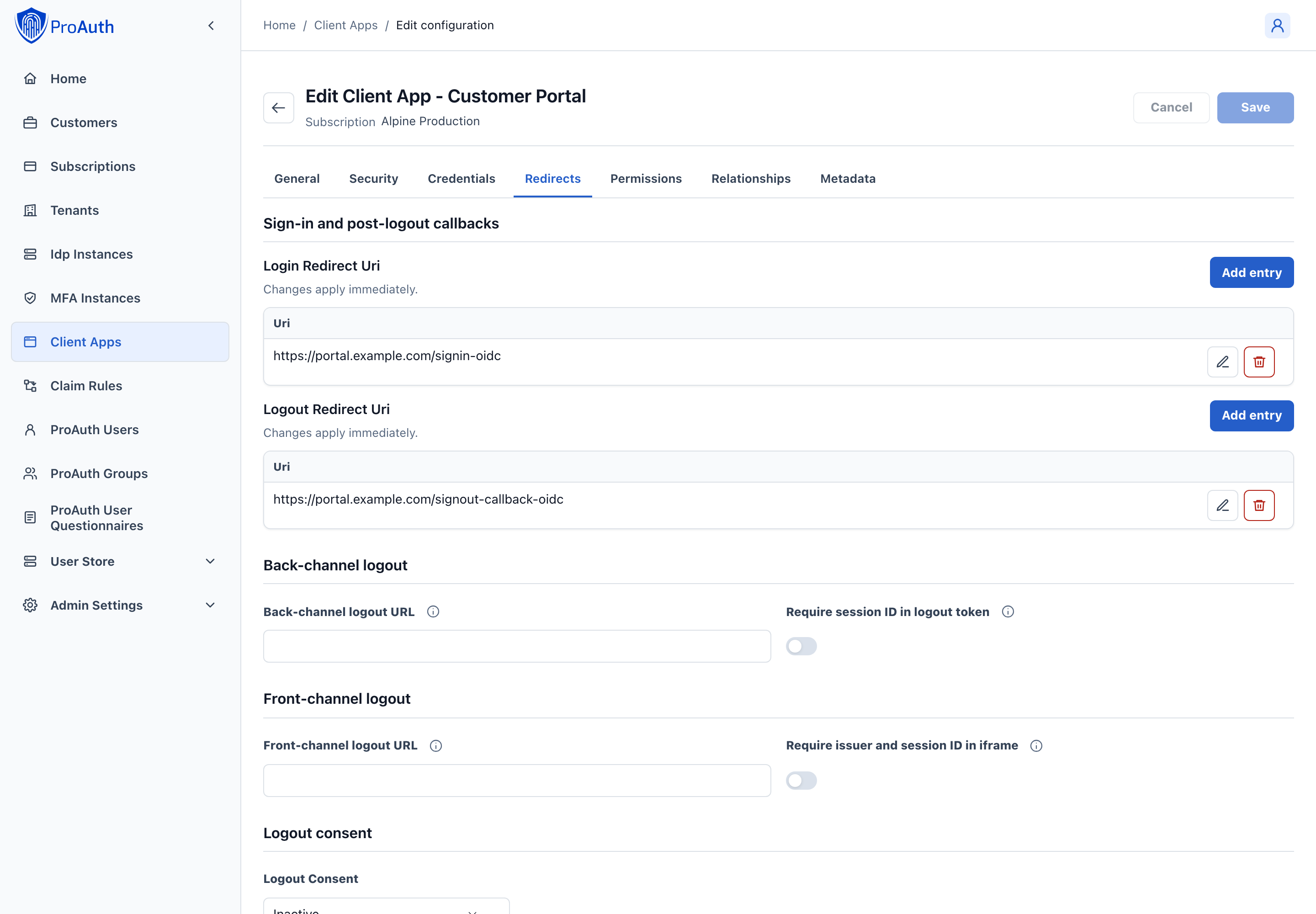
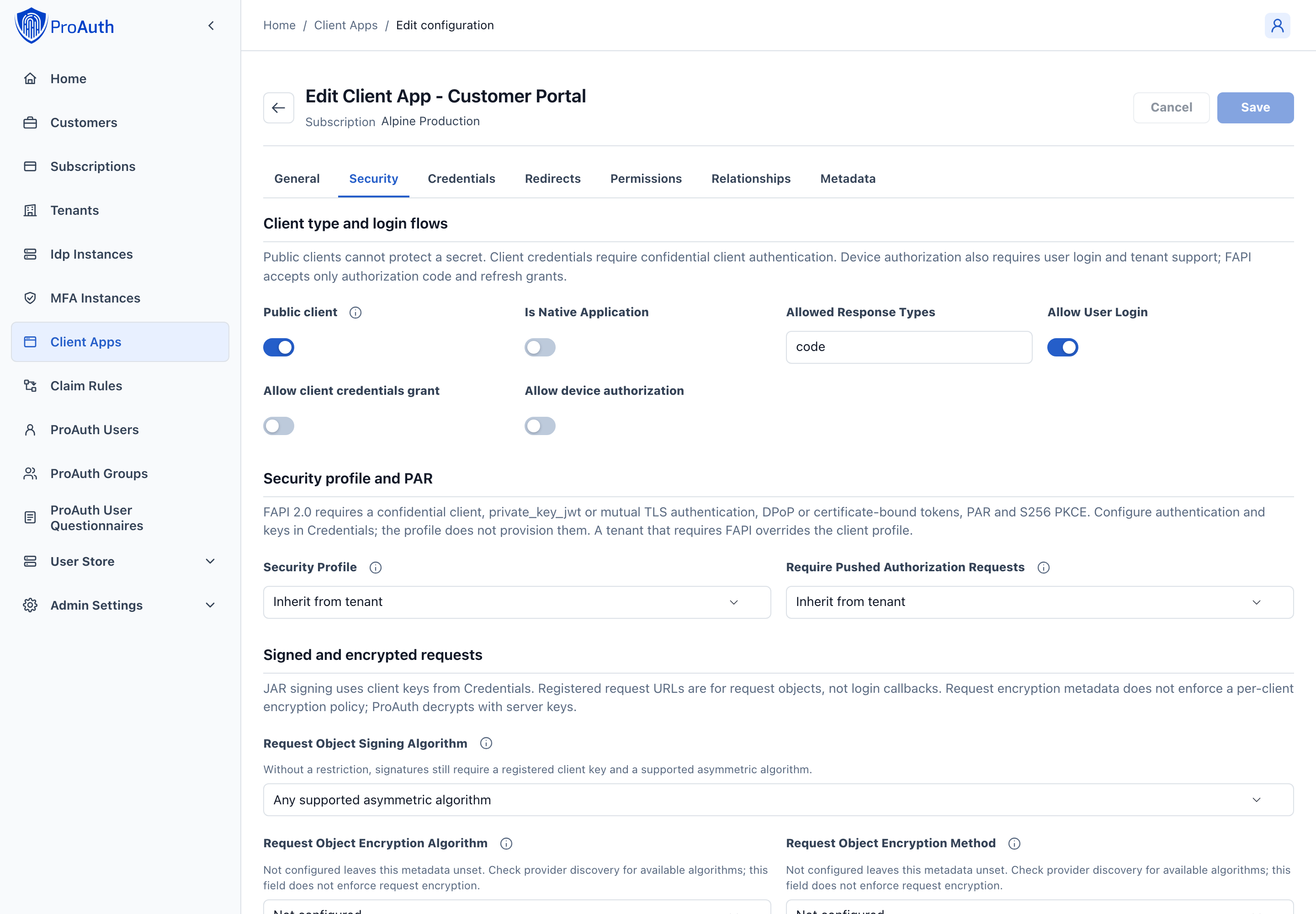
The Redirect URIs tab contains the application callback URLs. Use Security for protocol and token settings.
Edit Client Applications
The React AdminApp groups client settings by the task you are performing. Field and tab changes stay in the page draft until Save. Child collection and authentication-dialog commands save separately and immediately.
| Tab | Configuration |
|---|---|
| General | Application name, enabled state, immutable client ID and subscription, application and logo links. |
| Security | Public/confidential and native client settings, allowed response types, user login, client credentials and device authorization; security profile and PAR; JAR and registered request URLs; token formats and encryption; public/pairwise subject identifiers. |
| Credentials | Client authentication method and sender constraints, shared secrets, and key sets for client assertions, request signing, certificate matching or token encryption. |
| Redirects | Login and post-logout callback allowlists, front-channel and back-channel logout endpoints, session requirements and logout consent. |
| Permissions | Restricted user/group access, resource and scope filtering, access consent, roles and group claims, and token-exchange source clients. |
| Relationships | Identity and MFA providers, tenant access and cross-subscription use, and federated client identities. |
| Metadata | Application-specific key/value metadata. |
Common configuration workflows
Confidential web application: enable user login, keep Public off, configure authentication in Credentials, and register login callbacks in Redirects. Client credentials is a separate machine-to-machine grant; enable it only when required. Public browser/native clients cannot protect shared credentials. Device authorization requires client opt-in, user login and tenant support.
Native applications and response types: in Security, enable Is Native Application for an installed application that needs HTTP loopback redirects with a variable port. Register an IP-literal callback such as http://127.0.0.1/callback; Public alone does not enable this behavior. Allowed Response Types defaults to code. Register any required implicit or hybrid response types explicitly; see client security upgrade guidance before changing existing applications.
FAPI 2.0: select the profile in Security and configure private_key_jwt or mutual TLS authentication in Credentials. Configure DPoP or certificate-bound tokens there as well. The client must use PAR, authorization code flow and S256 PKCE. The profile does not create keys or configure the relying party. Mandatory tenant FAPI enforcement takes precedence even when the client selects None. See FAPI requirements.
Sender constraints: DPoP requires a proof on token requests and protected resource requests. Certificate binding requires the client certificate and resource-server validation of that binding. Encryption is separate: it protects token contents and does not establish proof of possession. See DPoP and mutual TLS.
Authentication configuration: open Credentials and use Configure authentication if no record exists, or edit the existing record. The dialog saves independently of the parent form. TLS subject/SAN values apply only to tls_client_auth; clear existing values before changing to another method. Optional certificate binding inherits the method default (enabled for mutual TLS). DPoP and nonce requirements have explicit inherited/enabled/disabled choices. A nonce requirement can also apply to optional DPoP proofs. After initial creation, Configure authentication can remain enabled until the page is reloaded; duplicate creation is rejected before another record is submitted.
Encrypted responses: configure alg and enc together for ID tokens or UserInfo, and register a compatible key set with TokenEncryption usage in Credentials. Clear both values to disable that response's encryption. Introspection defaults an omitted enc to A128CBC-HS256 when alg is configured. Reference access tokens ignore the JWT encryption override, so the override is disabled while Reference is selected; its stored value is retained. See token encryption.
Restricted access: enable Restrict user access in Permissions, then select allowed users or groups. Existing selections remain visible but cannot be edited while restriction is off. Resource and scope filters sit beside their lists: review those lists before enabling enforcement. These flags do not replace other authorization checks.
Privacy: pairwise subjects isolate user identifiers by sector. Changing a live client's subject type or sector can break account linking. The sector URL is enabled for pairwise subjects; an existing value remains editable so it can be cleared. See pairwise subject identifiers.
Logout: post-logout redirect allowlists control browser return locations. Front-channel iframe URLs and back-channel HTTPS POST endpoints notify the application of logout. Set the corresponding session requirement only if the application needs iss/sid or a logout-token sid. An already enabled requirement remains editable if its URL is removed so the setting can be cleared.
Dynamic login redirect URI
If your application uses subdomains or URL paths to identify the tenant, you can set placeholders in the login redirect URI. In this case, the login request parameter acr_values with the tenant property can be omitted.
The following placeholders are supported:
tenantkeyThis setting is defined in the Tenant entity
tenantidThis is the primary key of the Tenant entity
INFO
The redirect URI and the placeholders must be lowercase.
Samples:
https://.myapp.comhttps://www.myapp.com/https://www.myapp.com/
Token Exchange Configuration
OAuth 2.0 Token Exchange (RFC 8693) enables secure token-to-token exchanges between different client applications within an identity system. ProAuth implements token exchange to support two key scenarios: cross-client user token exchange and service principal federation.
Overview
Token exchange allows a client application to exchange an existing token for a new token with different properties, potentially targeting a different audience or client application. This capability is particularly useful in distributed systems where users or services need to seamlessly interact across multiple applications.
Configuration Requirements
To enable token exchange, you must configure the following:
Authorization for Token Exchange: The client application that will perform the token exchange (source client) must be explicitly authorized to exchange tokens for specific target client applications.
Federated Identity Configuration: For service principal federation, additional configuration is required to map external identity providers' tokens to internal service principals.
Cross-Client User Token Exchange
This scenario allows a user token from one client application to be exchanged for a token that appears as if the user had directly logged in through another client application.
Configuration Steps
- Identify the source client application that will request the token exchange
- Identify the target client application for which a new token should be issued
- Add the target client application to the source client's allowed token exchange list:
yaml
!ClientAppDto
id: b8075fdb-ac4f-4c25-8f2a-2
name: "ProAuth ExchangeToken Source TestClient A"
# ...
---
!ClientAppDto
id: "ff64b54e-3d4f-426d-ad1a-da30ebed78ab"
name: "ProAuth ExchangeToken Target TestClient B"
# ...
allowedTokenExchangeClientApps:
  - id: "b8075fdb-ac4f-4c25-8f2a-2085a9addbf6"
Example Use Case
A user authenticates to your main portal application, which then needs to access a dashboard application on the user's behalf. Instead of requiring a new login, the portal application can exchange the user's token for a token valid for the dashboard application.
Service Principal Federation
This scenario allows an external service token (such as from Azure, AWS, or GCP) to be exchanged for an internal service principal token within ProAuth. This enables secure cross-organizational service-to-service communication.
Configuration Steps
1. Configure the Service Principal Client Application
First, configure the client application that represents the service principal with federated identity information:
yaml
!ClientAppDto
id: "c400a0ee-f266-45f2-8fba-f5884ed2e386"
name: "Service Principal"
# ...
clientAppFederatedIdentities:
  - id: b4e9c08d-1b36-4cf0-8c65-1a3ee0676f7a
    issuer: https://auth.external.com
    subject: 123456789
Where:
issuer: The URI of the external identity provider that issues the tokenssubject: The subject identifier (usually in thesubclaim) of the external service account
You can add multiple federated identities if the service principal needs to accept tokens from different external sources.
2. Configure the Token Broker
Then, configure the client application that will act as a broker to perform the token exchange:
yaml
!ClientAppDto
id: "39bda194-1967-4d8e-a190-60448d5c1ab3"
name: "Broker"
# ...
allowedTokenExchangeClientApps:
  - id: "c400a0ee-f266-45f2-8fba-f5884ed2e386"
Example Use Case
Your organization has a partner that needs to access your internal API. The partner authenticates using their own identity provider. The broker service validates the partner's token and exchanges it for an internal token that your API trusts.
Token Exchange API Usage
Once configured, client applications can use the token exchange endpoint:
http
POST /connect/token HTTP/1.1
Content-Type: application/x-www-form-urlencoded

grant_type=urn:ietf:params:oauth:grant-type:token-exchange
&subject_token=eyJhb...existing token...
&subject_token_type=urn:ietf:params:oauth:token-type:access_token
&audience=https://target-audience
&client_id=broker-client-id
&client_secret=broker-client-secret
For service principal federation, the broker would submit the external token as the subject_token parameter.
Security Considerations
- Token exchange should only be allowed between trusted applications within your system
- Always validate the token exchange authorization before allowing an exchange
- Monitor token exchange activities to detect potential abuse
- Consider implementing additional security checks for service principal federation
- Use scopes to limit the permissions of exchanged tokens as appropriate
By properly configuring token exchange, you can enable secure and seamless interactions between different applications in your ecosystem while maintaining strong security boundaries.
JWT Client Authentication
ProAuth supports JWT bearer client authentication for confidential clients using the OpenID Connect private_key_jwt and client_secret_jwt methods. These methods can be used at all ProAuth OAuth endpoints that require client authentication: token, introspection, revocation, device authorization, and pushed authorization request (PAR).
For FAPI 2.0 clients, use private_key_jwt; client_secret_jwt is not FAPI-compatible. See FAPI 2.0 Security Profile.
JWT client authentication is configured per client application with the tokenEndpointAuthMethod setting:
client_secret_basicclient_secret_postclient_secret_jwtprivate_key_jwtnone
When a client application has an authentication configuration, ProAuth accepts only the configured method for that client. Existing clients without this configuration continue to use the legacy secret-based behavior.
Use the v2 Management API resource api/management/v2/ClientAppAuthenticationConfiguration to create or update this configuration. The request body uses these fields:
| Field | Description |
|---|---|
clientAppId | Client application id that owns the authentication configuration. |
tokenEndpointAuthMethod | Authentication method. Use private_key_jwt or client_secret_jwt for JWT client authentication. |
requireCertificateBoundAccessTokens | Optional token-binding flag. It may be enabled for non-mTLS methods, but the client must then present a valid certificate at the token endpoint so ProAuth can bind issued access tokens. |
For private_key_jwt, configure the client's public signing keys as one or more Client App Key Sets with usage ClientAssertionSigning. Key material is not configured on ClientAppAuthenticationConfiguration in ProAuth v3.
Configure private_key_jwt
Use private_key_jwt when the client can keep a private signing key and ProAuth can validate assertions with the corresponding public key.
Configure two resources:
- A
ClientAppAuthenticationConfigurationwithtokenEndpointAuthMethodset toprivate_key_jwt. - One or more
ClientAppKeySetrecords with usageClientAssertionSigning.
Example authentication configuration:
json
{
  "tokenEndpointAuthMethod": "private_key_jwt"
}
Example inline key set:
json
{
  "name": "Portal private_key_jwt signing keys",
  "clientAppId": "10000000-0000-4000-8000-000000000010",
  "sourceType": "InlinePublicJwks",
  "usage": "ClientAssertionSigning",
  "status": "Active",
  "jwksJson": "{\"keys\":[{\"kty\":\"RSA\",\"kid\":\"client-key-1\",\"use\":\"sig\",\"alg\":\"RS256\",\"n\":\"...\",\"e\":\"AQAB\"}]}"
}
Example remote key set:
json
{
  "name": "Portal remote private_key_jwt signing keys",
  "clientAppId": "10000000-0000-4000-8000-000000000010",
  "sourceType": "RemoteJwksUri",
  "usage": "ClientAssertionSigning",
  "status": "Active",
  "jwksUri": "https://client.example.com/.well-known/jwks.json"
}
Remote JWKS fetching is HTTPS-only. ProAuth resolves the host before fetching, does not follow redirects, enforces a short timeout and response-size cap, and rejects loopback, private, link-local, multicast, documentation, and reserved network targets.
The client signs each assertion with the private key. ProAuth validates the JWT header algorithm, kid, signature, issuer, subject, audience, expiration, and replay protection.
During key rotation, register both the old and new public keys. ProAuth selects by kid when the JWT header contains one, and active remote JWKS entries are refreshed when a kid is not found.
Configure client_secret_jwt
Use client_secret_jwt when the client and ProAuth share a client secret and the client signs assertions with HMAC.
json
{
  "tokenEndpointAuthMethod": "client_secret_jwt"
}
No JWKS source is allowed for this method. ProAuth validates the assertion with the active client secret.
Assertion Requirements
The request must include:
http
client_assertion_type=urn:ietf:params:oauth:client-assertion-type:jwt-bearer
client_assertion=<signed JWT>
The JWT must contain:
iss: the client application id.sub: the client application id.aud: the exact endpoint URL being called, for example/connect/token,/connect/introspect,/connect/revoke,/connect/device, or/connect/par.exp: a future expiration time.jti: a unique assertion id.
The jti value is stored until the assertion expires and cannot be reused for the same client.
Example token request with private_key_jwt:
http
POST /connect/token HTTP/1.1
Host: idp.example.com
Content-Type: application/x-www-form-urlencoded

grant_type=client_credentials&
client_id=00000000-0000-0000-0000-000000000000&
client_assertion_type=urn:ietf:params:oauth:client-assertion-type:jwt-bearer&
client_assertion=eyJhbGciOiJSUzI1NiIsImtpZCI6ImNsaWVudC1rZXktMSJ9...
Example token request with client_secret_jwt:
http
POST /connect/token HTTP/1.1
Host: idp.example.com
Content-Type: application/x-www-form-urlencoded

grant_type=client_credentials&
client_id=00000000-0000-0000-0000-000000000000&
client_assertion_type=urn:ietf:params:oauth:client-assertion-type:jwt-bearer&
client_assertion=eyJhbGciOiJIUzI1NiJ9...
Use the same request parameters at /connect/introspect, /connect/revoke, /connect/device, and /connect/par when those endpoints require client authentication. The assertion audience must be changed for each endpoint.
Client libraries fail closed for explicit secret-based methods. If ProAuth.Oidc.Client or ProAuth.Bff is configured with ClientSecretBasic, ClientSecretPost, or ClientSecretJwt, a client secret must be present. Use Auto only when the application intentionally allows public-client behavior when no secret is configured.
Discovery Metadata
Tenant discovery advertises client_secret_jwt and private_key_jwt in:
token_endpoint_auth_methods_supportedintrospection_endpoint_auth_methods_supportedrevocation_endpoint_auth_methods_supported
PAR support is advertised through pushed_authorization_request_endpoint; ProAuth applies the same configured client authentication method to PAR requests.
Mutual TLS Client Authentication
ProAuth supports OAuth 2.0 Mutual-TLS Client Authentication and certificate-bound access tokens according to RFC 8705. mTLS client authentication can be used at all ProAuth OAuth endpoints that require client authentication: token, introspection, revocation, device authorization, and pushed authorization request (PAR).
mTLS client authentication and certificate-bound access tokens satisfy the sender-constrained-token requirement for FAPI 2.0 Security Profile.
Configure the method per client application with tokenEndpointAuthMethod:
tls_client_authself_signed_tls_client_auth
When RequireCertificateBoundAccessTokens is enabled, access tokens issued by the token endpoint include a cnf claim with the SHA-256 thumbprint of the presented client certificate. This is enabled by default for mTLS client authentication methods and disabled by default for other methods.
Use the v2 Management API resource api/management/v2/ClientAppAuthenticationConfiguration to create or update this configuration. The request body uses these fields:
| Field | Description |
|---|---|
clientAppId | Client application id that owns the authentication configuration. |
tokenEndpointAuthMethod | Authentication method. Use tls_client_auth or self_signed_tls_client_auth for mTLS client authentication. |
requireCertificateBoundAccessTokens | Optional token-binding flag. Defaults to true for mTLS methods and false for other methods. |
tlsClientAuthSubjectDn | Registered subject distinguished name for tls_client_auth. |
tlsClientAuthSanDns | Registered DNS subject alternative name value or values for tls_client_auth. |
tlsClientAuthSanUri | Registered URI subject alternative name value or values for tls_client_auth. |
tlsClientAuthSanIp | Registered IP subject alternative name value or values for tls_client_auth. |
tlsClientAuthSanEmail | Registered email subject alternative name value or values for tls_client_auth. |
For self_signed_tls_client_auth, configure the certificate public keys as Client App Key Sets with usage SelfSignedTlsClientAuth. For tls_client_auth, configure subject DN or SAN metadata on ClientAppAuthenticationConfiguration; no key set is required.
tls_client_auth
Use tls_client_auth when the client presents a certificate that is validated by TLS termination or a trusted ingress. ProAuth checks the certificate validity period and matches the presented certificate against at least one registered metadata value.
Example client authentication configuration:
json
{
  "tokenEndpointAuthMethod": "tls_client_auth",
  "requireCertificateBoundAccessTokens": true,
  "tlsClientAuthSubjectDn": "CN=client.example.com,O=Example Corp,C=CH",
  "tlsClientAuthSanDns": "client.example.com"
}
The following metadata fields are supported and matched exactly:
tlsClientAuthSubjectDntlsClientAuthSanDnstlsClientAuthSanUritlsClientAuthSanIptlsClientAuthSanEmail
Multiple SAN values can be registered as comma-separated, semicolon-separated, or line-separated values.
tls_client_auth requires at least one subject DN or SAN metadata field. JWKS settings are not allowed for this method.
self_signed_tls_client_auth
Use self_signed_tls_client_auth when the client presents a self-signed certificate and ProAuth validates the certificate public key against the client's registered JWKS.
Configure two resources:
- A
ClientAppAuthenticationConfigurationwithtokenEndpointAuthMethodset toself_signed_tls_client_auth. - One or more
ClientAppKeySetrecords with usageSelfSignedTlsClientAuth.
Authentication configuration:
json
{
  "tokenEndpointAuthMethod": "self_signed_tls_client_auth",
  "requireCertificateBoundAccessTokens": true
}
Key set:
json
{
  "name": "Portal self-signed mTLS certificate keys",
  "clientAppId": "10000000-0000-4000-8000-000000000010",
  "sourceType": "InlinePublicJwks",
  "usage": "SelfSignedTlsClientAuth",
  "status": "Active",
  "jwksJson": "{\"keys\":[{\"kty\":\"RSA\",\"kid\":\"client-cert-key\",\"n\":\"...\",\"e\":\"AQAB\"}]}"
}
RemoteJwksUri key sets are also supported. Remote JWKS fetching is HTTPS-only, does not follow redirects, enforces a short timeout and response-size cap, and rejects loopback, private, link-local, multicast, documentation, and reserved network targets. The certificate public key must match one registered RSA or EC JWK.
Subject DN and SAN metadata fields are not used for self_signed_tls_client_auth. Register both old and new certificate public keys while rotating client certificates.
Forwarded Certificates
ProAuth reads direct TLS client certificates from the incoming TLS connection. For Kubernetes or reverse-proxy deployments, configure forwarded client certificates per tenant through tenant options. Forwarding is disabled by default.
| Tenant option | Default | Description |
|---|---|---|
ClientCertificateForwardingEnabled | False | Enables trusted forwarded client certificate headers for the tenant. |
ClientCertificateForwardingKnownProxies | empty | Comma-separated proxy IP addresses allowed to forward client certificates. |
ClientCertificateForwardingKnownNetworks | empty | Comma-separated proxy CIDR ranges allowed to forward client certificates. |
ClientCertificateForwardingXForwardedClientCertHeader | X-Forwarded-Client-Cert | Envoy-style header that contains a Cert= value. |
ClientCertificateForwardingPemCertificateHeaders | X-SSL-Client-Cert,X-Client-Cert,ssl-client-cert | Comma-separated header names containing URL-escaped PEM certificates. |
Example tenant option values:
text
ClientCertificateForwardingEnabled=True
ClientCertificateForwardingKnownNetworks=10.0.0.0/24
ClientCertificateForwardingXForwardedClientCertHeader=X-Forwarded-Client-Cert
ClientCertificateForwardingPemCertificateHeaders=X-SSL-Client-Cert,X-Client-Cert,ssl-client-cert
ProAuth accepts Envoy-style X-Forwarded-Client-Cert values with Cert= and URL-escaped PEM headers. Forwarding is disabled by default. Do not enable certificate forwarding unless the ingress strips untrusted incoming certificate headers and sets them itself after validating the client certificate.
For Traefik, include X-Forwarded-Tls-Client-Cert in the configured certificate headers. ProAuth accepts its raw Base64 encoding without changing + characters and uses the first certificate in a forwarded chain, which is the TLS peer's leaf certificate. Configure trusted proxy addresses or networks for the proxy that connects directly to ProAuth. Forwarded client IP headers do not establish certificate-forwarding trust.
Certificate-Bound Access Tokens
For token-endpoint-issued access tokens, ProAuth adds:
json
{
  "cnf": {
    "x5t#S256": "base64url-encoded-certificate-sha256-thumbprint"
  }
}
ProAuth enforces this proof for its OIDC bearer endpoints such as userinfo. External resource servers should require the same presented client certificate and compare its SHA-256 thumbprint with cnf.x5t#S256 from the JWT access token or token introspection response.
Refresh tokens and authorization-endpoint-issued implicit or hybrid access tokens are not certificate-bound. In FAPI mode, mTLS clients still present the configured certificate on refresh-token grants because mTLS is the client's token-endpoint authentication method and satisfies the sender-constrained-token requirement for newly issued access tokens.
Discovery Metadata
Tenant discovery advertises tls_client_auth and self_signed_tls_client_auth in:
token_endpoint_auth_methods_supportedintrospection_endpoint_auth_methods_supportedrevocation_endpoint_auth_methods_supported
PAR support is advertised through pushed_authorization_request_endpoint; ProAuth applies the same configured client authentication method to PAR requests. Discovery also sets tls_client_certificate_bound_access_tokens to indicate support for RFC 8705 certificate-bound access tokens.
Device Authorization Grant
ProAuth supports the OAuth 2.0 Device Authorization Grant defined by RFC 8628. Use this flow for clients that cannot comfortably open an embedded browser or enter a password directly, such as CLI tools, smart TVs, kiosks, and IoT devices.
The device client receives a device_code, a short user_code, and a verification URL. The user opens the verification URL on another device, signs in, reviews consent, and approves or denies the request. The device client polls the token endpoint until ProAuth can issue tokens or returns a final error.
Flow
Client Configuration
Enable the grant on the client application with the v2 Management API field allowDeviceAuthorizationGrant. The v1 Management API does not expose this setting.
Public clients may call the device authorization endpoint with client_id only. Confidential clients use the configured client authentication method from ClientAppAuthenticationConfiguration, including client_secret_basic, client_secret_post, client_secret_jwt, private_key_jwt, tls_client_auth, and self_signed_tls_client_auth.
json
{
  "name": "Example CLI",
  "isPublic": true,
  "allowDeviceAuthorizationGrant": true,
  "scopeFilterEnabled": true,
  "resourceFilterEnabled": true
}
Requested scopes and resources are still validated against the client application's configured filters. Request openid to receive an ID token and request offline_access to receive a refresh token.
Device Authorization Request
http
POST /{tenantKey}/connect/device HTTP/1.1
Content-Type: application/x-www-form-urlencoded

client_id=example-cli&scope=openid%20profile%20offline_access&resource=https%3A%2F%2Fapi.example.com
Successful response:
json
{
  "device_code": "opaque-high-entropy-device-code",
  "user_code": "ABCD-1234",
  "verification_uri": "https://idp.example.com/connect/verify",
  "verification_uri_complete": "https://idp.example.com/connect/verify?user_code=ABCD-1234",
  "expires_in": 600,
  "interval": 5
}
The user_code is short, uppercase, and case-insensitive. ProAuth stores only hashes of the device code and user code.
User Verification
Users can open either the tenant-specific verification URL or the root verification URL:
/{tenantKey}/connect/verify/connect/verify
When verification_uri_complete is used, the user_code is prefilled. Root verification resolves the active user code to the correct tenant before continuing through the normal login, MFA, and consent checks.
The user may approve or deny the request. Approval stores a protected authenticated principal for the pending device session. Denial makes token polling fail with access_denied.
Token Polling
http
POST /{tenantKey}/connect/token HTTP/1.1
Content-Type: application/x-www-form-urlencoded

grant_type=urn:ietf:params:oauth:grant-type:device_code
&client_id=example-cli
&device_code=opaque-high-entropy-device-code
Polling responses follow RFC 8628:
| Condition | OAuth error |
|---|---|
| User has not completed verification | authorization_pending |
| Client polls faster than the current interval | slow_down |
| Device session expired | expired_token |
| User denied the request | access_denied |
| Device code is missing, invalid, belongs to another client, or was already redeemed | invalid_grant |
After a slow_down response, ProAuth increases the current polling interval by 5 seconds. Clients should wait at least the latest interval before polling again.
Tenant Options
| Option | Default | Description |
|---|---|---|
DeviceCodeLifetime | 00:10:00 | Lifetime of the device authorization session, including both the device code and user code. |
DeviceCodePollingInterval | 00:00:05 | Initial minimum polling interval returned as interval. |
Discovery Metadata
The OpenID Connect discovery document advertises:
device_authorization_endpointurn:ietf:params:oauth:grant-type:device_codeingrant_types_supported
Device clients should prefer the discovery metadata instead of constructing endpoint URLs manually.
Back-Channel Logout
Back-channel logout lets ProAuth notify relying party applications directly when a ProAuth browser session ends. This is useful for enterprise single sign-out because it does not depend on browser iframes or third-party cookies.
Configure the client application with:
| Setting | Description |
|---|---|
backchannel_logout_uri | Absolute HTTPS endpoint that accepts logout notifications. The URI must not contain a fragment. |
backchannel_logout_session_required | When enabled, ProAuth only sends notifications for this client when a sid is available. New interactive OIDC sessions include a sid. |
HTTP back-channel logout URIs are rejected by default. They can be enabled only for non-public clients with the development/test setting BaseServiceSettings:AllowInsecureBackchannelLogoutUris.
Receiver Endpoint
The client endpoint must accept an HTTP POST with content type application/x-www-form-urlencoded. ProAuth sends one form field:
http
logout_token=<signed JWT>The logout token is signed with the same signing keys published by the ProAuth JWKS endpoint and uses typ value logout+jwt. Validate the token as a JWT and check:
| Claim | Expected value |
|---|---|
iss | The ProAuth issuer for the tenant. |
aud | The client application ID. |
iat and exp | The token is short lived and expires after 2 minutes. |
jti | Unique token identifier. Receivers must reject replays until the logout token expires. |
events | Contains http://schemas.openid.net/event/backchannel-logout. |
sid | Session identifier for the OP browser session when available. |
sub | ProAuth subject identifier for the logged-out user. |
The logout token never contains a nonce claim.
ProAuth.Bff performs this validation for BFF applications. When back-channel logout is enabled, the BFF must have IDistributedCache registered. The cache is used for logout-token replay protection keyed by issuer, audience, and jti, and should be backed by Redis or another shared provider in multi-instance deployments.
Delivery And Retries
When a user logs out, ProAuth sends one immediate POST to each enabled client application that participated in the same OP session and has a backchannel_logout_uri. Clients from other sessions are not notified.
Responses 200 OK and 204 No Content are treated as successful. Network failures, timeouts, HTTP 408, HTTP 429, and HTTP 5xx responses are retried. HTTP 4xx responses such as 400, 401, and 403 are treated as permanent delivery failures.
Retryable failures are stored in the ProAuth state store and processed by the back-channel logout retry job. The default retry policy uses exponential backoff starting at 60 seconds, capped at 60 minutes, and stops after 6 attempts. In multi-instance deployments, all instances must share the same state store and lock store so the retry queue is durable and only one worker processes due entries at a time.
Troubleshooting
If a client does not receive logout notifications, verify that the client application is enabled, backchannel_logout_uri is configured, and the URI is reachable from the ProAuth runtime. Also verify that TLS certificates are trusted by the ProAuth container.
If retries are not processed, verify that the ProAuth job queue is running and that all instances use the same state store and lock store configuration. Permanent failures are not retried; check the receiving application logs for HTTP 400, 401, or 403 responses.
If a BFF rejects all logout notifications with a replay-protection configuration error, register a distributed cache provider before enabling back-channel logout. In production, avoid per-instance memory caches because they cannot detect replays that arrive at another pod.
Front-Channel Logout
Front-channel logout lets ProAuth notify relying party applications through the user's browser when a ProAuth browser session ends. ProAuth renders hidden iframes for client applications that participated in the same OP session and have a front-channel logout URI configured.
Configure the client application with:
| Setting | Description |
|---|---|
frontchannel_logout_uri | Absolute HTTP(S) endpoint loaded by the browser in a hidden iframe. The URI must not contain a fragment. |
frontchannel_logout_session_required | When enabled, ProAuth includes the client only when a sid is available. New interactive OIDC sessions include a sid. |
Logout Request
For every active client application with frontchannel_logout_uri, ProAuth appends these query parameters:
| Parameter | Description |
|---|---|
iss | The ProAuth issuer for the tenant. |
sid | The OP session identifier from the ID token. |
Existing query parameters on the configured URI are preserved. If the configured URI already contains iss or sid, ProAuth replaces those values with the authoritative logout values.
Front-Channel vs Back-Channel Logout
Front-channel logout is widely supported and works well for browser-based clients that already handle iframe logout notifications. It depends on the browser loading the client endpoint, so browser tracking protections and third-party cookie restrictions can make it less reliable.
Back-channel logout sends a signed logout_token directly from ProAuth to the client application's server endpoint. Prefer back-channel logout for confidential server-side applications and enterprise single sign-out where delivery reliability matters.
Both mechanisms can be configured on the same client application. When both are configured, ProAuth renders the front-channel iframe and also sends the back-channel logout notification for the same active session.
RP-Initiated Logout
Front-channel logout is triggered during normal RP-Initiated Logout through the ProAuth end-session endpoint. When post_logout_redirect_uri is supplied, ProAuth first renders the hidden iframes and then redirects the browser to the validated post-logout redirect URI, preserving the state parameter.
Send the original ID token as id_token_hint. ProAuth validates the token signature, its association with the issuing client and session, and the registered post-logout redirect URI.
Reference Access Tokens
Client applications can choose the access token format with Access Token Type.
| Value | Behaviour |
|---|---|
SelfContainedJwtToken | Default. ProAuth returns a signed JWT access token. Resource servers can validate it locally with issuer metadata and signing keys. |
ReferenceToken | ProAuth returns an opaque 32-byte base64url handle. The signed JWT access-token payload is stored server-side and resource servers validate the handle through token introspection. |
Reference tokens are useful when immediate revocation and smaller tokens are more important than offline resource-server validation. Because the token contents are not visible to clients or intermediaries, APIs must call the introspection endpoint to get claims, scopes, expiry, audience, and client information.
Resource Server Validation
Resource servers that accept reference tokens must call the introspection endpoint:
http
POST /connect/introspect
Authorization: Basic <client credentials>
Content-Type: application/x-www-form-urlencoded

token=<access_token>&token_type_hint=access_token
An active reference token returns the same access-token payload data that a JWT client would receive locally, including scope, client_id, aud, sub, iss, iat, and exp. Missing, expired, or revoked reference tokens return active: false.
Revocation And Cleanup
Revoking a reference access token marks the stored token payload revoked immediately, so introspection returns inactive right away. With the database token backend, revoked and expired token rows are removed by the normal token prune job. With the Redis/state-store backend, revoked tokens are retained for the configured revocation TTL, or hard-deleted immediately when that TTL is 0.
Token Encryption
ProAuth can return encrypted JWTs for access tokens, ID tokens, and UserInfo responses. Encrypted tokens use compact JWE serialization and contain an inner signed JWT. This hides token contents from browsers, proxies, logs, and other intermediaries while preserving signature validation after decryption.
Client Configuration
Configure encryption on the ClientApp:
| Setting | Description |
|---|---|
| Access Token Encryption Enabled Override | Optional per-client override. Empty inherits the tenant default. true encrypts self-contained access tokens. Reference access tokens remain opaque handles. |
| ID Token Encrypted Response Alg | JWE key management algorithm for ID tokens. |
| ID Token Encrypted Response Enc | JWE content encryption algorithm for ID tokens. |
| UserInfo Encrypted Response Alg | JWE key management algorithm for UserInfo JWT responses. |
| UserInfo Encrypted Response Enc | JWE content encryption algorithm for UserInfo JWT responses. |
| Introspection Encrypted Response Alg | JWE key management algorithm for encrypted JWT introspection responses. |
| Introspection Encrypted Response Enc | Optional JWE content encryption algorithm for encrypted JWT introspection responses. If omitted while the introspection alg is configured, ProAuth uses A128CBC-HS256 as defined by RFC 9701. |
| Client App Key Sets | One or more key sets with usage TokenEncryption. Use these to provide the client's encryption keys. |
ID token and UserInfo encryption are enabled when both alg and enc are configured and ProAuth can resolve a matching client encryption key from Client App Key Sets. JWT introspection response encryption is enabled when Introspection Encrypted Response Alg is configured. If encryption is configured but no usable key is available, ProAuth fails closed instead of returning plaintext.
Supported Algorithms
Key management algorithms:
RSA-OAEPRSA-OAEP-256A128KWA256KW
Content encryption algorithms:
A128CBC-HS256A256CBC-HS512A128GCMA256GCM
Symmetric key wrapping algorithms (A128KW, A256KW) require an InlineProtectedJwks key set with usage TokenEncryption. ProAuth does not load symmetric keys from a remote JWKS URI and never publishes client symmetric keys.
Remote encryption JWKS fetching uses the same enterprise remote-document policy as JWT client-authentication keys: HTTPS only, DNS resolution before fetch, no redirects, short timeout, response-size cap, and public-address-only targets. Use a directly registered JWK Set for private-network key material.
Example RSA encryption key set:
json
{
  "name": "Portal token encryption keys",
  "clientAppId": "10000000-0000-4000-8000-000000000010",
  "sourceType": "InlinePublicJwks",
  "usage": "TokenEncryption",
  "status": "Active",
  "jwksJson": "{\"keys\":[{\"kty\":\"RSA\",\"kid\":\"portal-enc-2026-01\",\"use\":\"enc\",\"alg\":\"RSA-OAEP-256\",\"n\":\"...\",\"e\":\"AQAB\"}]}"
}
Example protected symmetric key set for JWT introspection response encryption:
json
{
  "name": "Resource server introspection encryption key",
  "clientAppId": "10000000-0000-4000-8000-000000000020",
  "sourceType": "InlineProtectedJwks",
  "usage": "TokenEncryption",
  "status": "Active",
  "protectedJwksJson": "{\"keys\":[{\"kty\":\"oct\",\"kid\":\"rs-enc-2026-01\",\"use\":\"enc\",\"alg\":\"A256KW\",\"k\":\"...\"}]}"
}
Resource Server Integration
APIs that receive encrypted self-contained access tokens can either decrypt and validate the inner signed JWT with the client-held private/symmetric key, or use ProAuth token introspection. Introspection resolves encrypted access tokens by the token hash stored by ProAuth and returns the same payload data as for signed JWT access tokens.
Reference access tokens are unchanged by access-token encryption settings. The client still receives an opaque handle, and APIs validate it through introspection.
JWT Introspection Responses
ProAuth supports RFC 9701 JWT responses at the token introspection endpoint. The default RFC 7662 JSON response is unchanged. To request a signed JWT response, the resource server sends:
http
POST /connect/introspect HTTP/1.1
Host: idp.example.com
Accept: application/token-introspection+jwt
Content-Type: application/x-www-form-urlencoded

token=<access-token>&client_id=<resource-server-client-id>&client_secret=<secret>
The response content type is application/token-introspection+jwt. The JWT is signed with the ProAuth authorization-server signing key and uses the typ header value token-introspection+jwt.
The JWT payload contains wrapper claims and a nested token_introspection object:
json
{
  "iss": "https://idp.example.com",
  "aud": "<resource-server-client-id>",
  "iat": 1800000000,
  "token_introspection": {
    "active": true,
    "scope": "openid profile",
    "client_id": "<token-client-id>",
    "sub": "<subject>",
    "exp": 1800003600,
    "iat": 1800000000,
    "nbf": 1800000000,
    "aud": ["api://orders"],
    "iss": "https://idp.example.com",
    "jti": "<token-id>"
  }
}
Resource servers must validate the JWT signature with the ProAuth discovery jwks_uri, check the issuer, check the audience, and require the typ header to be token-introspection+jwt. If the token is inactive or not intended for the authenticated resource server, ProAuth returns a signed JWT whose token_introspection object contains only { "active": false }.
To encrypt JWT introspection responses, configure Introspection Encrypted Response Alg and provide a client app key set with usage TokenEncryption. ProAuth signs the JWT first and then encrypts it as a nested JWE.
Discovery And JWKS
The discovery document advertises supported ID token, UserInfo, and introspection response signing/encryption algorithms. The ProAuth JWKS endpoint includes ProAuth encryption public keys with use: enc for server-issued encrypted internal tokens. Client encryption keys remain configured on each ClientApp.
DPoP Token Binding
ProAuth supports OAuth 2.0 Demonstrating Proof of Possession (DPoP) according to RFC 9449. DPoP binds issued access tokens to a client-held asymmetric key. A stolen token cannot be used unless the caller can also sign a valid DPoP proof JWT with the same key.
DPoP-bound access tokens satisfy the sender-constrained-token requirement for FAPI 2.0 Security Profile.
Configure DPoP per client application with the v2 Management API resource api/management/v2/ClientAppAuthenticationConfiguration.
| Field | Description |
|---|---|
dpopBoundAccessTokens | When true, token requests for the client must include a valid DPoP proof and issued access tokens use token_type DPoP. |
requireDpopNonce | When true, ProAuth requires a rotating server-managed nonce and returns it in the DPoP-Nonce response header. |
The tenant option DpopProofTimeWindow controls the accepted iat window for token endpoint proofs. The default is 00:05:00.
Supported DPoP proof signing algorithms are advertised in discovery as dpop_signing_alg_values_supported: RS256, RS384, RS512, PS256, PS384, PS512, ES256, ES384, and ES512. FAPI clients are restricted to PS256 and ES256 at PAR, token, and UserInfo endpoints; a tenant that requires FAPI advertises that restricted list.
Token Requests
Clients send a DPoP HTTP header at the token endpoint. The header value is a signed JWT with:
typheaderdpop+jwt- public
jwkheader - asymmetric
alg htmclaim matching the HTTP methodhtuclaim matching the token endpoint URI without query or fragment- numeric
iat - unique
jti - optional
noncewhen ProAuth requires nonces
Authorization-code token request:
http
POST /connect/token HTTP/1.1
Host: idp.example.com
Content-Type: application/x-www-form-urlencoded
DPoP: eyJ0eXAiOiJkcG9wK2p3dCIsImFsZyI6IkVTMjU2IiwiandrIjp7...}

grant_type=authorization_code&
client_id=...&
code=...&
redirect_uri=https%3A%2F%2Fclient.example.com%2Fcallback
Client-credentials token request:
http
POST /connect/token HTTP/1.1
Host: idp.example.com
Content-Type: application/x-www-form-urlencoded
DPoP: eyJ0eXAiOiJkcG9wK2p3dCIsImFsZyI6IlBTMjU2IiwiandrIjp7...}

grant_type=client_credentials&
client_id=...&
client_secret=...&
scope=api
Refresh-token request:
http
POST /connect/token HTTP/1.1
Host: idp.example.com
Content-Type: application/x-www-form-urlencoded
DPoP: eyJ0eXAiOiJkcG9wK2p3dCIsImFsZyI6IkVTMjU2IiwiandrIjp7...}

grant_type=refresh_token&
client_id=...&
refresh_token=...
Successful DPoP-bound responses use token_type DPoP and the access token contains:
json
{
  "cnf": {
    "jkt": "base64url-sha256-jwk-thumbprint"
  }
}
For public clients, refresh tokens issued during a DPoP-bound flow are also bound to the same cnf.jkt. Refresh grants must prove possession of the same key.
Authorization Requests
For authorization-code flows, clients can bind the authorization code to a DPoP key with dpop_jkt. The value is the base64url-encoded SHA-256 JWK thumbprint of the client's public key.
http
GET /connect/authorize?response_type=code&client_id=...&redirect_uri=...&scope=openid%20api&dpop_jkt=... HTTP/1.1
Host: idp.example.com
The same parameter is supported in pushed authorization requests (PAR). Authorization-code binding is optional even when dpopBoundAccessTokens is enabled. When dpop_jkt is supplied, the token endpoint proof must use that key.
A client can also send a DPoP proof header at PAR to bind the authorization code to the proof key. ProAuth validates its signature, method, URI, time window and replay protection. If the request also contains dpop_jkt, it must match the proof key. The token endpoint rejects redemption with a different key. A PAR request without either binding mechanism remains valid; the configured token endpoint proof requirement still applies.
Nonce Flow
When requireDpopNonce is enabled, a token request without a valid nonce is rejected with use_dpop_nonce and one DPoP-Nonce response header. The client retries with the nonce claim in the next DPoP proof. On success, ProAuth rotates the nonce and returns the next value in DPoP-Nonce.
Resource Server Verification
Resource requests for DPoP-bound access tokens use:
http
Authorization: DPoP <access-token>
DPoP: <proof-jwt>
The resource server must validate the proof signature and check htm, htu, iat, unique jti, optional nonce, and ath. The ath claim is the base64url SHA-256 hash of the access token. The proof JWK thumbprint must match the access token cnf.jkt.
ProAuth validates these rules for its own protected OIDC resource endpoints, including UserInfo.
When comparing htu, ProAuth ignores query and fragment components as required by RFC 9449 section 4.3. The scheme, host, port and path must still match the actual request.
Interactions
DPoP and mTLS certificate binding can both appear in the access token cnf claim. mTLS uses x5t#S256; DPoP uses jkt.
Reference tokens and encrypted access tokens remain supported. ProAuth stores and introspects the protected token metadata and exposes cnf.jkt in introspection responses for active DPoP-bound access tokens.
FAPI 2.0 Security Profile
ProAuth supports opt-in FAPI 2.0 Security Profile enforcement for tenants and client applications. FAPI mode is intended for high-value API access where authorization requests, client authentication, and access tokens must be strongly protected.
FAPI mode is disabled by default. Existing tenants and client applications continue to use the non-FAPI behavior unless you explicitly enable the profile.
Effective Policy
The effective security profile is resolved in this order:
- Tenant option
RequireFapi2SecurityProfile = trueforces FAPI 2.0 for every client in the tenant. - Otherwise, client application
SecurityProfiledecides. - If client application
SecurityProfileisnull, ProAuth uses tenant optionDefaultClientSecurityProfile.
Use None for normal OIDC/OAuth behavior and Fapi2Security for FAPI 2.0 enforcement. Migrated existing clients are set to explicit None to preserve compatibility.
Tenant Options
Configure tenant options through the v2 Management API.
| Option | Values | Default | Behavior |
|---|---|---|---|
DefaultClientSecurityProfile | None, Fapi2Security | None | Applied when a client application's SecurityProfile is null. |
RequireFapi2SecurityProfile | true, false | false | Forces all clients in the tenant into FAPI mode. |
RequireFapi2SignedAuthorizationRequests | true, false | false | Requires signed request objects at PAR for clients whose effective profile is FAPI 2.0. |
AllowFapi2ClientCredentials | true, false | false | Allows the machine grant for FAPI clients that also have client-credentials login enabled. |
DefaultOAuthResource | Absolute resource URI | Empty | Selects an audience for OAuth authorization or client-credentials requests that omit resource and do not request openid. Client resource restrictions still apply. |
Client Application Setting
Set SecurityProfile on the v2 client application resource:
json
{
  "name": "payments-api-client",
  "securityProfile": "Fapi2Security"
}
In the AdminApp, select the profile under Client App → Security. Configure the required authentication method and sender constraints under Credentials. These are separate settings: selecting FAPI does not provision keys, certificates or client proof generation.
Required Client Configuration
A FAPI client must use:
- Authorization code flow only:
response_type=code. - PAR for every authorization request.
- PKCE with
code_challenge_method=S256. - A confidential client application.
- Client authentication with
private_key_jwt,tls_client_auth, orself_signed_tls_client_auth. - Sender-constrained access tokens through DPoP or certificate binding.
For DPoP-bound FAPI clients, set dpopBoundAccessTokens = true and send a valid DPoP proof at the token endpoint. For mTLS-bound FAPI clients, use tls_client_auth or self_signed_tls_client_auth; certificate-bound access tokens are enabled by default for those methods. Non-mTLS clients can also set requireCertificateBoundAccessTokens = true when a client certificate is presented at the token endpoint.
Authorization Requests
In FAPI mode, clients first send the complete authorization request to the PAR endpoint. The browser-facing authorization request must then contain only:
client_idrequest_uri
The pushed request itself must include a registered redirect_uri, response_type=code, and S256 PKCE parameters.
ProAuth uses the stored PAR values as authoritative, including through login and consent. Extra browser parameters cannot override them. A request URI can be visited again before authorization completes; acceptance or rejection consumes it, and later reuse fails.
Signed Authorization Requests
Enable tenant option RequireFapi2SignedAuthorizationRequests to require the signed-request portion of FAPI 2.0 Message Signing for effective FAPI clients. Provision an active client key set with usage RequestObjectSigning; client-authentication key registration alone does not enable request-object verification. Use PS256 or ES256, with the optional client RequestObjectSigningAlg restricting that choice further.
Send all authorization parameters inside the signed request JWT at PAR, including client_id, response_type, redirect_uri, scope and PKCE values. The JWT issuer must be the client identifier and its audience must contain the authorization server issuer. Include nbf no more than 60 minutes in the past and exp no more than 60 minutes after nbf; validation allows 60 seconds of clock skew. The oauth-authz-req+jwt type is supported. Unsigned outer authorization values, including state and nonce, cannot supplement or override the signed request. PAR client authentication remains separate.
The option defaults to false, preserving unsigned FAPI Security Profile requests. It applies only to clients with effective FAPI enforcement. With tenant-wide FAPI enforcement and signed-request policy enabled, discovery publishes require_signed_request_object: true and the FAPI signing algorithms. This setting covers signed authorization requests; it does not enable JARM.
When a DPoP proof is supplied at PAR, ProAuth validates it against the resolved signed dpop_jkt, if present, and binds the authorization code to that proof's key. Token redemption must use the same key. This proof binding is retained even when the signed request omits dpop_jkt.
Token Requests
By default, FAPI mode accepts authorization_code and refresh_token grants. Enable tenant option AllowFapi2ClientCredentials and client setting allowClientCredentialLogin to additionally allow client_credentials. Machine clients still require asymmetric authentication and sender-constrained access tokens. They do not use PAR, PKCE or an interactive user session. Authorization-code redemption requires the original authorization code to have been issued with S256 PKCE and the token request to include code_verifier.
private_key_jwt client assertions for FAPI clients must use the issuer URL as a single string audience, not an array, and must be signed with PS256 or ES256. The permitted clock skew is 60 seconds. Discovery publishes supported client assertion algorithms separately from the OP's token-signing algorithms.
If client_id is omitted from the token request, ProAuth uses the assertion subject to locate the client registration, then validates the signature and all required assertion claims. PKCE proves possession of the authorization code verifier; it does not replace confidential-client authentication.
OAuth API Access
For API authorization without identity claims, request your API scopes without openid. Protect the API using resource-server validation: validate issuer, audience, expiry, required scopes and DPoP or certificate binding. UserInfo is an OIDC endpoint and is not a substitute for your API.
Clients can select an audience with the RFC 8707 resource parameter. For clients that omit it, configure DefaultOAuthResource on the tenant and allow that URI in each applicable client's resource list. It must be an absolute URI without credentials or a fragment. This optional default does not override an explicit resource, affect openid requests, or change the audiences stored in authorization codes and refresh tokens. Existing tenants keep their previous behavior until configured.
OAuth authorization-server metadata is available at /.well-known/oauth-authorization-server and /.well-known/oauth-authorization-server/{tenantKey}. The tenant-specific metadata uses the same issuer policy as OIDC discovery.
UserInfo Requests
FAPI access tokens must be presented in the Authorization header (Bearer for certificate-bound tokens, DPoP for DPoP-bound tokens). ProAuth rejects query-string access tokens for FAPI clients, even when a matching client certificate is supplied. Normal OIDC clients retain their existing token-presentation behavior.
Refresh Tokens
Non-FAPI clients keep ProAuth's default rolling refresh-token policy. Each successful refresh-token grant returns a new refresh token, revokes the used refresh token, and treats reuse of an old refresh token as a replay signal that revokes the token family for that user and client.
FAPI clients use stable sender-constrained refresh tokens. A successful FAPI refresh-token grant returns new access and ID tokens but does not return a replacement refresh_token. The client continues to use the original refresh token until it expires or is explicitly revoked.
FAPI refresh-token grants still require the configured FAPI client authentication and sender constraint:
- DPoP-bound clients must send a valid
DPoPproof with each refresh request. - mTLS clients must present the configured client certificate with each refresh request.
If a FAPI refresh request fails before token issuance, for example because the DPoP proof is missing, the refresh token is not consumed. A later compliant refresh request can still use the same refresh token. Explicit revocation, user deactivation, or expiry still makes the refresh token invalid.
Lifetimes
FAPI mode caps PAR handles to less than 600 seconds and authorization codes to at most 60 seconds. Non-FAPI clients keep the configured tenant lifetimes.
Discovery
Discovery stays broad unless tenant option RequireFapi2SecurityProfile is true. When the tenant requires FAPI, discovery advertises only FAPI-compatible response types, grant types, and client authentication methods, and sets require_pushed_authorization_requests to true.
Error Behavior
FAPI-specific failures use the standard OAuth/OIDC error response model. Examples include invalid_request for missing PAR or missing S256 PKCE, unsupported_response_type for implicit or hybrid response types, and invalid_client or unauthorized_client for unsupported client authentication.
Related Configuration
Pairwise Subject Identifiers
Pairwise subject identifiers let a client application receive an opaque sub value that is unique for that user and client sector. This prevents relying parties from correlating the same ProAuth user across unrelated client applications.
Pairwise subjects are opt-in per client app. Existing clients use public subjects by default and continue to receive the ProAuth user GUID as sub.
Client configuration
Set SubjectType on the client app:
| Value | Behavior |
|---|---|
Public | Emits the ProAuth user GUID as sub. This is the default. |
Pairwise | Emits a deterministic opaque sub derived for the tenant, issuer, sector, and ProAuth user. |
For Management API v2, configure subjectType and, optionally, sectorIdentifierUri on client app create, update, or patch requests.
Changing a live client from Public to Pairwise changes the sub value seen by the relying party. Treat this as a breaking identity-contract change because the relying party may no longer link the user to an existing local account.
Sector grouping
By default, a pairwise client uses the lower-cased host of its registered redirect URI as the sector identifier. If a pairwise client has no sectorIdentifierUri, all registered redirect URIs must use the same host.
Use sectorIdentifierUri when multiple clients should receive the same pairwise sub for the same user, or when one client has redirect URIs on multiple hosts. The URI must:
- use HTTPS
- not contain userinfo or a fragment
- pass ProAuth remote URI security validation
- return a JSON array of redirect URI strings
- contain every registered redirect URI exactly as stored on the client app
Example sector document:
json
[
  "https://app1.example.com/signin-oidc",
  "https://app2.example.net/signin-oidc"
]
All pairwise clients using https://sector.example.com/sector.json receive the same pairwise sub for the same ProAuth user, tenant, issuer, and tenant pairwise secret.
Secret and rotation
ProAuth stores a hidden tenant option named PairwiseSubjectSecret. The value is protected at rest and is created lazily the first time a pairwise subject is issued for the tenant.
The pairwise calculation is deterministic:
text
Base64Url(HMACSHA256(secret, UTF8(issuer + "\n" + tenantId + "\n" + sectorIdentifier + "\n" + localSubject)))localSubject is the ProAuth user GUID. ProAuth keeps the real user id in internal token, session, audit, and revocation context, and only emits the pairwise subject externally.
Rotating PairwiseSubjectSecret, changing sectorIdentifierUri, or changing the redirect URI host used as the sector changes pairwise sub values. Plan these changes as breaking relying-party account-link migrations.
Back up and restore the tenant pairwise secret with the tenant database. Restoring a tenant without its original secret changes all pairwise subjects for that tenant.
Client App Key Sets
ProAuth v3 stores client-owned public keys in first-class ClientAppKeySet records. A key set belongs to one client application and can be used by one or more security features through its usage flags.
Use key sets for public keys that ProAuth must trust when it validates something produced by the client, or for public encryption keys that ProAuth uses when it encrypts tokens for the client. Do not store client private keys in public key sets.
When To Configure A Key Set
| Feature | Configure a ClientAppKeySet? | Required usage |
|---|---|---|
private_key_jwt client authentication | Yes | ClientAssertionSigning |
| JWT-secured authorization requests (JAR) | Yes | RequestObjectSigning |
self_signed_tls_client_auth | Yes | SelfSignedTlsClientAuth |
| Access token, ID token, UserInfo, or introspection response encryption | Yes | TokenEncryption |
tls_client_auth with CA or ingress validated certificates | No | Configure subject DN or SAN metadata on ClientAppAuthenticationConfiguration |
| Certificate-bound access tokens | No additional key set | ProAuth binds the access token to the certificate presented at the token endpoint |
| DPoP-bound access tokens | No static key set | The DPoP public key is sent in each DPoP proof and bound to the issued token |
INFO
If the same public JWKS is intentionally used for more than one feature, use one key set with multiple usage flags. If different teams, deployments, rotation schedules, or trust boundaries own the keys, create separate key sets per usage.
Key Set Fields
Use the v2 Management API resource api/management/v2/ClientAppKeySet or the AdminApp key-set section of a client application.
| Field | Description |
|---|---|
clientAppId | Client application that owns the key set. |
name | Human-readable name. Use names that identify the owner and purpose, for example portal-prod private_key_jwt. |
description | Optional operational notes, such as certificate serial numbers or rotation ticket references. |
sourceType | One of InlinePublicJwks, RemoteJwksUri, or InlineProtectedJwks. |
usage | One or more key usages: ClientAssertionSigning, RequestObjectSigning, SelfSignedTlsClientAuth, TokenEncryption. |
status | Lifecycle state: Next, Active, Retiring, Retired, or Revoked. |
jwksUri | HTTPS URI for remote public JWKS sources. |
jwksJson | Inline public JWKS for signing, self-signed TLS client authentication, or asymmetric encryption. |
protectedJwksJson | Protected inline JWKS for token encryption keys that must be protected at rest, including symmetric oct keys. |
validFrom / validTo | Optional operational validity window. Runtime only uses key sets inside this window. |
lastValidatedOn / lastValidationError | Diagnostic validation metadata. |
Runtime key resolution uses only key sets with status Active or Retiring and a currently valid time window. Next is useful for staging future configuration, but it is not used to validate signatures or encrypt tokens until it is changed to Active.
When one key set intentionally serves multiple features, provide a comma-separated usage value, for example ClientAssertionSigning, RequestObjectSigning.
Source Types
InlinePublicJwks
Use InlinePublicJwks when the public key material should be stored directly with the client configuration.
json
{
  "name": "Portal private_key_jwt signing keys",
  "clientAppId": "10000000-0000-4000-8000-000000000010",
  "sourceType": "InlinePublicJwks",
  "usage": "ClientAssertionSigning",
  "status": "Active",
  "jwksJson": "{\"keys\":[{\"kty\":\"RSA\",\"kid\":\"portal-signing-2026-01\",\"use\":\"sig\",\"alg\":\"RS256\",\"n\":\"...\",\"e\":\"AQAB\"}]}"
}
Inline public JWKS may contain public RSA or EC keys. Signing and self_signed_tls_client_auth keys must be public asymmetric keys. Do not include private JWK members such as d, p, q, dp, dq, or qi.
RemoteJwksUri
Use RemoteJwksUri when the client publishes keys at a stable HTTPS endpoint.
json
{
  "name": "Portal remote signing keys",
  "clientAppId": "10000000-0000-4000-8000-000000000010",
  "sourceType": "RemoteJwksUri",
  "usage": "ClientAssertionSigning",
  "status": "Active",
  "jwksUri": "https://portal.example.com/.well-known/jwks.json"
}
Remote JWKS fetching is HTTPS-only, does not follow redirects, applies a short timeout and response-size limit, and rejects loopback, private, link-local, multicast, documentation, and reserved network targets. Publish old and new keys together during rotation so ProAuth can validate both kid values.
InlineProtectedJwks
Use InlineProtectedJwks only for token encryption keys that must be protected at rest.
json
{
  "name": "Resource server introspection response encryption key",
  "clientAppId": "10000000-0000-4000-8000-000000000020",
  "sourceType": "InlineProtectedJwks",
  "usage": "TokenEncryption",
  "status": "Active",
  "protectedJwksJson": "{\"keys\":[{\"kty\":\"oct\",\"kid\":\"rs-enc-2026-01\",\"use\":\"enc\",\"alg\":\"A256KW\",\"k\":\"...\"}]}"
}
Protected JWKS key sets are valid only with TokenEncryption. Symmetric JWE key wrapping algorithms such as A128KW and A256KW require this source type.
Rotation Guidance
Register more than one key during rotation. This avoids downtime for clients, distributed deployments, and cached remote JWKS documents.
Recommended rotation process for signing keys:
- Create the new key set as
Next, or publish the new key in the existing remote JWKS while the key set remainsActive. - Change the new key set to
Activebefore clients start signing with the newkid. - Keep the old key set
ActiveorRetiringuntil all old assertions, request objects, certificates, or encrypted responses can no longer be used. - Change the old key set to
Retired. - Use
Revokedonly when the key must stop being trusted immediately.
For remote JWKS, prefer one stable URI per deployed application or resource server. During rotation, publish both keys at that URI. For inline JWKS, either add both keys to one key set or create a second key set with the same usage. Separate key sets are easier to audit when the old and new keys have different validity windows or owners.
For CLI-style or installed software clients, do not register every end-user installation unless the installation has a stable identity and lifecycle you can administer. For broad CLI distributions, prefer DPoP when the proof key is generated per token flow, or use a small number of managed confidential-client deployments with registered key sets for private_key_jwt, JAR, or token encryption.
YAML Import
In ProAuth CLI YAML imports, key sets are owned children of ClientApp. Use clientAppKeySets for long-lived configuration files. The shorter keySets alias is also accepted.
yaml
apiVersion: management.proauth.net/v2
kind: ClientApp
metadata:
  id: "{{guid:portal-client}}"
spec:
  subscriptionId: "{{guid:subscription}}"
  name: "Portal"
  enabled: true
  isPublic: false
  allowUserLogin: true
  clientAppKeySets:
    - id: "{{guid:portal-client-assertion-key}}"
      name: "Portal private_key_jwt signing keys"
      sourceType: InlinePublicJwks
      usage: ClientAssertionSigning
      status: Active
      jwksJson: '{"keys":[{"kty":"RSA","kid":"portal-signing-2026-01","use":"sig","alg":"RS256","n":"...","e":"AQAB"}]}'
For client authentication settings, create a separate ClientAppAuthenticationConfiguration resource and keep key material in clientAppKeySets:
yaml
apiVersion: management.proauth.net/v2
kind: ClientAppAuthenticationConfiguration
metadata:
  id: "{{guid:portal-client}}"
spec:
  tokenEndpointAuthMethod: private_key_jwt
The importer creates missing key sets and updates existing key sets by id. Omitting clientAppKeySets leaves existing key sets unchanged.