Appearance
System for Cross-domain Identity Management (SCIM)
ProAuth implements the SCIM interface and supports the SCIM API for the IDP OIDC. Each OIDC IDP instance has its own SCIM endpoint.
Setup IPD for SCIM synchronization
SCIM synchronization is currently only available for IDP types of OpenIdConnect.
Setup ProAuth for SCIM synchronization
To enable and use SCIM in ProAuth in general, the SCIM token security key ScimTokenSecurityKey in the ProAuthRoot appsettings must be set. The SCIM token security key must have a minimum length of 128 bit (16 chars).
This security key is needed to create individual SCIM tokens for the IDP instances where SCIM will be enabled and to verify the security token of every incoming SCIM request.
Enable IPD for SCIM synchronization
To enable the SCIM API on an OIDC IDP, do the following steps:
- Navigate to the ProAuth Admin UI and login with a user assigned to role
SubscriptionAdminor higher - Navigate to
Idp Instances - Open the IDP in the extended edit view
- Search for the option
ScimEnabledand change the value toTrue - Save the new option value
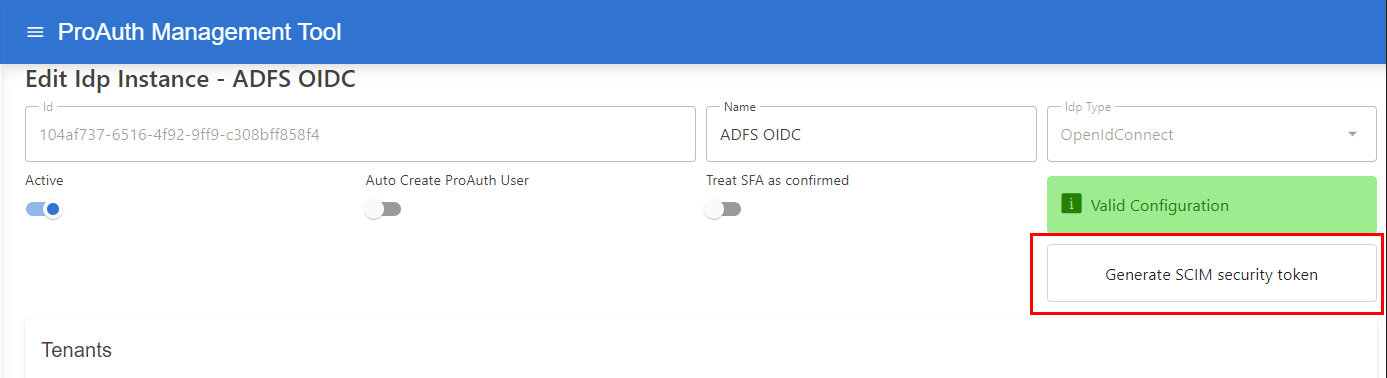
Once SCIM is enabled by the option ScimEnabled, it's necessary to release a new long-running security token:
- Press the button
Generate SCIM Security Tokenon the top right of the edit view - Reload the edit view content by close and re-open the edit view
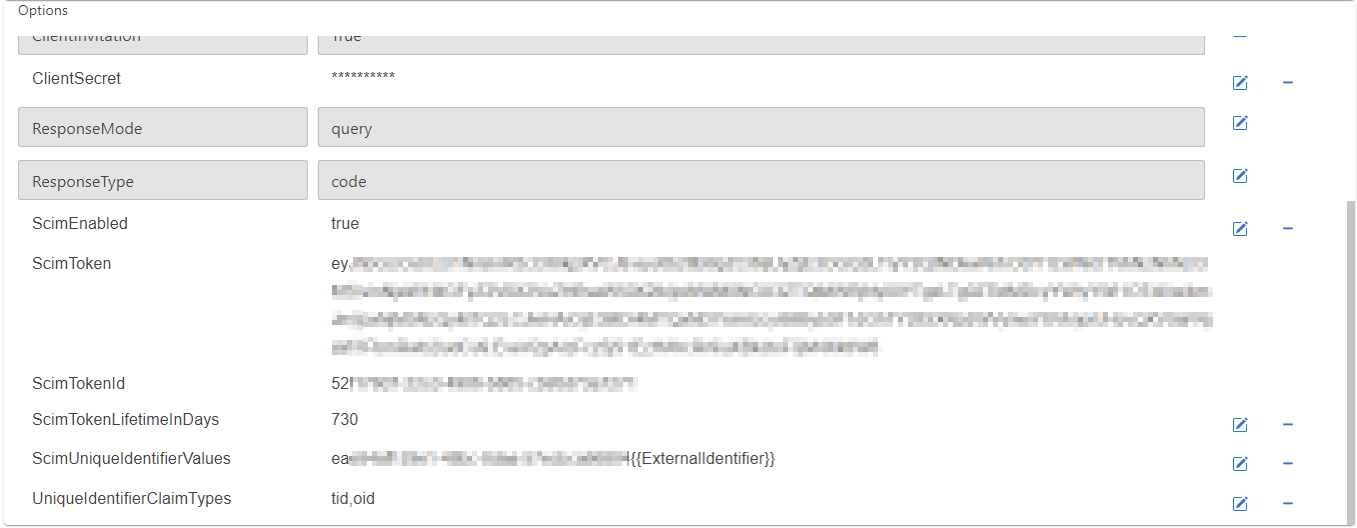
- After the options are reloaded, new values for the options
ScimTokenandScimTokenIdshould appear
Configure IPD for SCIM synchronization with Azure AD
It is necessary to configure the IDP to use specific claims for creating a unique key for the ProAuth user, which can be recognized properly during the login.
Set following options to achieve a correct unique id when synchronize ProAuth Users by the SCIM API:
- Search for the option
ScimUniqueIdentifierValuesand change the value to<AAD-TenantId>- Replace the value
<AAD-TenantId>with the TenantID of the ClientApp (it is also part of theAuthorityuri)
- Replace the value
- Search for the option
UniqueIdentifierClaimTypesand change the value totid,oid
Configure IPD for SCIM synchronization with Windows AD FS
It is necessary to configure the IDP to use specific claims for creating a unique key for the ProAuth user, which can be recognized properly during the login.
Set following options to achieve a correct unique id when synchronize ProAuth Users by the SCIM API:
- Search for the option
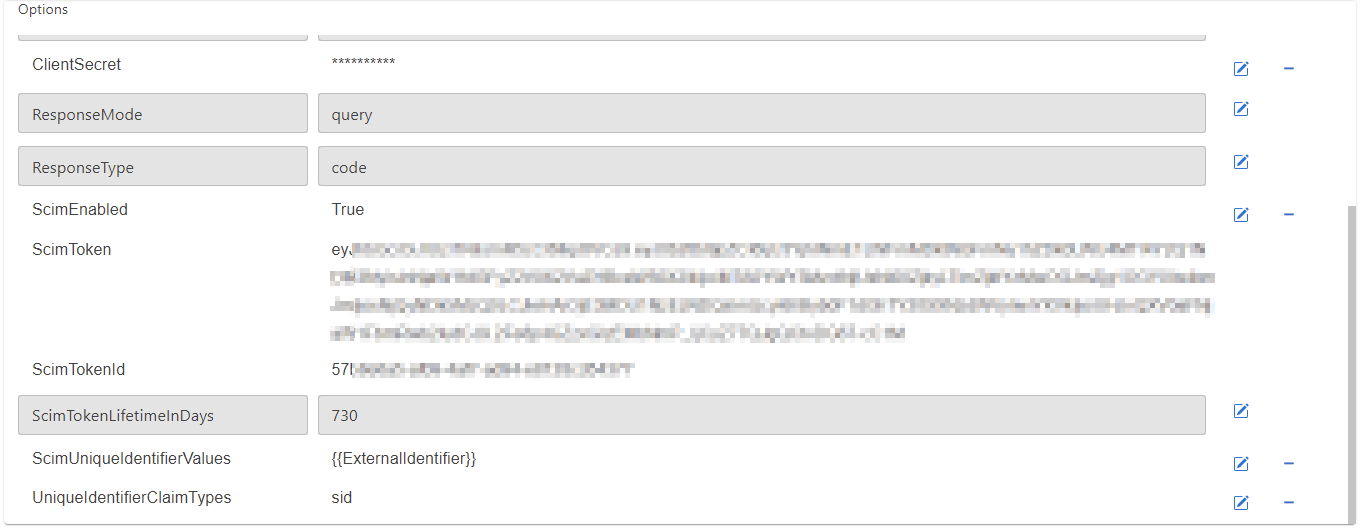
ScimUniqueIdentifierValuesand change the value to - Search for the option
UniqueIdentifierClaimTypesand change the value tosid
Setup Scim Synchronization for ProAuth
Once an IDP with SCIM enabled is setup, ProAuth is ready to handle SCIM API requests for that IDP.
Following values from the IDP Instance are necessary in the next steps to configure the SCIM synchronizers.
- IdpInstance Id
- ScimToken
ProAuth supports multiple SCIM endpoints, therefore the IDP Instance ID is part of the ProAuth SCIM API url.
The default SCIM endpoint on ProAuth is:
https://<ProAuth-URI>/idpscheme/<IdpInstanceId>/scim
Configure Azure Active Directory for SCIM Provisioning.
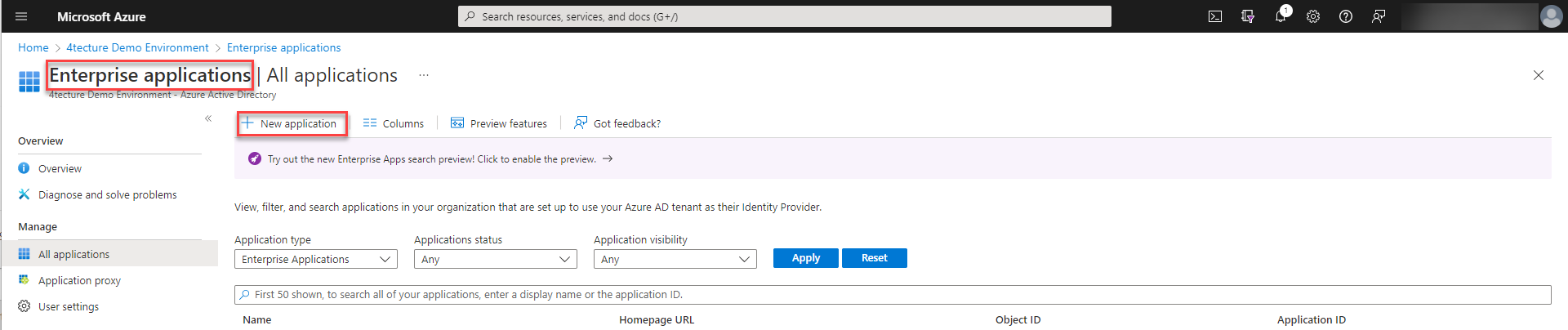
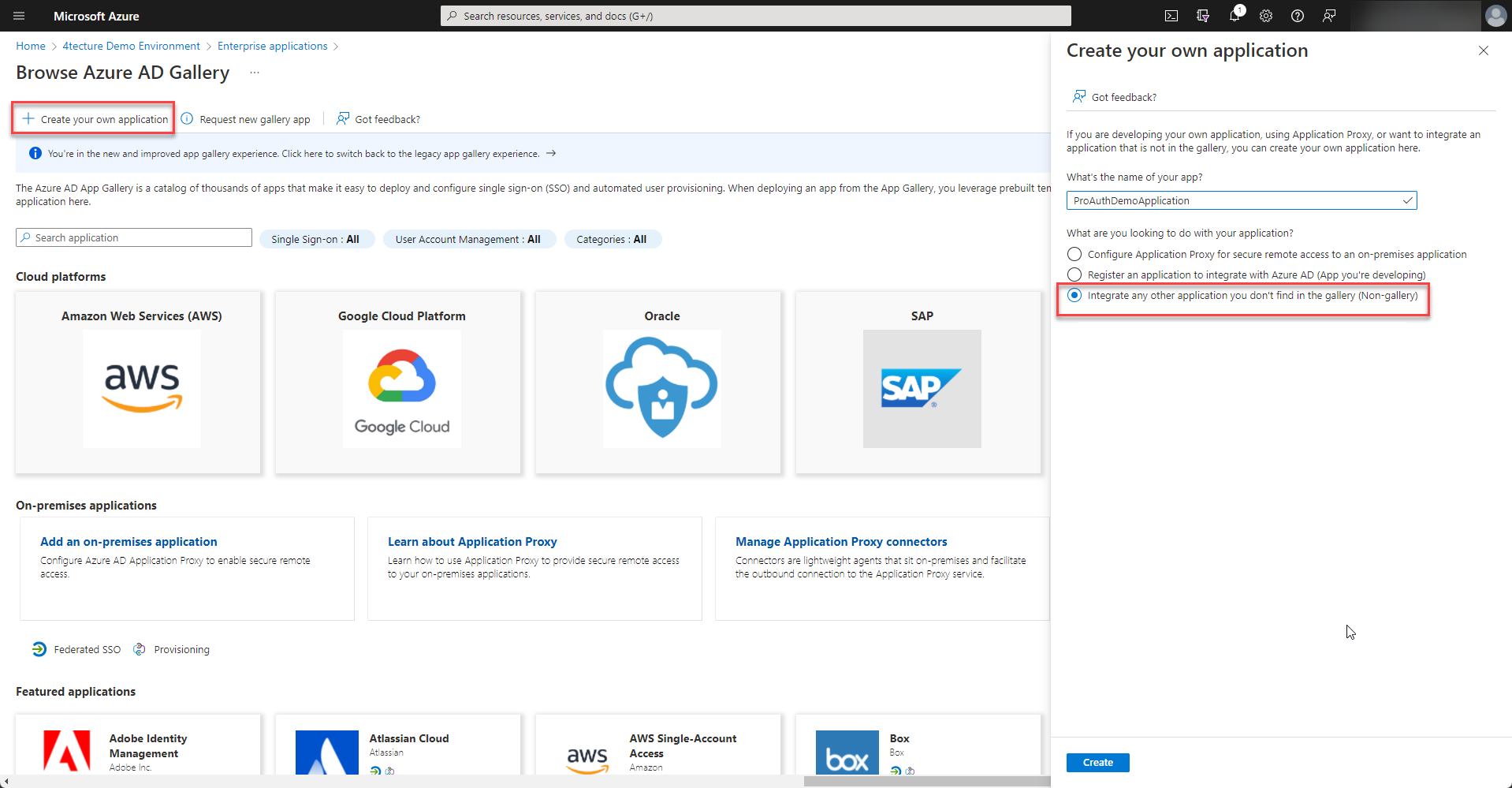
In order to setup SCIM provisioning an enterprise application has to be created within Azure Active Directory.
:::caution If you would like to have SCIM provisioning an enterprise application has to be created. Please do not create an app registration as described in chapter @sec:setupappregistrationaad , if you create an enterprise app, also a corresponding app registration is available and the same configuration steps are applicable. :::
Please choose to "Create your own application" and select "Integrate any other application you don't find in the gallery (Non-gallery)" from the options.
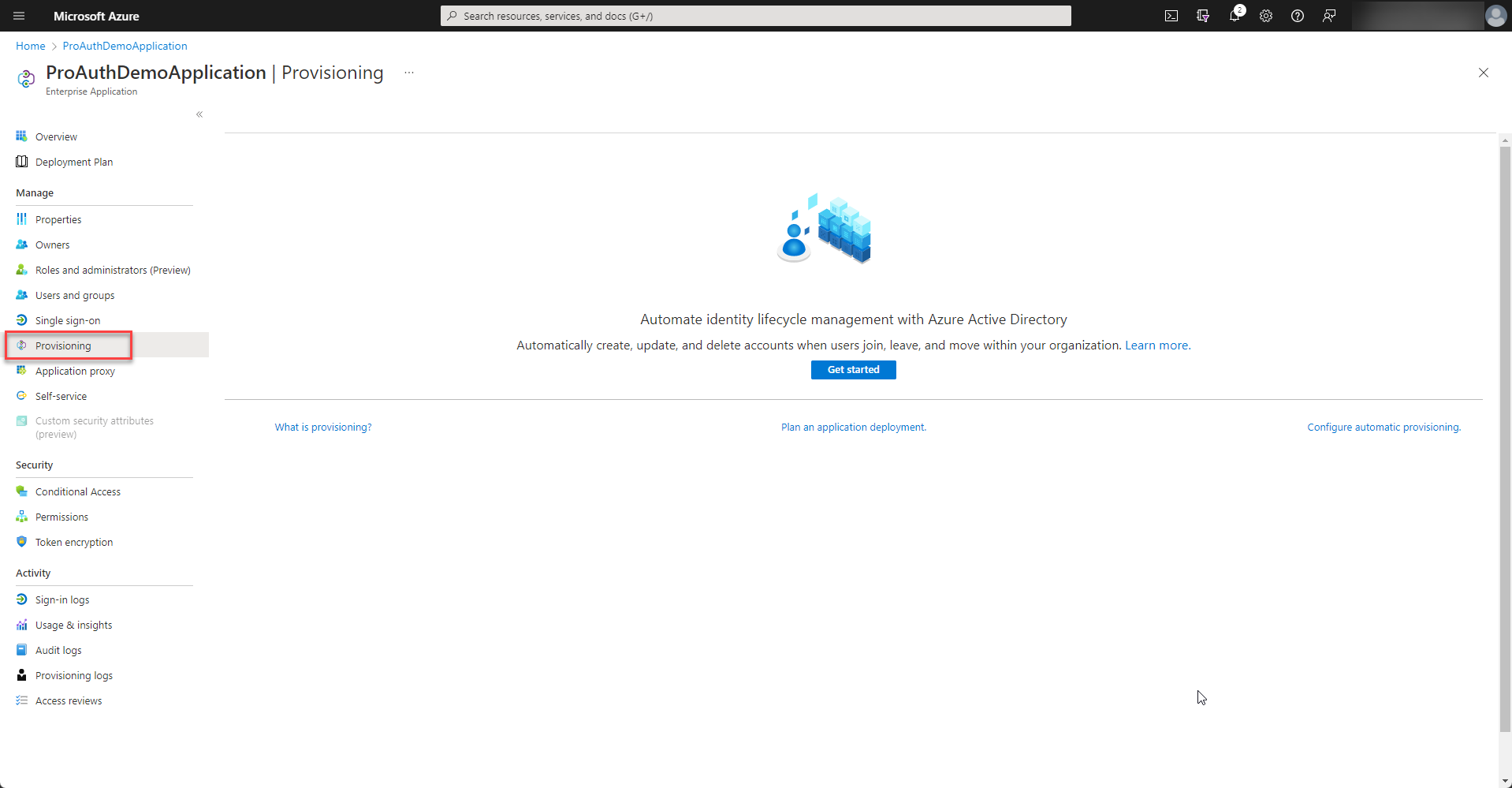
Once the enterprise application is created, please start to setup the provisioning.
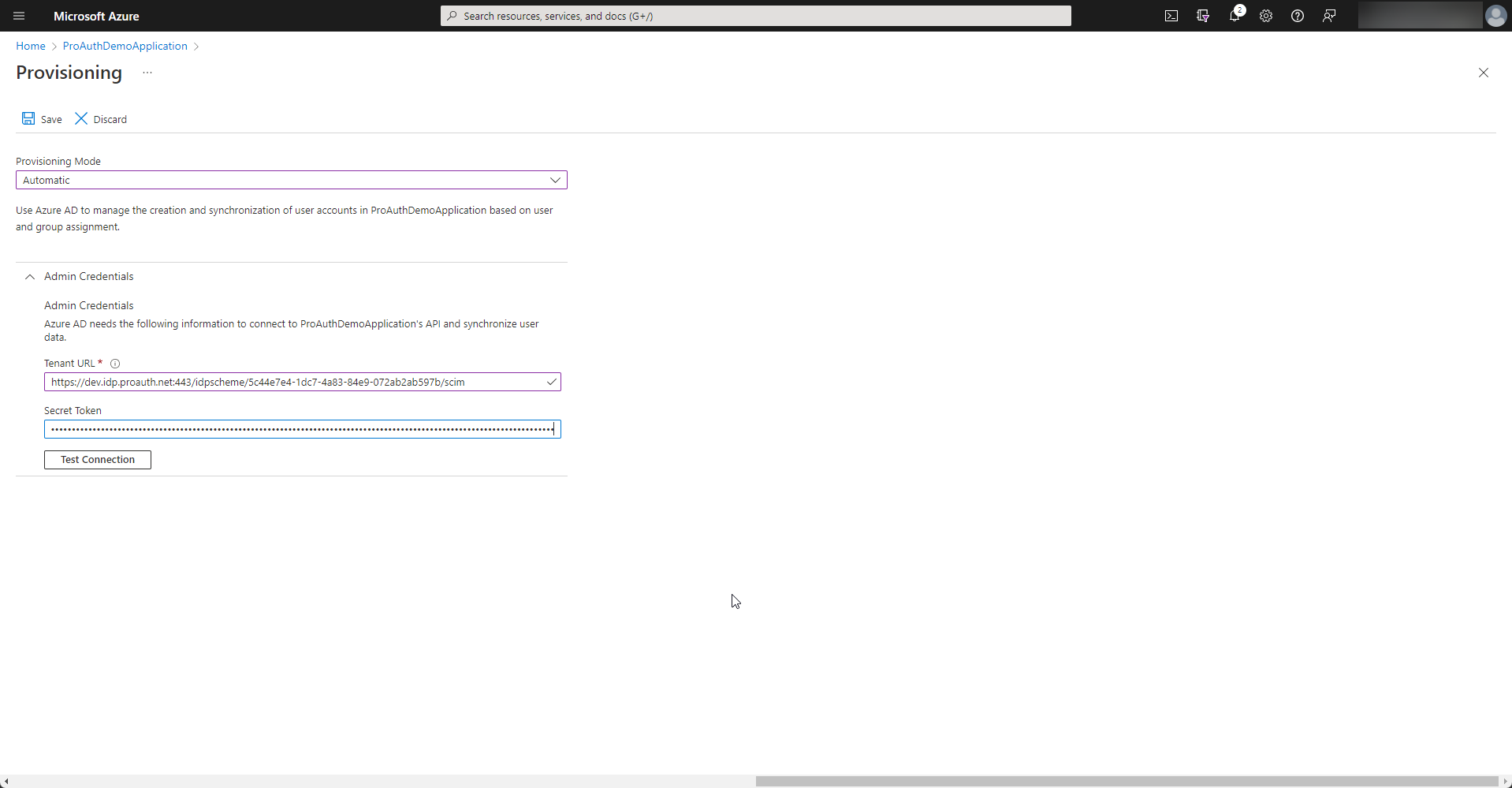
Please fill in the Tenant URL and Secret Token from the SCIM Options of your IDP instance in ProAuth and test the connection. If everything is ok, the configuration can be saved.
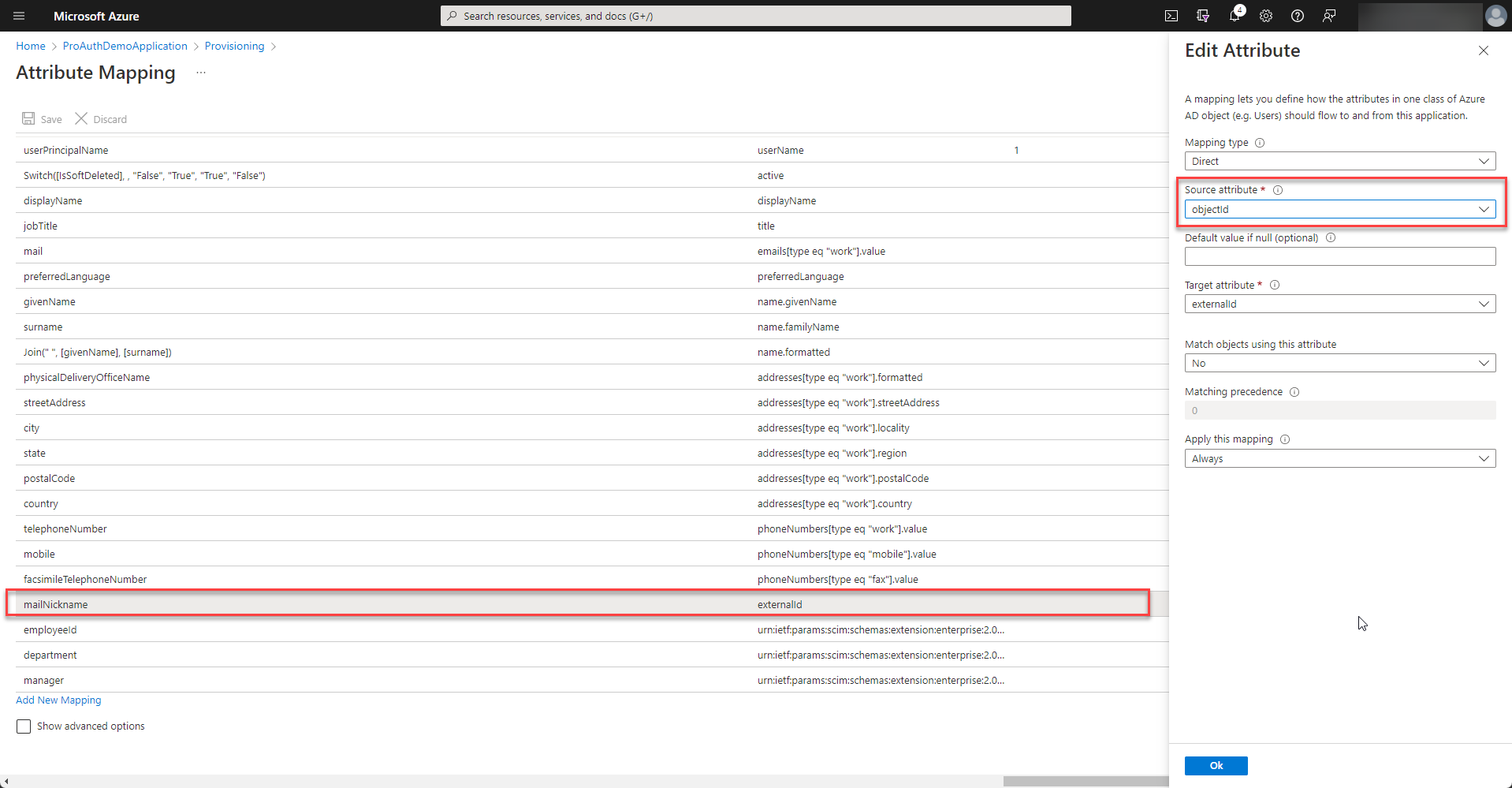
In order to match the ids of the user correctly, the externalid mapping needs to be customized. Therefore select to modify the mapping of the users.
Double click the externalId mapping and change the source attribute to
objectId.
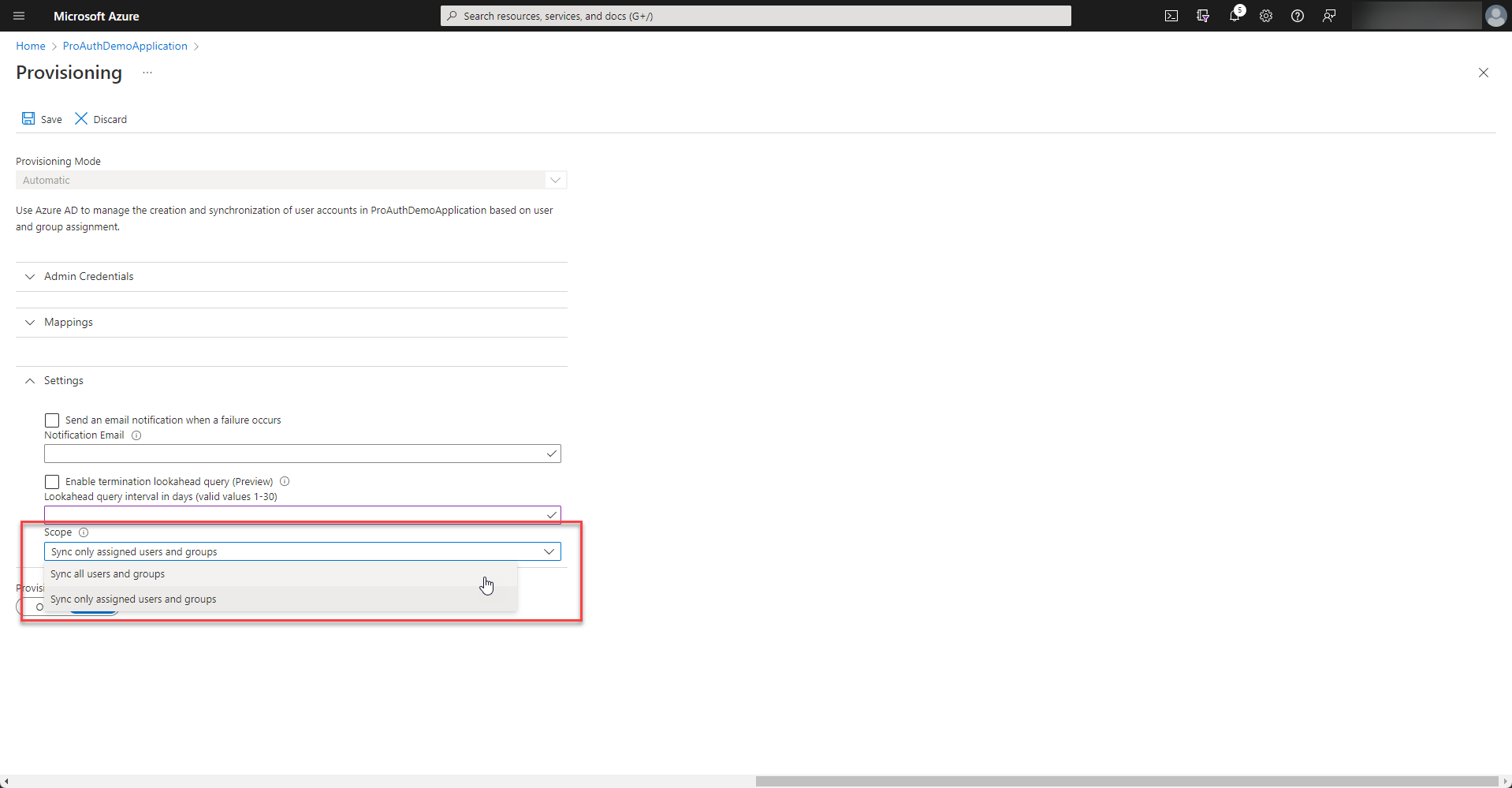
Depending on your enterprise application setup, only assigned users or all users of your directory are synchronized. If there is no assignment made, please select "Sync all users and groups".
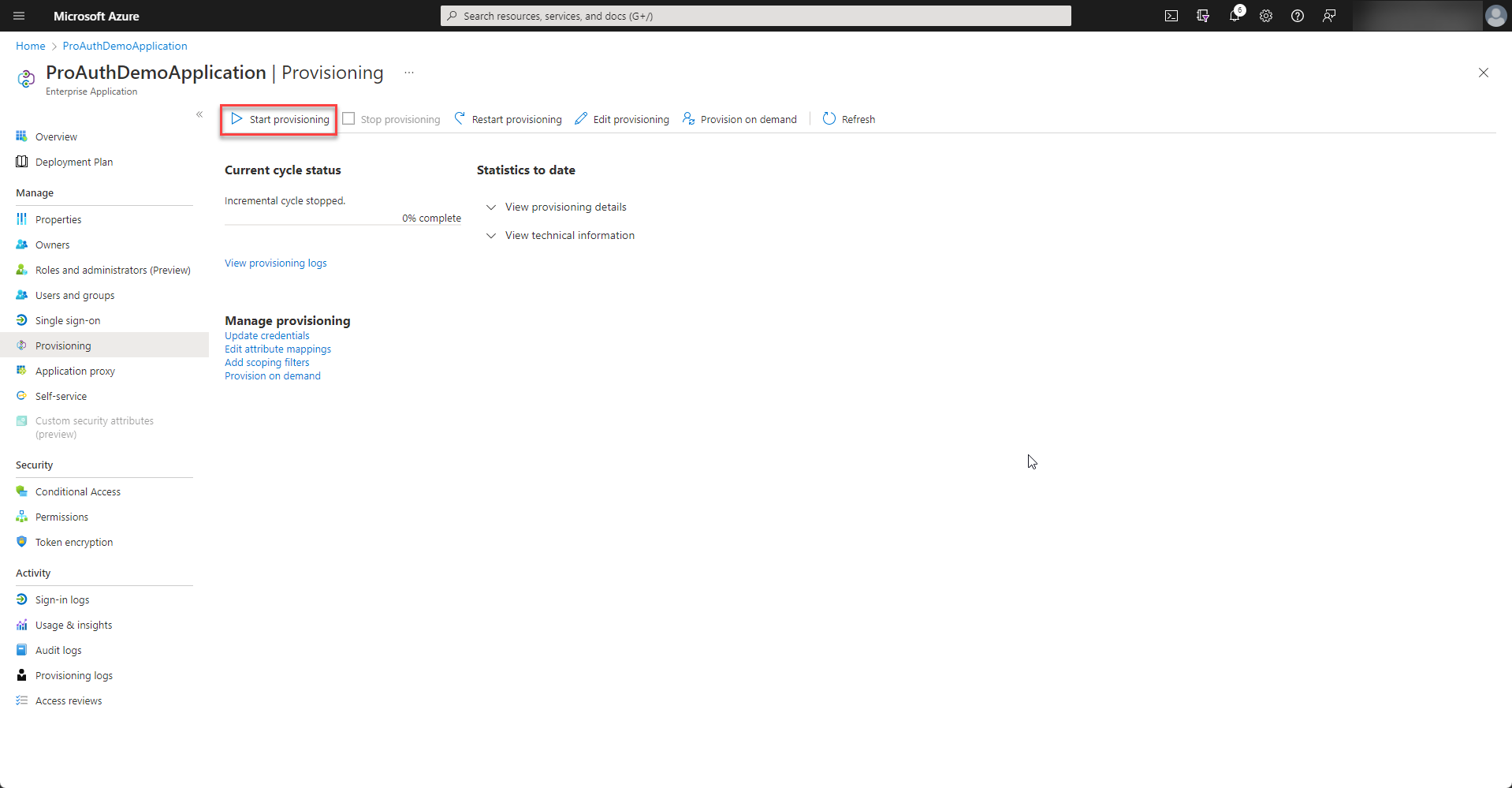
Once all the settings are in place, the provisioning can be started.
Azure Active Directory runs the synchronization every 40 minutes. There is a detailed log of each synchronization job and also e-mail alerts can be configured. Please review the logs of the first synchronization jobs if any error occured.
For this enterprise application, a corresponding app registration has been created. Please follow the steps in chapter @sec:setupappregistrationaad to configure the federated authentication. Please make sure that the option "Auto Create ProAuth User" is disabled because the users and groups are now managed by SCIM provisioning.
Setup ProAuth.DirectorySync for Active Directory Provisioning
For synchronizing Windows AD with ProAuth, there exists a sync tool from ProAuth.
The ProAuth.DirectorySync tool synchronizes the Windows AD users and groups with ProAuth.
Configuration for the ProAuth.DirectorySync settings
Replace the following setting placeholders __<placeholder>__ with your values:
| Setting | Value / Description |
|---|---|
| __ScimHost__ | The ProAuth SCIM API uri |
| __ScimIdpInstance__ | The IDP Instance Id |
| __ScimToken__ | The SCIM Security Token created in the IDP Instance |
| __LdapDomain__ | The LDAP Domain uri |
| __LdapRootDirectory__ | The LDAP root directory |
| __LdapUser__ | Windows user with permissions to read all LDAP entries |
| __LdapPassword__ | Password for the windows user |
| __LdapGroupSearchFilter__ | The LDAP groups filters, separated by pipes |
| __LdapUserSearchFilter__ | The LDAP users filters, separated by pipes |
Settings file
json
{
  "Logging": {
    "LogLevel": {
      "Default": "Information",
      "Microsoft": "Warning",
      "Microsoft.Hosting": "Warning",
      "System": "Warning"
    }
  },
  "ProAuthDirectorySync": {
    "Scim": {
      "Host": "__ScimHost__",
      "Port": null,
      "IdpInstance": "__ScimIdpInstance__",
      "Token": "__ScimToken__",
      "AcceptAnyServerCertificates": false
    },
    "Ldap": {
      "Domain": "__LdapDomain__",
      "RootDirectory": "__LdapRootDirectory__",
      "User": "__LdapUser__",
      "Password": "__LdapPassword__",
      "GroupSearchFilter": "__LdapGroupSearchFilter__",
      "UserSearchFilter": "__LdapUserSearchFilter__"
    },
    "SynchronizeIntervalInMinutes": "40"
  }
}
SCIM Attribute Mapping
This document describes how SCIM 2.0 attributes are mapped to ProAuth entities during synchronization operations. ProAuth supports both User and Group resources with comprehensive attribute mapping.
User Attribute Mapping
ProAuth maps SCIM User attributes to ProAuthUser entities using both direct field mapping and a flexible profile-based key-value store for extended attributes.
Core User Attributes
These SCIM attributes are mapped directly to ProAuthUser entity fields:
| SCIM Attribute | ProAuth Field | Type | Description |
|---|---|---|---|
id | Id | Guid | Internal ProAuth user identifier |
externalId | ScimExternalId | string | External system identifier |
userName | ScimLoginName, LoginName | string | Primary login username |
active | IsUserActive | bool | User account status |
name.givenName | FirstName | string | User's first name |
name.familyName | LastName | string | User's last name |
emails[primary=true].value | EmailAddress | string | Primary email address |
emails[].value | EmailAddress | string | Fallback email (if no primary) |
enterpriseExtension.manager.value | ManagerId | Guid? | Manager reference (ProAuth user ID) |
enterpriseExtension.organizationalUnit | OrganizationalUnit | string | Organizational unit |
User Profile Attributes
These SCIM attributes are stored as key-value pairs in the ProAuthUserProfiles collection:
Simple Attributes
| SCIM Attribute | Profile Key | Type | Description |
|---|---|---|---|
displayName | DisplayName | string | Display name |
locale | Locale | string | User locale |
nickName | Nickname | string | Nickname |
preferredLanguage | PreferredLanguage | string | Preferred language |
timezone | TimeZone | string | User timezone |
title | Title | string | Job title |
userType | UserType | string | User type classification |
Complex Attributes (JSON Serialized)
| SCIM Attribute | Profile Key | Type | Description |
|---|---|---|---|
addresses | Addresses | JSON | Array of address objects |
emails | ElectronicMailAddresses | JSON | Array of email objects |
ims | InstantMessagings | JSON | Array of instant messaging objects |
name | Name | JSON | Complete name object |
phoneNumbers | PhoneNumbers | JSON | Array of phone number objects |
roles | Roles | JSON | Array of role objects |
customExtension | CustomExtension | JSON | Custom extension attributes |
enterpriseExtension | EnterpriseExtension | JSON | Enterprise extension attributes |
User Profile Storage Details
- Key: The profile key matches the SCIM attribute name (e.g.,
DisplayName,Addresses) - Value: For simple attributes, stored as string. For complex attributes, JSON serialized
- Removal: When a SCIM attribute is empty or null, the corresponding profile entry is removed
- JSON Serialization: Uses System.Text.Json with SCIM-compatible settings
Example User Profile Entries
json
// Simple profile entry
{
  "Key": "DisplayName",
  "Value": "John Doe"
}

// Complex profile entry
{
  "Key": "Addresses",
  "Value": "[{\"type\":\"work\",\"streetAddress\":\"123 Main St\",\"locality\":\"City\",\"region\":\"State\",\"postalCode\":\"12345\",\"country\":\"US\",\"primary\":true}]"
}
Group Attribute Mapping
ProAuth maps SCIM Group attributes to ProAuthGroup entities with member relationship management.
Core Group Attributes
| SCIM Attribute | ProAuth Field | Type | Description |
|---|---|---|---|
id | Id | Guid | Internal ProAuth group identifier |
externalId | ScimExternalId | string | External system identifier |
displayName | Name | string | Group display name |
Group Membership
| SCIM Attribute | ProAuth Relationship | Type | Description |
|---|---|---|---|
members[type="User"] | MemberUsers | Collection | User members |
members[type="Group"] | MemberGroups | Collection | Group members (nested groups) |
Group Membership Details
- User Members:
membersarray withtype="User"maps toMemberUserscollection - Group Members:
membersarray withtype="Group"maps toMemberGroupscollection - Bidirectional: Relationships are maintained in both directions:
- Users have
MemberOfGroupscollection - Groups have
ParentGroupscollection
- Users have
- Member Value: The
valuefield contains the ProAuth entity ID (Guid) - Type Handling: If
typeis omitted, ProAuth attempts to resolve as either User or Group
Supported SCIM Operations
User Operations
- CREATE: Creates new ProAuth user with federated identity
- READ: Returns SCIM user with all mapped attributes
- UPDATE: Updates ProAuth user and profiles
- PATCH: Supports partial updates
- DELETE: Removes ProAuth user and relationships
- QUERY: Supports filtering by
userNameandexternalId
Group Operations
- CREATE: Creates new ProAuth group
- READ: Returns SCIM group with members
- UPDATE: Updates group and membership
- PATCH: Supports partial updates including membership changes
- DELETE: Removes ProAuth group and relationships
- QUERY: Supports filtering by
displayName
Query and Filtering
Supported Filters
Users
userName eq "value"- Filters by ScimLoginNameexternalId eq "value"- Filters by ScimExternalId
Groups
displayName eq "value"- Filters by Name
Pagination
- startIndex: 1-based SCIM pagination (converted to 0-based internally)
- count: Maximum number of results per page
- totalResults: Total number of matching resources
Data Validation
User Validation
userNameis required for create/update operationsexternalIdis required for create operations- Manager references must exist in ProAuth
- Duplicate usernames within the same IdP instance are rejected
Group Validation
displayNameis required for create/update operationsexternalIdis required for create operations- Duplicate group names within the same IdP instance are rejected
- Member references must exist in ProAuth
Multi-Tenant Considerations
All SCIM operations are scoped to:
- IdP Instance: Each SCIM endpoint serves a specific IdP instance
- Subscription: Users and groups belong to a specific subscription
- Isolation: Complete data isolation between tenants
Error Handling
Common HTTP Status Codes
400 Bad Request: Missing required fields or invalid data404 Not Found: Resource not found409 Conflict: Duplicate username/group name or constraint violations500 Internal Server Error: System errors
Specific Error Scenarios
- Manager Not Found: Returns 400 with descriptive error when manager ID doesn't exist
- Member Not Found: Silently skips invalid member references during group updates
- Constraint Violations: Returns 409 for duplicate usernames or group names
Performance Considerations
- Batch Operations: Use SCIM bulk operations for large data sets
- Profiles: Complex attributes in profiles have JSON serialization overhead
- Relationships: Group membership changes trigger relationship updates
- Caching: ProAuth caches frequently accessed entities
- Async Operations: All database operations use async patterns for scalability